
cancel
Showing results for 
Search instead for 
Did you mean: 

Learn from the best! Meet the four finalists headed to the FINALS of the Power BI Dataviz World Championships! Register now

Reply
TaroGulati
Helper III
Helper III

IsInscope function issue

Hey Everyone,


I am having some issue with ISINSCOPE Function. 


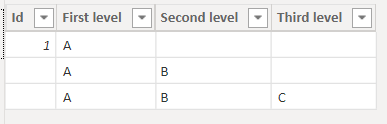
i have this simple table:


TaroGulati_0-1644321265292.png


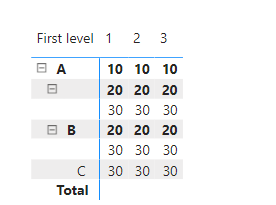
I am getting this as result:


TaroGulati_1-1644321307968.png

I am using this measure: 

measure =
SWITCH(TRUE(), ISINSCOPE('Table'[Third level]),30,ISINSCOPE('Table'[Second level]),20,ISINSCOPE('Table'[First level]),10)
 
 
I am expecting to not see any value where Raw header value is empty. for e.g i am expecting to see only B once i open A and only C once i open B. I was thinking with ISINSCOPE function, we could hide the empty values. 
 
 
Thanks in advance for any suggestions. 
 
Thanks
 
1 ACCEPTED SOLUTION
v-jingzhang
Community Support
Community Support

Hi @TaroGulati 


You could try this measure

NewMeasure = 
SWITCH (
    TRUE (),
    ISINSCOPE ( 'Table'[Third level] ),
        SWITCH (
            SELECTEDVALUE ( 'Table'[Third level] ),
            BLANK (), BLANK (),
            "", BLANK (),
            30
        ),
    ISINSCOPE ( 'Table'[Second level] ),
        SWITCH (
            SELECTEDVALUE ( 'Table'[Second level] ),
            BLANK (), BLANK (),
            "", BLANK (),
            20
        ),
    ISINSCOPE ( 'Table'[First level] ), 10,
    BLANK ()
)

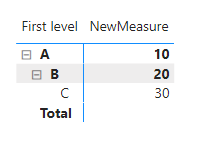
vjingzhang_1-1644558605633.png


Best Regards,
Community Support Team _ Jing
If this post helps, please Accept it as Solution to help other members find it.

View solution in original post

3 REPLIES 3
v-jingzhang
Community Support
Community Support

Hi @TaroGulati 


You could try this measure

NewMeasure = 
SWITCH (
    TRUE (),
    ISINSCOPE ( 'Table'[Third level] ),
        SWITCH (
            SELECTEDVALUE ( 'Table'[Third level] ),
            BLANK (), BLANK (),
            "", BLANK (),
            30
        ),
    ISINSCOPE ( 'Table'[Second level] ),
        SWITCH (
            SELECTEDVALUE ( 'Table'[Second level] ),
            BLANK (), BLANK (),
            "", BLANK (),
            20
        ),
    ISINSCOPE ( 'Table'[First level] ), 10,
    BLANK ()
)

vjingzhang_1-1644558605633.png


Best Regards,
Community Support Team _ Jing
If this post helps, please Accept it as Solution to help other members find it.

amitchandak
Super User
Super User

@TaroGulati , for that you have check blank too


SWITCH(TRUE(), ISINSCOPE('Table'[Third level]) && not(isblank('Table'[Third level])) ,30,

ISINSCOPE('Table'[Second level]) && not(isblank('Table'[Second level]))  ,20

,ISINSCOPE('Table'[First level]),10, blank() )


Share with Power BI Enthusiasts: Full Power BI Video (20 Hours) YouTube
Microsoft Fabric Series 60+ Videos YouTube
Microsoft Fabric Hindi End to End YouTube

@amitchandak thanks for your kind reply. 


i am having one issue to validate this measure. ISBLANK function is not accepting the column of table. 


TaroGulati_0-1644326641571.png


Should i use it in some different way?


thanks


Helpful resources

Announcements
New to Fabric survey Carousel

New to Fabric Survey

If you have recently started exploring Fabric, we'd love to hear how it's going. Your feedback can help with product improvements.

Power BI DataViz World Championships carousel

Power BI DataViz World Championships - June 2026

A new Power BI DataViz World Championship is coming this June! Don't miss out on submitting your entry.

Join our Fabric User Panel

Join our Fabric User Panel

Share feedback directly with Fabric product managers, participate in targeted research studies and influence the Fabric roadmap.

March Power BI Update Carousel

Power BI Community Update - March 2026

Check out the March 2026 Power BI update to learn about new features.