cancel
Showing results for 
Search instead for 
Did you mean: 

Try your skills in the Power BI Dataviz World Championship! Round one ends June 26. Join now

Reply
lcerrapa
Helper I
Helper I

Is this a bug?

Hello.

I don't know if is this a bug or there is something that I can't see.
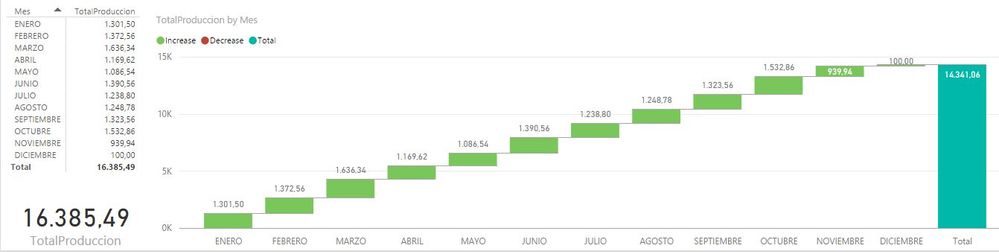
I use the same measure in two differents components in the Power BI Desktop, a table and a Waterfall Chart:


Captura.JPG

The total is different for the two components, but the partial data are the same. There are the same filters/interactions for all the components in the page.

Do you know what could be happening?


Many thanks in advance.


1 ACCEPTED SOLUTION

I have a short post on this topic, perhaps it will help you get through it:


http://community.powerbi.com/t5/DAX-Commands-and-Tips/Dealing-with-Measure-Totals/td-p/63376/jump-to...


Follow on LinkedIn
@ me in replies or I'll lose your thread!!!
Instead of a Kudo, please vote for this idea
Become an expert!: Enterprise DNA
External Tools: MSHGQM
YouTube Channel!: Microsoft Hates Greg
Latest book!:
DAX For Humans

DAX is easy, CALCULATE makes DAX hard...

View solution in original post

5 REPLIES 5
Greg_Deckler
Community Champion
Community Champion

Well, for the table component, it looks like you are 153710.05 off (lower). It's all about context. The waterfall chart has the correct total by my calculation. The important thing to remember about the table visualization is that with measures, it is not simply totaling the individual components but rather re-evaluating the measure in the context of all rows. I do not believe that is how the waterfall chart works because of the type of visual display it renders, that wouldn't make sense. So, if you have some negative numbers in your data, your table visualization would account for those and possibly throw off your numbers whereas with the waterfall chart it would not? Can't be certain without the raw data.


Follow on LinkedIn
@ me in replies or I'll lose your thread!!!
Instead of a Kudo, please vote for this idea
Become an expert!: Enterprise DNA
External Tools: MSHGQM
YouTube Channel!: Microsoft Hates Greg
Latest book!:
DAX For Humans

DAX is easy, CALCULATE makes DAX hard...

Hello, 

Thank you for your time.


That's right because a label with the measure has the same value as the table. But I have another measure that works in reverse mode. The total (label too) is bigger for the table than the waterfall chart. Querying the data in the source database with the filters that affects context (only year and proyection), both cases the right values are shown in the waterfall chart component:


Captura2.JPG


Thanks.

I have a short post on this topic, perhaps it will help you get through it:


http://community.powerbi.com/t5/DAX-Commands-and-Tips/Dealing-with-Measure-Totals/td-p/63376/jump-to...


Follow on LinkedIn
@ me in replies or I'll lose your thread!!!
Instead of a Kudo, please vote for this idea
Become an expert!: Enterprise DNA
External Tools: MSHGQM
YouTube Channel!: Microsoft Hates Greg
Latest book!:
DAX For Humans

DAX is easy, CALCULATE makes DAX hard...

Thanks a lot, this is just my case.

Awesome, glad that helps!


Follow on LinkedIn
@ me in replies or I'll lose your thread!!!
Instead of a Kudo, please vote for this idea
Become an expert!: Enterprise DNA
External Tools: MSHGQM
YouTube Channel!: Microsoft Hates Greg
Latest book!:
DAX For Humans

DAX is easy, CALCULATE makes DAX hard...

Helpful resources

Announcements
Fabric Data Days is here Carousel

Data Days 2026

Don't miss out on Data Days, June 15 through August 7. Learn Fabric, Power BI, SQL, AI and more.

Power BI DataViz World Championships carousel

Power BI DataViz World Championships - June 2026

A new Power BI DataViz World Championship is coming this June! Don't miss out on submitting your entry.