cancel
Showing results for 
Search instead for 
Did you mean: 

Level up your Power BI skills this month - build one visual each week and tell better stories with data! Get started

Reply
RevenueMonkey
New Member

Is there a Reverse Summarize or De-Summarize function!

I have a table which summarizes product price and frequency. I wish to perform a number of statistical functions on the table, such as average, standard deviation and wish to use some visuals that require the data in a single coloum de-summarised: - How do I best do this?


Current table:

Price, Frequency

12.99, 3

4.50, 1

8.95, 3


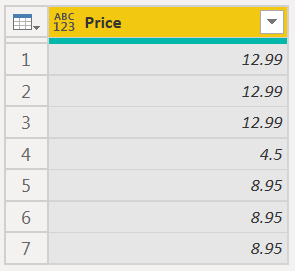
Desired column:

12.99

12.99

12.99

4.50

8.95

8.95

8.95


1 ACCEPTED SOLUTION

Scratch that, I've fiddled with Advanced Query and got it work. Thank you for your swift eligant solution.

View solution in original post

3 REPLIES 3
CNENFRNL
Community Champion
Community Champion


let
    Source = Table.FromRows(Json.Document(Binary.Decompress(Binary.FromText("i45WMjTSs7RU0lEyVorViVYy0TMFsg3BbAs9S1OIRCwA", BinaryEncoding.Base64), Compression.Deflate)), let _t = ((type nullable text) meta [Serialized.Text = true]) in type table [Price = _t, Frequency = _t]),
    #"Changed Type" = Table.TransformColumnTypes(Source,{{"Price", type number}, {"Frequency", Int64.Type}}),

    Repeated = Table.CombineColumns(#"Changed Type", {"Price", "Frequency"}, each List.Repeat({_{0}}, _{1}), "Price"),
    #"Expanded Price" = Table.ExpandListColumn(Repeated, "Price")
in
    #"Expanded Price"

CNENFRNL_0-1656074368465.png


Thanks to the great efforts by MS engineers to simplify syntax of DAX! Most beginners are SUCCESSFULLY MISLED to think that they could easily master DAX; but it turns out that the intricacy of the most frequently used RANKX() is still way beyond their comprehension!

DAX is simple, but NOT EASY!

Thank you, because my expertise in Advance Editor is limited. Can the answer be simplified and expressed as individual Power Query steps? or as a New Measure in PBI using AverageX perhaps?

Scratch that, I've fiddled with Advanced Query and got it work. Thank you for your swift eligant solution.

Helpful resources

Announcements
April Power BI Update Carousel

Power BI Monthly Update - April 2026

Check out the April 2026 Power BI update to learn about new features.

Fabric SQL PBI Data Days

Data Days 2026 coming soon!

Sign up to receive a private message when registration opens and key events begin.

New to Fabric survey Carousel

New to Fabric Survey

If you have recently started exploring Fabric, we'd love to hear how it's going. Your feedback can help with product improvements.

Power BI DataViz World Championships carousel

Power BI DataViz World Championships - June 2026

A new Power BI DataViz World Championship is coming this June! Don't miss out on submitting your entry.