Join us at FabCon Atlanta from March 16 - 20, 2026, for the ultimate Fabric, Power BI, AI and SQL community-led event. Save $200 with code FABCOMM.
Register now!Vote for your favorite vizzies from the Power BI Dataviz World Championship submissions. Vote now!
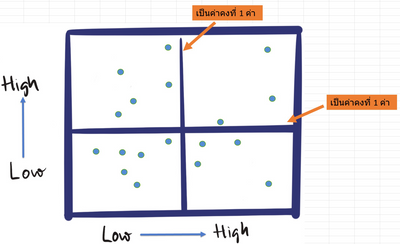
Per the picture - is it possible to create RRG chart like this using Charticulator ? If possible - would be nice if you can guide me on how to do it. Thank you for your help in advance 🙂
HI @Hystericred,
It seems like you are working with a third-party visualization tool and you want to integrate with power bi, right?
For this requirement, you can refer to its documentation to design these graphs on the 'charticulator' side and try to export it as a power bi custom visual so that you can use it on the power bi side.
Build your custom visual with Charticulator and Power BI
Regards,
Xiaoxin Sheng
Vote for your favorite vizzies from the Power BI World Championship submissions!
If you love stickers, then you will definitely want to check out our Community Sticker Challenge!
Check out the January 2026 Power BI update to learn about new features.
| User | Count |
|---|---|
| 57 | |
| 52 | |
| 45 | |
| 17 | |
| 16 |
| User | Count |
|---|---|
| 108 | |
| 108 | |
| 39 | |
| 33 | |
| 26 |