Join us at FabCon Atlanta from March 16 - 20, 2026, for the ultimate Fabric, Power BI, AI and SQL community-led event. Save $200 with code FABCOMM.
Register now!The Power BI Data Visualization World Championships is back! Get ahead of the game and start preparing now! Learn more
@PBCommunity
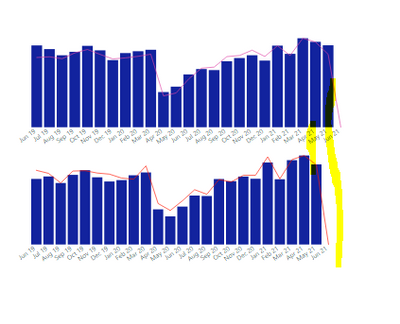
I have created 2 visuals and arrange in top and bottom with the Same height, X axis and Width. When i am trying to apply the filter for these two visuals (for two visuals i am applying visual level filter) x axis alignment is changing like below.
Is there any way to give fixed alignment for x-axis irrespective of filters?
More info:
Different filters are applied for these two visuals example: First visual is showing for one division and another visual is showing for one division.
If i remove the filter for second visual x-axis alignment will be same however if i apply filter on it showing wrong alignment.
Solved! Go to Solution.
Hi @Mounika09 ,
Your issue is that you don't have values for april in the bottom chart that is why the two visualizations are not matching you can do one of two options:
Measure = COALESCE (SUM(Table[Column]), 0)
Regards
Miguel Félix
Proud to be a Super User!
Check out my blog: Power BI em PortuguêsHi, @Mounika09 ;
Have MFelix’s reply helped you to find the solution to this problem?
If so, would you like to mark your own reply as a solution so that others can learn from it and close this topic?
If not,could you share file without any sesentive information.
Thanks in advance!
Hi @Mounika09 ,
Your issue is that you don't have values for april in the bottom chart that is why the two visualizations are not matching you can do one of two options:
Measure = COALESCE (SUM(Table[Column]), 0)
Regards
Miguel Félix
Proud to be a Super User!
Check out my blog: Power BI em PortuguêsHello MFelix,
I do have data for all months except June in both visuals. I tried with your suggested measure as well however i am getting same issue.
Can you please share a mockup data or sample of your PBIX file. You can use a onedrive, google drive, we transfer or similar link to upload your files.
If the information is sensitive please share it trough private message.
Regards
Miguel Félix
Proud to be a Super User!
Check out my blog: Power BI em PortuguêsHello MFelix,
I will send Sample data to you
The Power BI Data Visualization World Championships is back! Get ahead of the game and start preparing now!
Check out the November 2025 Power BI update to learn about new features.
| User | Count |
|---|---|
| 59 | |
| 43 | |
| 42 | |
| 23 | |
| 17 |
| User | Count |
|---|---|
| 190 | |
| 122 | |
| 96 | |
| 66 | |
| 47 |