


We've captured the moments from FabCon & SQLCon that everyone is talking about, and we are bringing them to the community, live and on-demand. Starts on April 14th. Register now
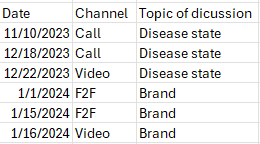
I have 3 columns as date, channel and topic of discussion and wanted to show them in a grid as below. Can you please help me know how this can be done in Power BI?
Solved! Go to Solution.
Hi @Sakshi_S ,
Based on your description, I created the following test data
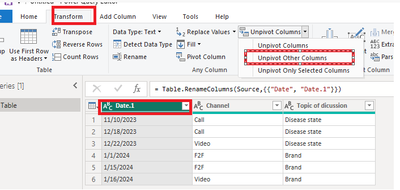
If you want to achieve the effect you want, first click on Transform data and open the power query.
Change the name of date as date.1 and Select the date column and UNpivot the other columns.
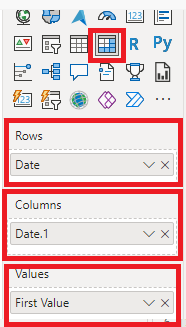
Close and apply and create matrix visual
Final output
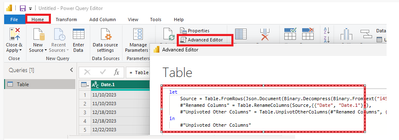
Of course, you can also open the advance editor and enter the M code into it.
let
Source = Table.FromRows(Json.Document(Binary.Decompress(Binary.FromText("i45WMjTUNzTQNzIwMlbSUXJOzMkBUi6ZxamJxakKxSWJJalKsTpAVUb6hhbEqDIygqkKy0xJzceuTN8QpMgEKOlm5AYknYoS81JgUqZ45MxgcjDDobKxAA==", BinaryEncoding.Base64), Compression.Deflate)), let _t = ((type nullable text) meta [Serialized.Text = true]) in type table [Date = _t, Channel = _t, #"Topic of dicussion" = _t]),
#"Renamed Columns" = Table.RenameColumns(Source,{{"Date", "Date.1"}}),
#"Unpivoted Other Columns" = Table.UnpivotOtherColumns(#"Renamed Columns", {"Date.1"}, "Date", "Value")
in
#"Unpivoted Other Columns"
Best regards,
Albert He
If this post helps, then please consider Accept it as the solution to help the other members find it more quickly
Hi,
Create a Calendar Table with an active relationship (Many to One and Single) from the Date column of your Data Table to the Date column of the Calendar Table. To your visual, drag Date from the Calendar Table. Write these measures
Measure1 = min(Data[Channel])
Measure2 = min(Data[Topic of discussion])
Hope this helps.
Hi @Sakshi_S ,
Based on your description, I created the following test data
If you want to achieve the effect you want, first click on Transform data and open the power query.
Change the name of date as date.1 and Select the date column and UNpivot the other columns.
Close and apply and create matrix visual
Final output
Of course, you can also open the advance editor and enter the M code into it.
let
Source = Table.FromRows(Json.Document(Binary.Decompress(Binary.FromText("i45WMjTUNzTQNzIwMlbSUXJOzMkBUi6ZxamJxakKxSWJJalKsTpAVUb6hhbEqDIygqkKy0xJzceuTN8QpMgEKOlm5AYknYoS81JgUqZ45MxgcjDDobKxAA==", BinaryEncoding.Base64), Compression.Deflate)), let _t = ((type nullable text) meta [Serialized.Text = true]) in type table [Date = _t, Channel = _t, #"Topic of dicussion" = _t]),
#"Renamed Columns" = Table.RenameColumns(Source,{{"Date", "Date.1"}}),
#"Unpivoted Other Columns" = Table.UnpivotOtherColumns(#"Renamed Columns", {"Date.1"}, "Date", "Value")
in
#"Unpivoted Other Columns"
Best regards,
Albert He
If this post helps, then please consider Accept it as the solution to help the other members find it more quickly
If you have recently started exploring Fabric, we'd love to hear how it's going. Your feedback can help with product improvements.
A new Power BI DataViz World Championship is coming this June! Don't miss out on submitting your entry.
Share feedback directly with Fabric product managers, participate in targeted research studies and influence the Fabric roadmap.
| User | Count |
|---|---|
| 57 | |
| 38 | |
| 33 | |
| 19 | |
| 16 |
| User | Count |
|---|---|
| 68 | |
| 66 | |
| 41 | |
| 34 | |
| 25 |