Share feedback directly with Fabric product managers, participate in targeted research studies and influence the Fabric roadmap.
Sign up nowGet Fabric certified for FREE! Don't miss your chance! Learn more
I have a table of backordered items and a table of incoming shipments to fulfill those backorders. The quantity of the backorder often exceeds the quantity of any one fulfillment shipment. For a given item i need to take a cumulative of arriving shipments and calculate when I will have recieved enough to fill the backorders. Be gentle, I'm a newb.
| ITEMID | Actual Back Order Qty |
| UCJV300-160 | 16 |
| ITEMNUMBER | AVAILDATE | QTYREMAINING |
| UCJV300-160 | 8/16/2021 | 8 |
| UCJV300-160 | 8/27/2021 | 6 |
| UCJV300-160 | 9/6/2021 | 6 |
| UCJV300-160 | 9/22/2021 | 2 |
| UCJV300-160 | 9/23/2021 | 12 |
| UCJV300-160 | 9/29/2021 | 6 |
I would in this example be able to fill backorders by 9/6/2021. Any help would be appreciated.
Here is a link to the pbix https://drive.google.com/file/d/15mXmznI2b2f5kLliRVJL2GYJAqF-jUmc/view?usp=sharing
Solved! Go to Solution.
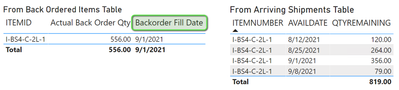
Try this solution.
1. Create measures:
Qty Remaining = SUM ( ArrivingShipments[QTYREMAINING] )
Backorder Fill Date =
VAR vBackOrderQty = [Actual Back Order Qty]
VAR vBaseTable =
ADDCOLUMNS (
SUMMARIZE (
ArrivingShipments,
ArrivingShipments[ITEMNUMBER],
ArrivingShipments[AVAILDATE]
),
"@QtyRemaining", [Qty Remaining]
)
VAR vFinalTable =
ADDCOLUMNS (
vBaseTable,
"@RunningTotal",
VAR vDate = ArrivingShipments[AVAILDATE]
RETURN
CALCULATE ( [Qty Remaining], ArrivingShipments[AVAILDATE] <= vDate )
)
VAR vResult =
CALCULATE (
MIN ( ArrivingShipments[AVAILDATE] ),
FILTER ( vFinalTable, [@RunningTotal] >= vBackOrderQty )
)
RETURN
vResult
This measure was already in your pbix:
Actual Back Order Qty =
SUM(BackOrderedItems[BackOrder])
-SUM(BackOrderedItems[QtyReserved])
-Sum(BackOrderedItems[Picked])
2. In table visual "From Back Ordered Items Table", ITEMID should be from table INVENTORYMASTERTABLE.
Proud to be a Super User!
Try this solution.
1. Create measures:
Qty Remaining = SUM ( ArrivingShipments[QTYREMAINING] )
Backorder Fill Date =
VAR vBackOrderQty = [Actual Back Order Qty]
VAR vBaseTable =
ADDCOLUMNS (
SUMMARIZE (
ArrivingShipments,
ArrivingShipments[ITEMNUMBER],
ArrivingShipments[AVAILDATE]
),
"@QtyRemaining", [Qty Remaining]
)
VAR vFinalTable =
ADDCOLUMNS (
vBaseTable,
"@RunningTotal",
VAR vDate = ArrivingShipments[AVAILDATE]
RETURN
CALCULATE ( [Qty Remaining], ArrivingShipments[AVAILDATE] <= vDate )
)
VAR vResult =
CALCULATE (
MIN ( ArrivingShipments[AVAILDATE] ),
FILTER ( vFinalTable, [@RunningTotal] >= vBackOrderQty )
)
RETURN
vResult
This measure was already in your pbix:
Actual Back Order Qty =
SUM(BackOrderedItems[BackOrder])
-SUM(BackOrderedItems[QtyReserved])
-Sum(BackOrderedItems[Picked])
2. In table visual "From Back Ordered Items Table", ITEMID should be from table INVENTORYMASTERTABLE.
Proud to be a Super User!
THANK YOU SO MUCH! I pictured that the solution would require an intermediate table and the varResult calculation is exatly what I knew it should be, but my expression-building chops aren't there yet.
Thank yu for taking the time to share with all of us DAX beginners. I'm going to try this right now.
If you love stickers, then you will definitely want to check out our Community Sticker Challenge!
Check out the January 2026 Power BI update to learn about new features.
| User | Count |
|---|---|
| 65 | |
| 64 | |
| 45 | |
| 21 | |
| 18 |
| User | Count |
|---|---|
| 119 | |
| 116 | |
| 38 | |
| 36 | |
| 27 |