FabCon is coming to Atlanta
Join us at FabCon Atlanta from March 16 - 20, 2026, for the ultimate Fabric, Power BI, AI and SQL community-led event. Save $200 with code FABCOMM.
Register now!- Power BI forums
- Get Help with Power BI
- Desktop
- Service
- Report Server
- Power Query
- Mobile Apps
- Developer
- DAX Commands and Tips
- Custom Visuals Development Discussion
- Health and Life Sciences
- Power BI Spanish forums
- Translated Spanish Desktop
- Training and Consulting
- Instructor Led Training
- Dashboard in a Day for Women, by Women
- Galleries
- Data Stories Gallery
- Themes Gallery
- Contests Gallery
- QuickViz Gallery
- Quick Measures Gallery
- Visual Calculations Gallery
- Notebook Gallery
- Translytical Task Flow Gallery
- TMDL Gallery
- R Script Showcase
- Webinars and Video Gallery
- Ideas
- Custom Visuals Ideas (read-only)
- Issues
- Issues
- Events
- Upcoming Events
The Power BI Data Visualization World Championships is back! Get ahead of the game and start preparing now! Learn more
- Power BI forums
- Forums
- Get Help with Power BI
- Desktop
- Inventory over time: Multiple IFS issue and MoM/Yo...
- Subscribe to RSS Feed
- Mark Topic as New
- Mark Topic as Read
- Float this Topic for Current User
- Bookmark
- Subscribe
- Printer Friendly Page

- Mark as New
- Bookmark
- Subscribe
- Mute
- Subscribe to RSS Feed
- Permalink
- Report Inappropriate Content
Inventory over time: Multiple IFS issue and MoM/YoY visualization
Hello I'm new to Power Bi and I'm stuck on a report with very confused ideas on what and how should I do as a column or as a measure...
This is my source file (I have deleted the columns that are not relevant to the issue):
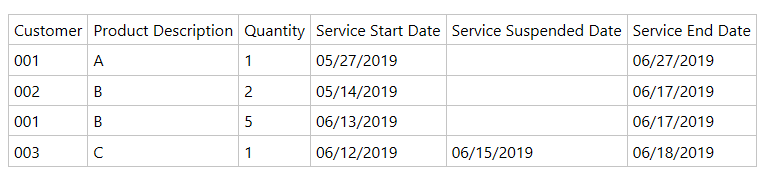
The file is historical and contains records from 2012.
First problem: I need to calculate the number of active licenses (from the beginning of time to the last date of the previous month), where:
- Active = Not suspended OR Not ended
- Service Suspended Date can be a later date than End of Last Month (hence the license is still active even if a Suspended date is present)
- Service Suspended Date can coexist with Service End Date (Service is first suspended and then ended at a later date)
- Service End Date can be a later date that End of Last Month (hence the license is still active even if an End date is present).
I have tried to solve this with a conditional column that returns 0 if conditions are not met and Quantity if they are, but it works only if I simply consider Active the absence of Service Suspended Date and Service End Date. I tried several formulas, including SWITCH and || instead of OR but I cannot find a single one that works.
How can I have an exact calculation that includes also those licenses that are set to be suspended or to end at a later date?
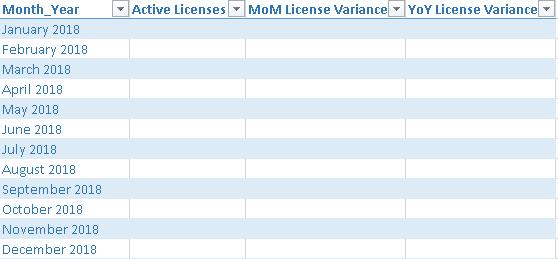
Second problem: When I have the exact number of Active licenses, I need to produce a chart that shows the Total for the Active licenses MoM (i.e., not the increase/decrease by Service Start date, but whatever is Active at the end of each month.
Example:
Solved! Go to Solution.


- Mark as New
- Bookmark
- Subscribe
- Mute
- Subscribe to RSS Feed
- Permalink
- Report Inappropriate Content
Hi @Anonymous ,
Although your data table is reduced try to do the following:
- Create a date table (unrelated with the other table)
- Create the following 3 measures:
Active Licenses =
CALCULATE (
    COUNT ( Services[Product Description] );
    FILTER (
        ALL (
            Services[Product Description];
            Services[Service Start Date];
            Services[Service End Date];
            Services[Service Suspended Date]
        );
        Services[Service Start Date] <= MAX ( 'Calendar'[Date] )
            && Services[Service Start Date] >= MIN ( 'Calendar'[Date] )
            && ( Services[Service End Date] >= MAX ( 'Calendar'[Date] ) )
    )
) + 0


Ended Licenses =
CALCULATE (
    COUNT ( Services[Product Description] );
    FILTER (
        ALL (
            Services[Product Description];
            Services[Service Start Date];
            Services[Service End Date];
            Services[Service Suspended Date]
        );
        (
            Services[Service End Date] <= MAX ( 'Calendar'[Date] )
                && Services[Service End Date] >= MIN ( 'Calendar'[Date] )
        )
    )
) + 0

Suspended Licenses =
CALCULATE (
    COUNT ( Services[Product Description] );
    FILTER (
        ALL (
            Services[Product Description];
            Services[Service Start Date];
            Services[Service End Date];
            Services[Service Suspended Date]
        );

                     Services[Service Suspended Date] >= min ( 'Calendar'[Date] )
           &&  Services[Service Suspended Date] <= max ( 'Calendar'[Date] )
    )
) + 0
This should give the result below:
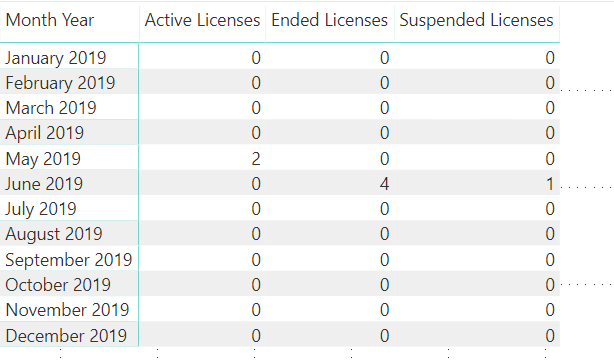
Believe this result is correct considering your data, can you please confirm?
Regarding your second question what do you need exactly what is the calculation should look like? In this case you want to have the change from 2 to zero?
Check PBIX.
Regards,
MFelix
Regards
Miguel Félix
Did I answer your question? Mark my post as a solution!
Proud to be a Super User!
Check out my blog: Power BI em Português- Mark as New
- Bookmark
- Subscribe
- Mute
- Subscribe to RSS Feed
- Permalink
- Report Inappropriate Content
Hi @MFelix, thanks a million for the scripts and the file!
I implemented them and they seem to work fine. However, the result on my Inventory file doesn't seem to match the numbers from the previous reports (the number of active licenses I obtain with your solution is considerably lower than what we have historically for the same periods).
I will try to dig into this and try to understand what’s wrong. We know that the calculation for the previous files was made just based on “Active = no suspend date and no end date”, which is imprecise. But the difference now is significant.
For the second question, I need to be able to see the inventory of active licenses at specific checkpoints (end of each month and end of each year), but if I well understand what you’ve done, this is already in the output of that table.
No issues with the calculation of the variance between periods.
Thanks again! This has been very helpful!
Simona
- Mark as New
- Bookmark
- Subscribe
- Mute
- Subscribe to RSS Feed
- Permalink
- Report Inappropriate Content
Hi @Anonymous ,
Although your data table is reduced try to do the following:
- Create a date table (unrelated with the other table)
- Create the following 3 measures:
Active Licenses =
CALCULATE (
    COUNT ( Services[Product Description] );
    FILTER (
        ALL (
            Services[Product Description];
            Services[Service Start Date];
            Services[Service End Date];
            Services[Service Suspended Date]
        );
        Services[Service Start Date] <= MAX ( 'Calendar'[Date] )
            && Services[Service Start Date] >= MIN ( 'Calendar'[Date] )
            && ( Services[Service End Date] >= MAX ( 'Calendar'[Date] ) )
    )
) + 0


Ended Licenses =
CALCULATE (
    COUNT ( Services[Product Description] );
    FILTER (
        ALL (
            Services[Product Description];
            Services[Service Start Date];
            Services[Service End Date];
            Services[Service Suspended Date]
        );
        (
            Services[Service End Date] <= MAX ( 'Calendar'[Date] )
                && Services[Service End Date] >= MIN ( 'Calendar'[Date] )
        )
    )
) + 0

Suspended Licenses =
CALCULATE (
    COUNT ( Services[Product Description] );
    FILTER (
        ALL (
            Services[Product Description];
            Services[Service Start Date];
            Services[Service End Date];
            Services[Service Suspended Date]
        );

                     Services[Service Suspended Date] >= min ( 'Calendar'[Date] )
           &&  Services[Service Suspended Date] <= max ( 'Calendar'[Date] )
    )
) + 0
This should give the result below:
Believe this result is correct considering your data, can you please confirm?
Regarding your second question what do you need exactly what is the calculation should look like? In this case you want to have the change from 2 to zero?
Check PBIX.
Regards,
MFelix
Regards
Miguel Félix
Did I answer your question? Mark my post as a solution!
Proud to be a Super User!
Check out my blog: Power BI em Português- Mark as New
- Bookmark
- Subscribe
- Mute
- Subscribe to RSS Feed
- Permalink
- Report Inappropriate Content
Hi @MFelix, thanks a million for the scripts and the file!
I implemented them and they seem to work fine. However, the result on my Inventory file doesn't seem to match the numbers from the previous reports (the number of active licenses I obtain with your solution is considerably lower than what we have historically for the same periods).
I will try to dig into this and try to understand what’s wrong. We know that the calculation for the previous files was made just based on “Active = no suspend date and no end date”, which is imprecise. But the difference now is significant.
For the second question, I need to be able to see the inventory of active licenses at specific checkpoints (end of each month and end of each year), but if I well understand what you’ve done, this is already in the output of that table.
No issues with the calculation of the variance between periods.
Thanks again! This has been very helpful!
Simona
- Mark as New
- Bookmark
- Subscribe
- Mute
- Subscribe to RSS Feed
- Permalink
- Report Inappropriate Content
Hi @Anonymous .
If you need any further assistance please tell me.
Regards,
MFelix
Regards
Miguel Félix
Did I answer your question? Mark my post as a solution!
Proud to be a Super User!
Check out my blog: Power BI em Português- Mark as New
- Bookmark
- Subscribe
- Mute
- Subscribe to RSS Feed
- Permalink
- Report Inappropriate Content
Hi @MFelix,
I still need some help...
For problem #1, these are the charts summarizing historical results (Active = no suspend date and no end date) and the results from the query you suggested:

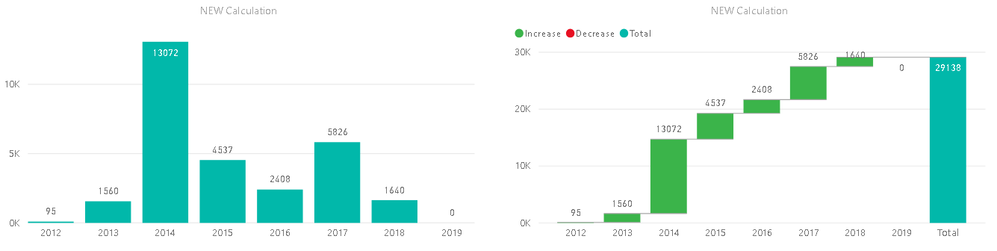
As you can see, the new calculation outputs much smaller values, and the fact that we have 0 in 2019 cannot be right. We do have customers with active licenses, so what I think might be wrong here is that the query doesn't take into account the quantity of licences... shouldn't this be calculating a SUM (not a count) of the quantity of active licenses?
On problem #2, if you see the charts on the left, what I see is the increments, not the inventory. In the charts on the right, the total column is exactly what I get as the value for the current inventory for active licenses. What I would need is a cumulative total, where each month's total = previous month + current month's increment.
Example based on the first chart:
2012 = 95
2013 = 95 + 8751 = 8846
2014 = 8846 + 28755 = 37601
2015 = 37601 + 19955 = 57556
... and so on.
How I would calculate this it would be via a VAR Table that stores the previous period's results. However, I'm not sure how to do this in Power BI.
Can you help?
Thanks!
Helpful resources

Power BI Dataviz World Championships
The Power BI Data Visualization World Championships is back! Get ahead of the game and start preparing now!

Power BI Monthly Update - December 2025
Check out the December 2025 Power BI Holiday Recap!

FabCon Atlanta 2026
Join us at FabCon Atlanta, March 16-20, for the ultimate Fabric, Power BI, AI and SQL community-led event. Save $200 with code FABCOMM.

| User | Count |
|---|---|
| 41 | |
| 38 | |
| 36 | |
| 30 | |
| 28 |


| User | Count |
|---|---|
| 128 | |
| 88 | |
| 79 | |
| 67 | |
| 62 |


