cancel
Showing results for 
Search instead for 
Did you mean: 

The Power BI Data Visualization World Championships is back! Get ahead of the game and start preparing now! Learn more

Reply
Anonymous
Not applicable

Inventory Dashboard - Matching IDs in two tables to determine status. Many:1 Relationship

I have two datasets.  One showing the available Inventory of Products over time, the other Products Sold and Part IDs.


In a dashboard, I have to show all Products both Sold and Available.  This "status" will be determined by whether an ID appears in both datasets or not.


**This is where I am struggling most.  I need a solution that addresses a Many:1 relationship of repeating Item IDs in the Sold data, and a unique Item ID in inventory during the match process.  Many of Power BIs functions require unique IDs in each of two columns to "match" between two datasets.


In the dashboard, I'd like to show the following in a hierarchical table


  • Show Item ID (not repeating)
  • Show status Sold or Available
    • If Item ID appears in both datasets then "Sold", if Item ID does not appear in both tables "Available"
    • The solution needs to address that Item ID may repeat in the "Sold" dataset, hence Many:1 
  • Show the Part IDs under the Item ID when SOLD.


I have created (2) sample datasets, one representing Available Inventory, the other what's Sold.


https://www.dropbox.com/s/gbzdwo6qxxt026x/Sample%20Data.xlsx?dl=0


Thanks in advance.  Appreciate a link to a .pbix file if possible.

1 ACCEPTED SOLUTION
Anonymous
Not applicable

@Anonymous,

Create a column in the Inventory table using DAX below.

Status = IF(CALCULATE(COUNTROWS(Sold), FILTER( Sold, Sold[Item ID] = EARLIER(Inventory[Item ID]) ) ) > 0,"Sold","Available")


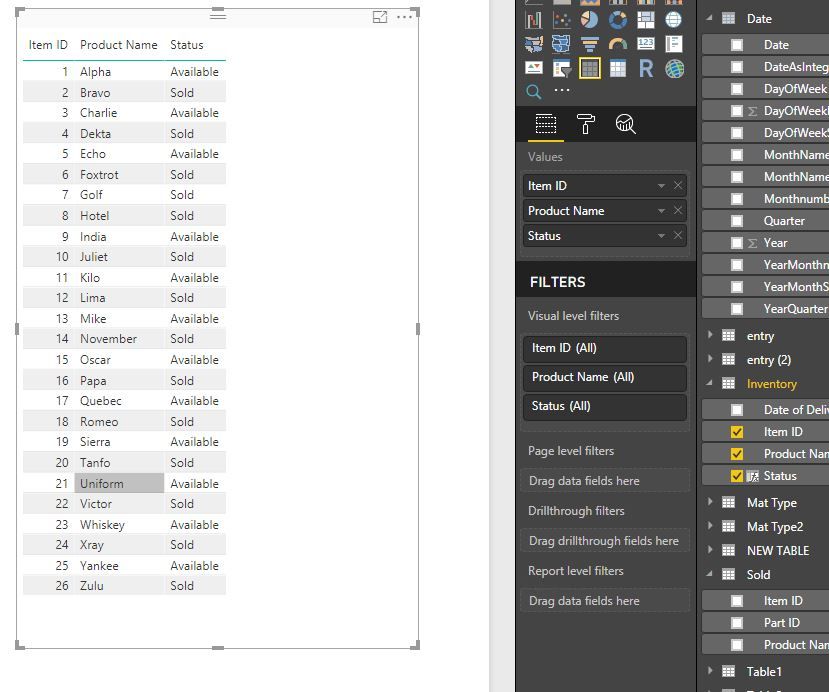
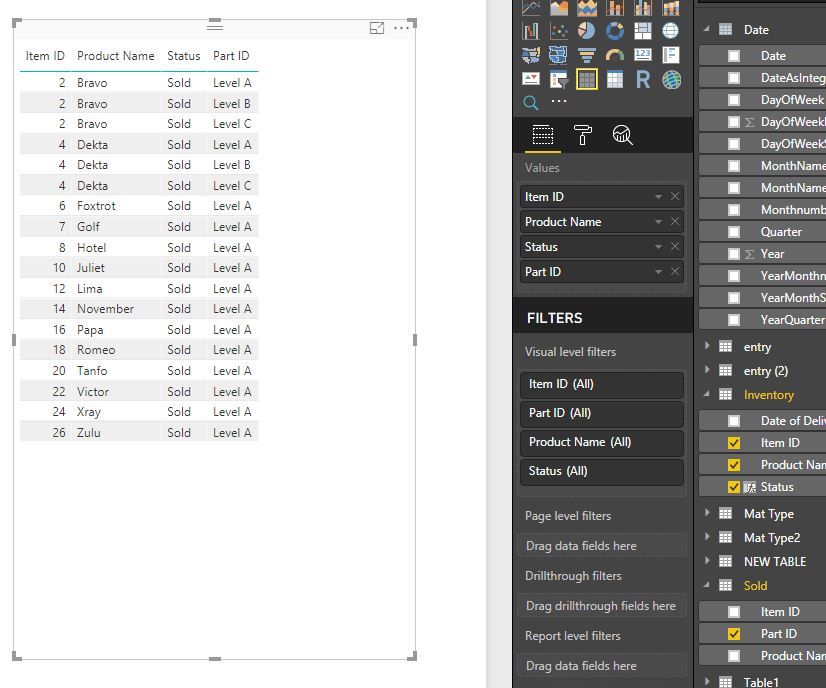
Create table visuals as below.
1.JPG2.JPG

Regards,
Lydia

View solution in original post

2 REPLIES 2
Anonymous
Not applicable

@Anonymous,

Create a column in the Inventory table using DAX below.

Status = IF(CALCULATE(COUNTROWS(Sold), FILTER( Sold, Sold[Item ID] = EARLIER(Inventory[Item ID]) ) ) > 0,"Sold","Available")


Create table visuals as below.
1.JPG2.JPG

Regards,
Lydia

Anonymous
Not applicable

@Anonymous


This worked wonderfully.  Can you break down the dax statement so I understand what's happening, and how it works?


Thanks!

Helpful resources

Announcements
November Power BI Update Carousel

Power BI Monthly Update - November 2025

Check out the November 2025 Power BI update to learn about new features.

Fabric Data Days Carousel

Fabric Data Days

Advance your Data & AI career with 50 days of live learning, contests, hands-on challenges, study groups & certifications and more!

FabCon Atlanta 2026 carousel

FabCon Atlanta 2026

Join us at FabCon Atlanta, March 16-20, for the ultimate Fabric, Power BI, AI and SQL community-led event. Save $200 with code FABCOMM.

Top Solution Authors
Top Kudoed Authors