cancel
Showing results for 
Search instead for 
Did you mean: 

July 28 - August 9 | Final Round of the Power BI Dataviz World Championships. This is your chance. Learn more

Reply
Capstone
Resolver I
Resolver I

Inventory Calculation

 Capture.PNG


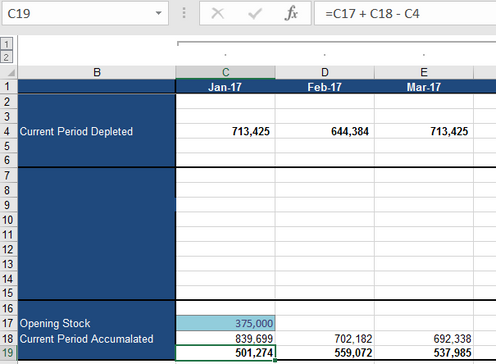
I need to make a fairly simple calculation involving time intelligence measures but Im struggling with it. Bascially in Excel the calculation is as follows:


Monthly Inventory(C19) = Opening stock (C17) + Current period accumulated (C18) - Current period depleted (C4)

       = 375000 +839699 -  713425

       = 501,274


The data starts from January 2017 and hence C17 is fixed for that month.


For the next period onwards the calculation is (for example D19)

  D19 = D18 + Inventory at end of last month(C19) - D4 

         = 702182 +501274 - 644384 

         = 559072


I have a date table with all dates ranging from 01/01/2017 to 31/12/2025 and the Years, months, quarters to go with it. And a Facts table which is connected to the Date table with the Date column. I just want the monthly change in inventory, so was wondering what is the best way to go about it ?


Abhi


1 ACCEPTED SOLUTION

I managed to solve it. This is how I did it. I defined a measure which gave me the first month of the data


00_MinMonthIndex = Min('Date'[MonthIndex])


Using this I calculcalated a measure for opening inventory


01_Opening Pit Inventory At Start = If([00_MinMonthIndex] =1,375000,0)


I then calculated monthly inventory change as


02_ Inventory change = [00_Opening Pit Inventory At Start] + FactTable(Current period accumulated) - FactTable(Current period depleted)


Finally got the cumulative inventory


03_Total Inventory = CALCULATE (
[02_Inventory change],
FILTER (
ALL ( 'Date'[Date]),
'Date'[Date] <= MAX ( ( 'Date'[Date] ) )))


It took me a while to arrive at the solution because I was focussed on time intelligence formulas but in the end it was just a basic cumulative calculation which did the trick.


Abhi

View solution in original post

3 REPLIES 3
v-ljerr-msft
Microsoft Employee
Microsoft Employee

Hi @Capstone,


Could you post the structure of your facts table with some sample data? So that we can help with the measure.Smiley Happy


Regards

I managed to solve it. This is how I did it. I defined a measure which gave me the first month of the data


00_MinMonthIndex = Min('Date'[MonthIndex])


Using this I calculcalated a measure for opening inventory


01_Opening Pit Inventory At Start = If([00_MinMonthIndex] =1,375000,0)


I then calculated monthly inventory change as


02_ Inventory change = [00_Opening Pit Inventory At Start] + FactTable(Current period accumulated) - FactTable(Current period depleted)


Finally got the cumulative inventory


03_Total Inventory = CALCULATE (
[02_Inventory change],
FILTER (
ALL ( 'Date'[Date]),
'Date'[Date] <= MAX ( ( 'Date'[Date] ) )))


It took me a while to arrive at the solution because I was focussed on time intelligence formulas but in the end it was just a basic cumulative calculation which did the trick.


Abhi

Hi @Capstone,


Great to hear the problem got resolved! Could you accept your reply as solution to help others who may have similar issue easily find the answer and close this thread?Smiley Happy


Regards

Helpful resources

Announcements
FabCon and SQLCon Barcelona 2026

FabCon & SQLCon – Barcelona 2026

Join us in Barcelona for FabCon and SQLCon, the Fabric, Power BI, SQL, and AI community event. Save €200 with code FABCMTY200.

Fabric Community Sticker Design Challenge Barcelona Carousel

Fabric Community Sticker Challenge - Barcelona 2026

If you love stickers, then you will definitely want to check out our community sticker challenge, Barcelona edition!

July Power BI Update Carousel

Power BI Monthly Update - July 2026

Check out the July 2026 Power BI update to learn about new features.

Power BI DataViz World Championships carousel

Power BI DataViz World Championships - June 2026

A new Power BI DataViz World Championship is coming this June! Don't miss out on submitting your entry.

Top Solution Authors