
Join us at FabCon Atlanta from March 16 - 20, 2026, for the ultimate Fabric, Power BI, AI and SQL community-led event. Save $200 with code FABCOMM.
Register now!The Power BI Data Visualization World Championships is back! Get ahead of the game and start preparing now! Learn more
Hello!
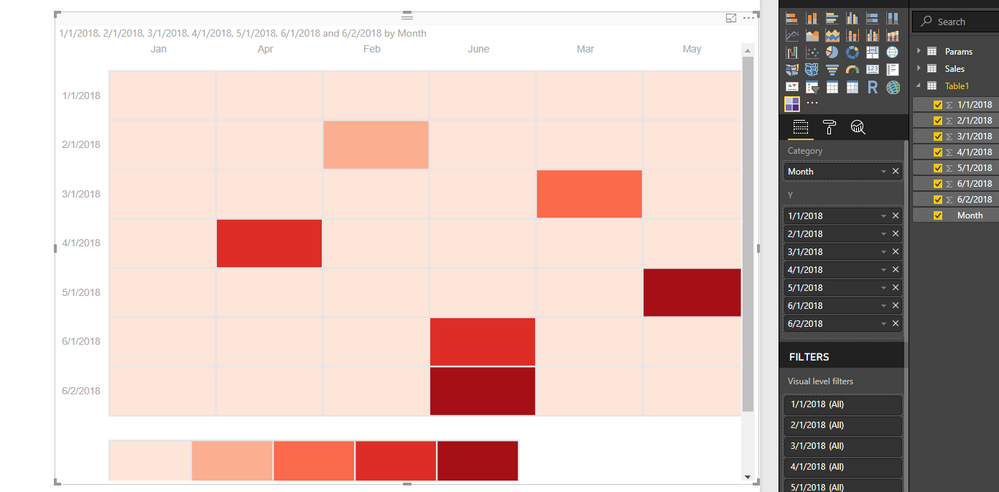
This is my first project at work with power BI and as a preliminary step, I am creating a table heat map with my organization's data. For the table heat map, it does not allow me to flip the axes around. As in I want the months 1 through 12 in my X axis and the dates on the Y axis. Is there a way to do this or a work around for it? Thank you!
Solved! Go to Solution.
Hi @pat1214,
By my tests, it seems that we could not drag measure to category field.
If you have to use the measures of month, you could use Table visual which also have conditional formatting.
Best Regards,
Cherry
Hi @pat1214,
It seems that you should drag the Month column to Category Field and Dates columns to Y Field.
You could have a view of this video about how to create table heatmap.
If you still need help, please share your data model then I could help you.
Best Regards,
Cherry
Thank you very much for responding. I have not been able to drag the months to 'Category', as in, when I drop the field there, it doesn't do anything and that's why I ended up showing them on the Y axis, but the person who requested this prefers it to be the other way around. The months are all 'New measure', I don't know if it has anything to with that. If you need to see the data model, I can attach a snap shot of it. Appreciate any help to get this corrected.
Thank you!
Hi @pat1214,
By my tests, it seems that we could not drag measure to category field.
If you have to use the measures of month, you could use Table visual which also have conditional formatting.
Best Regards,
Cherry
Thank you, that was my suspicion as well but I wanted to confirm before I scrapped the whole heat map.
The Power BI Data Visualization World Championships is back! Get ahead of the game and start preparing now!
Check out the November 2025 Power BI update to learn about new features.
| User | Count |
|---|---|
| 59 | |
| 46 | |
| 42 | |
| 23 | |
| 18 |
| User | Count |
|---|---|
| 193 | |
| 124 | |
| 101 | |
| 67 | |
| 49 |