We've captured the moments from FabCon & SQLCon that everyone is talking about, and we are bringing them to the community, live and on-demand. Starts on April 14th. Register now
Hello
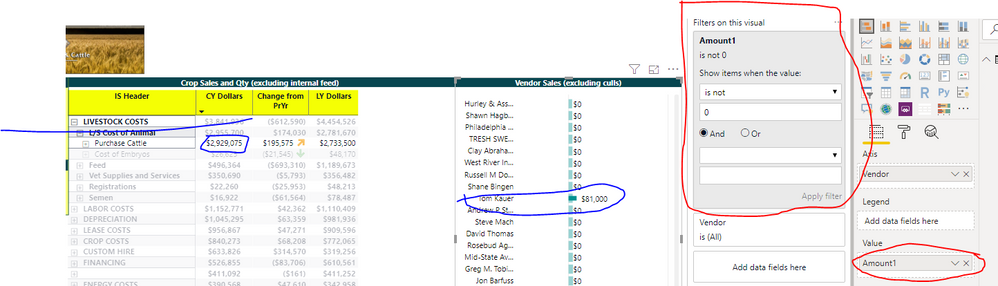
I am needing help in filtering out zero values in an interactive visual. If I select "purchased livestock" in the left visual, I only want the customers related to purchased livestock to show up in the right visual.
Within the "right" visual, I have attempted to filter out (at the visual level) for any value not 0, for the measure Amount. The desired result for the "right sided" visual is all vendors with an Amount <>0.
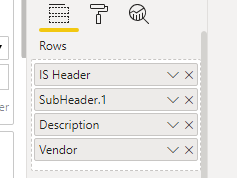
Within hte left sided visual - I have 4 row levels within the matrix visual. I am assuming whatever is done, will require these data elements?
I have also attempted to adjust the measure if zero, then blank. See below.
Amount1 =
VAR calcAmount1 =
SUMX (
COASetup,
[Amount (dbcr balance)] * COASetup[NormalBalance] * COASetup[Report Sign]
)
RETURN
IF ( calcAmount1 = 0, BLANK (), calcAmount1 )Please advise - surely there is a simple fix. I am disappointed in the visual filter not working - or am I missing something?
thanks
Solved! Go to Solution.
Hi @Dellis81 ,
You should use the Edit interactions instead of the filter.
When selecting values from a visual the other visual can responde in 3 different ways:
Check the documentation for further explanation.
Regards,
MFelix
Regards
Miguel Félix
Proud to be a Super User!
Check out my blog: Power BI em PortuguêsHi @Dellis81 ,
You should use the Edit interactions instead of the filter.
When selecting values from a visual the other visual can responde in 3 different ways:
Check the documentation for further explanation.
Regards,
MFelix
Regards
Miguel Félix
Proud to be a Super User!
Check out my blog: Power BI em PortuguêsThank you very much! Yes, I was making this to hard and the video clarified so much. I recall watching the same video several months ago, but with a little experience, the video makes more sense. Appreciate your quick response!
If you have recently started exploring Fabric, we'd love to hear how it's going. Your feedback can help with product improvements.
A new Power BI DataViz World Championship is coming this June! Don't miss out on submitting your entry.
Share feedback directly with Fabric product managers, participate in targeted research studies and influence the Fabric roadmap.
| User | Count |
|---|---|
| 57 | |
| 38 | |
| 33 | |
| 19 | |
| 16 |
| User | Count |
|---|---|
| 67 | |
| 66 | |
| 40 | |
| 34 | |
| 25 |