cancel
Showing results for 
Search instead for 
Did you mean: 

The Power BI Data Visualization World Championships is back! Get ahead of the game and start preparing now! Learn more

Reply
AndreaToth
Regular Visitor

Interactive time filter

Hello,

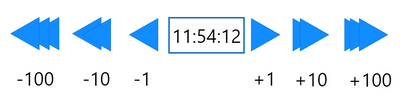
In my workplace I got the tast to make this visualisation, where we could skip time intervals with buttons. So we could step back or forward with 1s, 10s, 100s (or steps in time), and the actual time would be seen in the middle. Any ideas?

Thanks!

Time skip.PNG


1 REPLY 1
amitchandak
Super User
Super User

@AndreaToth , You can try bookmarks and buttons

https://radacad.com/bookmarks-and-buttons-making-power-bi-charts-even-more-interactive
https://docs.microsoft.com/en-us/power-bi/desktop-bookmarks

Share with Power BI Enthusiasts: Full Power BI Video (20 Hours) YouTube
Microsoft Fabric Series 60+ Videos YouTube
Microsoft Fabric Hindi End to End YouTube

Helpful resources

Announcements
Power BI DataViz World Championships

Power BI Dataviz World Championships

The Power BI Data Visualization World Championships is back! Get ahead of the game and start preparing now!

December 2025 Power BI Update Carousel

Power BI Monthly Update - December 2025

Check out the December 2025 Power BI Holiday Recap!

FabCon Atlanta 2026 carousel

FabCon Atlanta 2026

Join us at FabCon Atlanta, March 16-20, for the ultimate Fabric, Power BI, AI and SQL community-led event. Save $200 with code FABCOMM.