FabCon is coming to Atlanta
Join us at FabCon Atlanta from March 16 - 20, 2026, for the ultimate Fabric, Power BI, AI and SQL community-led event. Save $200 with code FABCOMM.
Register now!- Power BI forums
- Get Help with Power BI
- Desktop
- Service
- Report Server
- Power Query
- Mobile Apps
- Developer
- DAX Commands and Tips
- Custom Visuals Development Discussion
- Health and Life Sciences
- Power BI Spanish forums
- Translated Spanish Desktop
- Training and Consulting
- Instructor Led Training
- Dashboard in a Day for Women, by Women
- Galleries
- Data Stories Gallery
- Themes Gallery
- Contests Gallery
- QuickViz Gallery
- Quick Measures Gallery
- Visual Calculations Gallery
- Notebook Gallery
- Translytical Task Flow Gallery
- TMDL Gallery
- R Script Showcase
- Webinars and Video Gallery
- Ideas
- Custom Visuals Ideas (read-only)
- Issues
- Issues
- Events
- Upcoming Events
Learn from the best! Meet the four finalists headed to the FINALS of the Power BI Dataviz World Championships! Register now
- Power BI forums
- Forums
- Get Help with Power BI
- Desktop
- Re: Interactive filtering treemap
- Subscribe to RSS Feed
- Mark Topic as New
- Mark Topic as Read
- Float this Topic for Current User
- Bookmark
- Subscribe
- Printer Friendly Page


- Mark as New
- Bookmark
- Subscribe
- Mute
- Subscribe to RSS Feed
- Permalink
- Report Inappropriate Content
Interactive filtering treemap
Hello,
my first post.
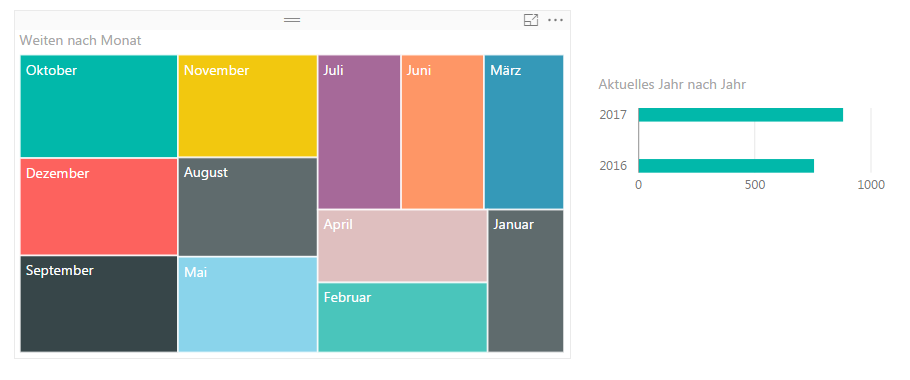
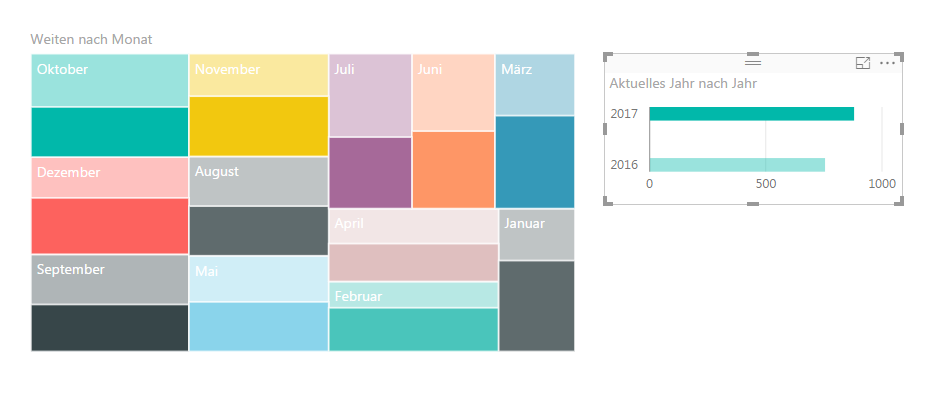
I am using two charts. One bar and one treemap chart. When filtering interactively by pressing one bar in the chart, the treemap's content adopts to this action.
The treemaps ractangles keep the same size (without filtering) and the filtered content is shown as part of the original size.
Is it possible, to let the treemap fully adopt to the filtered data? No transparent part in treemap, but completely filled with the now selected/filtered data?
Thanks in advance
Two screenshots might be helpful:
Solved! Go to Solution.
- Mark as New
- Bookmark
- Subscribe
- Mute
- Subscribe to RSS Feed
- Permalink
- Report Inappropriate Content
That's weird. I can get it to work on my PC. I mean I can press the bar chart and get the filtering mechanism on the treemap.
A pie chart is still a good solution nevertheless.
Don't forget to accept a solution and give kudos.
- Mark as New
- Bookmark
- Subscribe
- Mute
- Subscribe to RSS Feed
- Permalink
- Report Inappropriate Content
Meanwhile I've found the solution. This is obviously included since november 2015.
Edit interactions.
https://powerbi.microsoft.com/en-us/guided-learning/powerbi-service-visual-interactions/

- Mark as New
- Bookmark
- Subscribe
- Mute
- Subscribe to RSS Feed
- Permalink
- Report Inappropriate Content
Hi @jpodBerlin
As far as I'm aware, you can't do this per se.
You can try with this measure: and plot it in the tree map:
Sum Value = IF(HASONEFILTER(Table[Category]);CALCULATE(SUM(Table[Value]);ALLEXCEPT(Table;Table[Category]);SUM(Table[Value]))
Let me know how it goes.
Best,
Martin
- Mark as New
- Bookmark
- Subscribe
- Mute
- Subscribe to RSS Feed
- Permalink
- Report Inappropriate Content
Hello Martin,
thanks for the swift answer. I've tested it.
However, it shows an error (I try to translate in English). I hope I've transmitted the formula correctly.
"the function of type 'SUM' is used in a TRUE/FALSE expression, which serves as table filter expression. this is not allowed'
But the answer, it is generally out of box possible is helpful.
Matthias
- Mark as New
- Bookmark
- Subscribe
- Mute
- Subscribe to RSS Feed
- Permalink
- Report Inappropriate Content
Hello Martin,
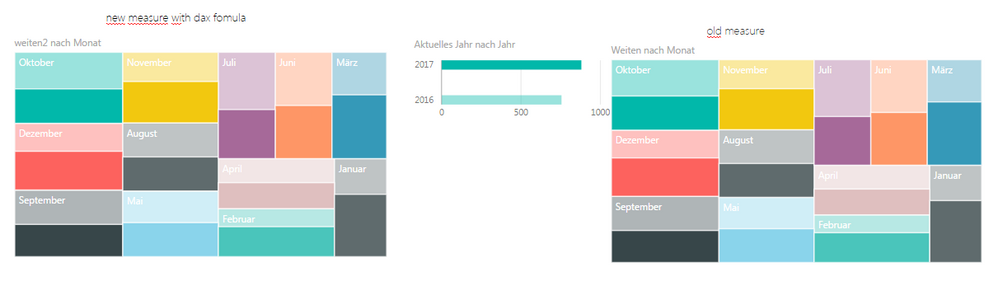
the measure is now valid. However, it is the same result (image: left with new measures, right the original object).
The problem is, the numbers have to adopt to the filter expression (here: 2017), but interactive filtering from charts keeps the size and just provides subsets. So it is not so easy to identify relative changes.
I will recommend my colleague to use a pie chart. And after filtering to enlarge the filtered result. Not perfect, but here it is better to identify changes in relations. And there is still a table possible.
- Mark as New
- Bookmark
- Subscribe
- Mute
- Subscribe to RSS Feed
- Permalink
- Report Inappropriate Content
That's weird. I can get it to work on my PC. I mean I can press the bar chart and get the filtering mechanism on the treemap.
A pie chart is still a good solution nevertheless.
Don't forget to accept a solution and give kudos.
- Mark as New
- Bookmark
- Subscribe
- Mute
- Subscribe to RSS Feed
- Permalink
- Report Inappropriate Content
Meanwhile I've found the solution. This is obviously included since november 2015.
Edit interactions.
https://powerbi.microsoft.com/en-us/guided-learning/powerbi-service-visual-interactions/
- Mark as New
- Bookmark
- Subscribe
- Mute
- Subscribe to RSS Feed
- Permalink
- Report Inappropriate Content
I messed up a paranthesis. Try this:
Sum Value = IF(HASONEFILTER(Table[Category]);CALCULATE(SUM(Table[Value]);ALLEXCEPT(Table;Table[Category]));SUM(Table[Value]))
Let me know how it goes.
Helpful resources

Join our Fabric User Panel
Share feedback directly with Fabric product managers, participate in targeted research studies and influence the Fabric roadmap.

Power BI Monthly Update - February 2026
Check out the February 2026 Power BI update to learn about new features.

FabCon Atlanta 2026
Join us at FabCon Atlanta, March 16-20, for the ultimate Fabric, Power BI, AI and SQL community-led event. Save $200 with code FABCOMM.

| User | Count |
|---|---|
| 60 | |
| 59 | |
| 41 | |
| 18 | |
| 15 |


| User | Count |
|---|---|
| 106 | |
| 103 | |
| 40 | |
| 29 | |
| 29 |


