Join us at FabCon Atlanta from March 16 - 20, 2026, for the ultimate Fabric, Power BI, AI and SQL community-led event. Save $200 with code FABCOMM.
Register now!The Power BI Data Visualization World Championships is back! It's time to submit your entry. Live now!
Hi Deveiopers,
Is there anyway or is it possible to have a interactive measure?
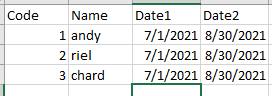
Dashboard Scenario
Filter :
Date 1
Date 2
Measure scenario
If I choose Date 1 Filter the visuals computation will show Date 1 - Current date,
else I choose Date 2 Filter the visuals computation will show Date 2 - Current date,
Solved! Go to Solution.
HI @Anonymous,
You can write measure expression with if statement to check the current filter effect and navigate to different results. If you mean to create a calculated column/table based on filter selection, it is impossible.
Regards,
Xiaoxin Sheng
HI @Anonymous,
You can write measure expression with if statement to check the current filter effect and navigate to different results. If you mean to create a calculated column/table based on filter selection, it is impossible.
Regards,
Xiaoxin Sheng
@Anonymous , Not very clear. You can have table with Date 1 and Date 2 has row values
assume slicer
a new measures
example measure
Switch(selectedvale(Slicer[slicer])
"Date 1" , calculate(countrows(Table), filter(Table, Table[Date1] = today())) ,
"Date 2" , calculate(countrows(Table), filter(Table, Table[Date2] = today()))
)
The Power BI Data Visualization World Championships is back! It's time to submit your entry.
Check out the January 2026 Power BI update to learn about new features.
| User | Count |
|---|---|
| 61 | |
| 49 | |
| 30 | |
| 25 | |
| 23 |
| User | Count |
|---|---|
| 128 | |
| 102 | |
| 56 | |
| 39 | |
| 31 |