Join us at FabCon Atlanta from March 16 - 20, 2026, for the ultimate Fabric, Power BI, AI and SQL community-led event. Save $200 with code FABCOMM.
Register now!The Power BI Data Visualization World Championships is back! Get ahead of the game and start preparing now! Learn more
Think of this scenario. You check out a library book and have not yet returned it. In the database, it will have a Check Out date (start date) and should not have a Check In date (end date).
My SQL query has 2 date values: 1. Start Date 2. End Date. The end date cannot have any null values so it will auto populate with 1900-01-01 00:00:000.
CURRENT PROBLEM: This auto populate is messing up my calculations because I am looking to have NULL values where the end date is still pending.
FAILED SOLUTION ATTEMPT: I tried to replace the value in PBI but it will not let me proceed without a value to replace (NULL will not be accepted). I also tried to do a CASE in SQL but that didn't work either.
How would you approach this? Lets say you need to calculate how many library books are returned on a monthly/weekly/daily/hourly level...how would you approach this since there is a prepopulated field where there is suppose to be a NULL?
Solved! Go to Solution.
Hi @Anonymous
1.Write this code in Advanced editor
#"Replaced Value" = Table.ReplaceValue(#"Changed Type",#datetime(1900, 1, 1, 0, 0, 0)," ",Replacer.ReplaceValue,{"end date"}),
#"Changed Type" is last step name
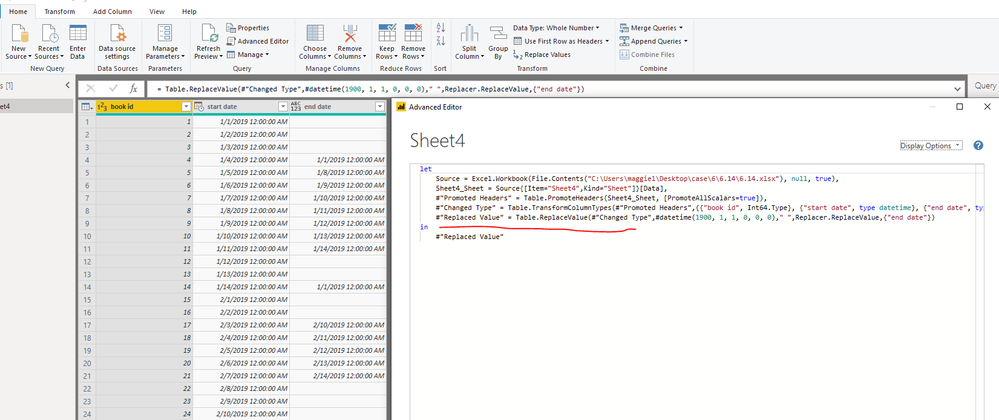
2.Transform "end date" column to "datetime" format
3.Click on "end date",
Add Column->add date, date only, then a new column [Date] is added
Close&&apply,
"calculate how many library books are returned on a monthly/weekly/daily/hourly level"
4. Create a calendar table, then create relationship based on my table[Date]
calendar = ADDCOLUMNS( CALENDARAUTO(),"year",YEAR([Date]),"month",MONTH([Date]),"week",WEEKNUM([Date],2))
Add "year","month","week" in the "Row" fields.
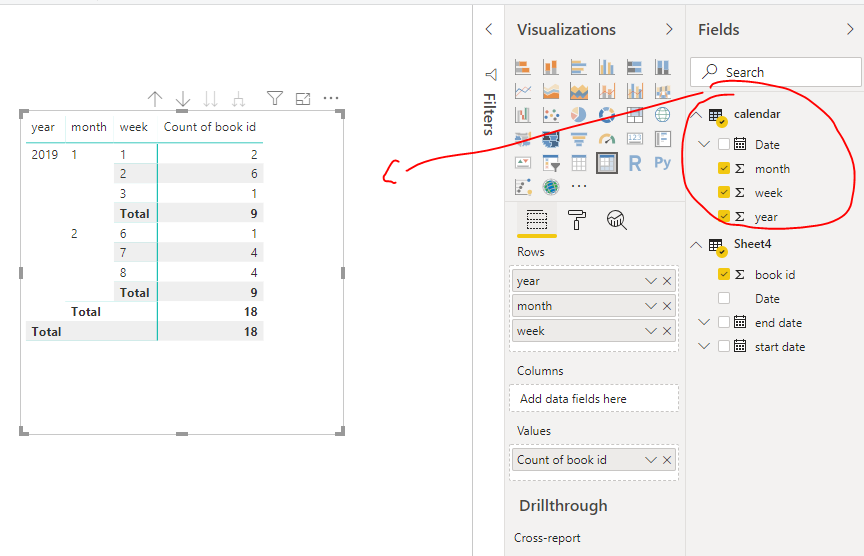
As for hourly level, please provide more details with some data or expect result.
If problem "Inserting NULL Values", i would suggest you to post another one for hourly level result, so more engineers will involve in your problem.
Best Regards
Maggie
Community Support Team _ Maggie Li
If this post helps, then please consider Accept it as the solution to help the other members find it more quickly.
Hi @Anonymous
1.Write this code in Advanced editor
#"Replaced Value" = Table.ReplaceValue(#"Changed Type",#datetime(1900, 1, 1, 0, 0, 0)," ",Replacer.ReplaceValue,{"end date"}),
#"Changed Type" is last step name
2.Transform "end date" column to "datetime" format
3.Click on "end date",
Add Column->add date, date only, then a new column [Date] is added
Close&&apply,
"calculate how many library books are returned on a monthly/weekly/daily/hourly level"
4. Create a calendar table, then create relationship based on my table[Date]
calendar = ADDCOLUMNS( CALENDARAUTO(),"year",YEAR([Date]),"month",MONTH([Date]),"week",WEEKNUM([Date],2))
Add "year","month","week" in the "Row" fields.
As for hourly level, please provide more details with some data or expect result.
If problem "Inserting NULL Values", i would suggest you to post another one for hourly level result, so more engineers will involve in your problem.
Best Regards
Maggie
Community Support Team _ Maggie Li
If this post helps, then please consider Accept it as the solution to help the other members find it more quickly.
Check out the November 2025 Power BI update to learn about new features.
Advance your Data & AI career with 50 days of live learning, contests, hands-on challenges, study groups & certifications and more!
| User | Count |
|---|---|
| 58 | |
| 45 | |
| 40 | |
| 21 | |
| 18 |