cancel
Showing results for 
Search instead for 
Did you mean: 

Data Days is here! Join us now for 60+ days of learning, challenges, and connection. Learn more

Reply
karimk
Helper III
Helper III

Inserting High Resolution Images

Hello,

When I insert an image on a dashboard I lose a good chunck of resolution. It becomes to bad/blurry to use. 

Anyone having this?

1 ACCEPTED SOLUTION
v-caliao-msft
Microsoft Employee
Microsoft Employee

@karimk,


I have tested it on my local environment, we cannot reproduce this issue. In your scenario, do you insert a online picture or download picture from internt and then insert into your report?


In your insert local picture, please check your image size after download from internet. If the issue persists, please provide us more detail information, so that we can try to reproduce this issue and make further analysis.


Regards,

Charlie Liao


View solution in original post

3 REPLIES 3
v-caliao-msft
Microsoft Employee
Microsoft Employee

@karimk,


I have tested it on my local environment, we cannot reproduce this issue. In your scenario, do you insert a online picture or download picture from internt and then insert into your report?


In your insert local picture, please check your image size after download from internet. If the issue persists, please provide us more detail information, so that we can try to reproduce this issue and make further analysis.


Regards,

Charlie Liao


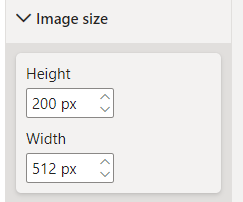
Hi, may I ask if it's possible to inert images by URL, filter and visualise them in high resolution higher than 512x512 ? I see the Image size is limited to 512 px

Congzheng_0-1695978415842.png


I am having a similar issue. Inserting images into powerbi as dynamic URL using cloud scope app. The direct URL link shows ultrasharp images. When viewing in powerbi the images look blurry. When the same powerbi report is inserted into a sharepoint site this results in even more blurr to all images.   

Helpful resources

Announcements
Fabric Data Days is here Carousel

Fabric Data Days 2026

Don't miss out on Data Days, June 15 through August 7. Learn Fabric, Power BI, SQL, AI and more.

May Power BI Update Carousel

Power BI Monthly Update - May 2026

Check out the May 2026 Power BI update to learn about new features.

Power BI DataViz World Championships carousel

Power BI DataViz World Championships - June 2026

A new Power BI DataViz World Championship is coming this June! Don't miss out on submitting your entry.