Hi Team,
have this question for you guys regarding a sort of index column. I have this (simplified) dataset for you, where the date range is expanded into different rows in order to reflect the daily duration of each product.
| Product name | Duration (days) | Duration (night) | Service Start (date) | Operation day (date) | End day (date) |
| X1 | 3 | 2 | 10/01/2021 | 10/01/2021 | 12/01/2021 |
| X1 | 3 | 2 | 10/01/2021 | 11/01/2021 | 12/01/2021 |
| X1 | 3 | 2 | 10/01/2021 | 12/01/2021 | 12/01/2021 |
| X1 | 3 | 2 | 20/01/2021 | 20/01/2021 | 22/01/2021 |
| X1 | 3 | 2 | 20/01/2021 | 21/01/2021 | 22/01/2021 |
| X1 | 3 | 2 | 20/01/2021 | 22/01/2021 | 22/01/2021 |
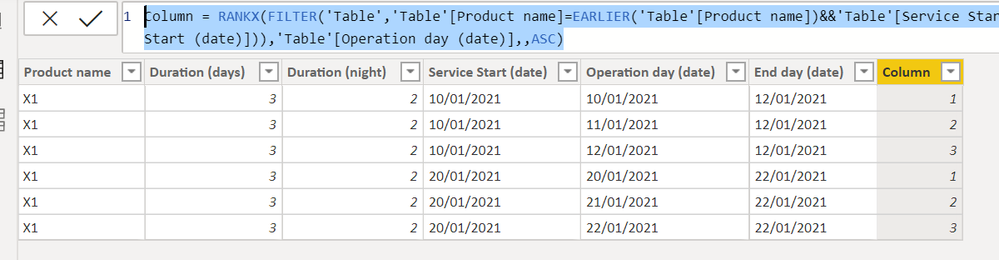
what do I need to add to this is a sort of index column that counts the days as follows in this example:
| Product name | Duration (days) | Duration (night) | Service Start (date) | Operation day (date) | End day (date) | Day no |
| X1 | 3 | 2 | 10/01/2021 | 10/01/2021 | 12/01/2021 | 1 |
| X1 | 3 | 2 | 10/01/2021 | 11/01/2021 | 12/01/2021 | 2 |
| X1 | 3 | 2 | 10/01/2021 | 12/01/2021 | 12/01/2021 | 3 |
| X1 | 3 | 2 | 20/01/2021 | 20/01/2021 | 22/01/2021 | 1 |
| X1 | 3 | 2 | 20/01/2021 | 21/01/2021 | 22/01/2021 | 2 |
| X1 | 3 | 2 | 20/01/2021 | 22/01/2021 | 22/01/2021 | 3 |
what do I get is this
| Product name | Duration (days) | Duration (night) | Service Start (date) | Operation day (date) | End day (date) | Day no |
| X1 | 3 | 2 | 10/01/2021 | 10/01/2021 | 12/01/2021 | 1 |
| X1 | 3 | 2 | 10/01/2021 | 11/01/2021 | 12/01/2021 | 2 |
| X1 | 3 | 2 | 10/01/2021 | 12/01/2021 | 12/01/2021 | 3 |
| X1 | 3 | 2 | 20/01/2021 | 20/01/2021 | 22/01/2021 | 4 |
| X1 | 3 | 2 | 20/01/2021 | 21/01/2021 | 22/01/2021 | 5 |
| X1 | 3 | 2 | 20/01/2021 | 22/01/2021 | 22/01/2021 | 6 |
How do i get to the first chart result?