cancel
Showing results for 
Search instead for 
Did you mean: 

The Power BI Data Visualization World Championships is back! Get ahead of the game and start preparing now! Learn more

Reply
ericet
Helper I
Helper I

Input data time field 14/11/2020 11:15:54

Hello everyone,


I need to create Input date time field example "14/11/2020 11:15:54"

so that I can get the start data time for a report.


I want to be able to type it in ? or something close


Any ideas ?


Eric


5 REPLIES 5
Anonymous
Not applicable

Hi @ericet ,


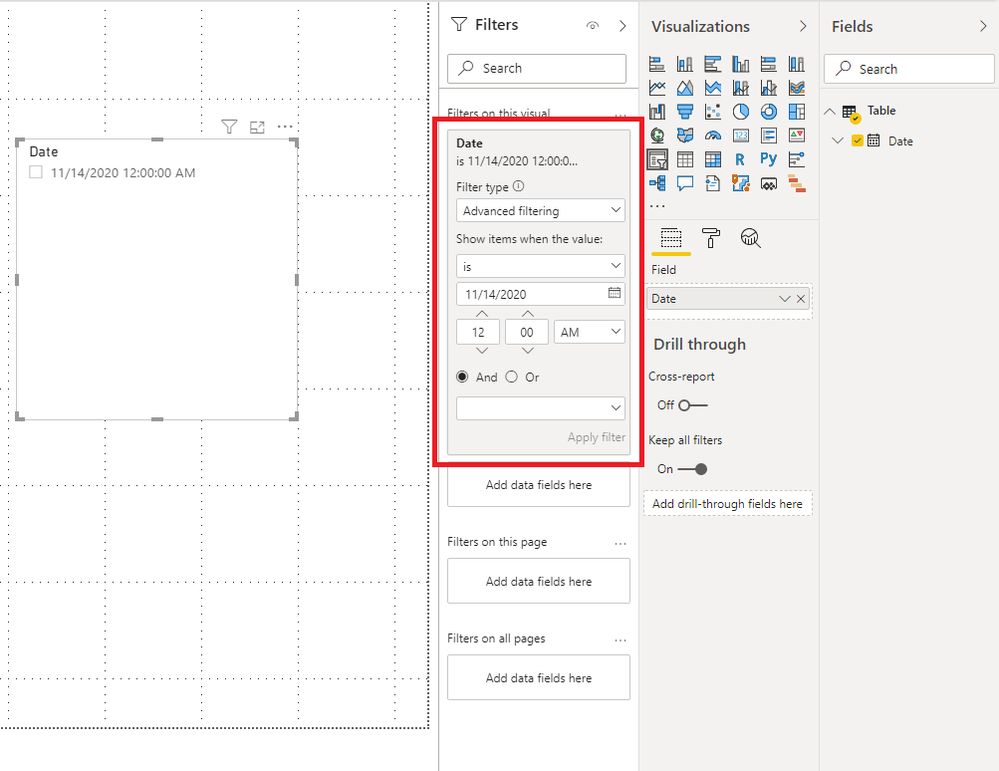
I think you may want to find the exact date from the slicer to filter. You can try to use Advanced filtering from Filters.

2.png


Best Regards,

Stephen Tao


If this post helps, then please consider Accept it as the solution to help the other members find it more quickly.

ericet
Helper I
Helper I

Maybe the date serial number could be the solution ?


How do I find the serial number of a date ?


Eric

Anonymous
Not applicable

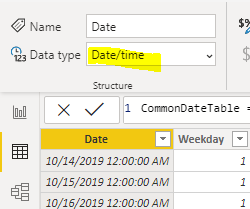
@ericet - If I am understanding your point, you want to change the data type of the date column

Change the format of the date column to Date/Time

NikhilKumar_1-1602689243528.png


Appreciate your kudos!! Mark my post as solution if this helps.


No that's not what I mean.


I need the user to be able to Input date time field example "14/11/2020 11:15:54"


Is it posiblle to have a slicer that includes date time ?


Eric

Anonymous
Not applicable

Possible workaround is-

Two tables for Hour and two tables for Minute. I would suggest creating two time table instead. Please refer to the snapshot below.

startTimeTable =
GENERATESERIES ( TIME ( 0, 0, 0 ), TIME ( 23, 59, 0 ), TIME ( 0, 1, 0 ) )

NikhilKumar_0-1602693902174.png


Make sure the date format should be MM/DD/YYYY HH:MM:SS


Appreciate your kudos!! Mark my post as solution if it helps.

Helpful resources

Announcements
Power BI DataViz World Championships

Power BI Dataviz World Championships

The Power BI Data Visualization World Championships is back! Get ahead of the game and start preparing now!

December 2025 Power BI Update Carousel

Power BI Monthly Update - December 2025

Check out the December 2025 Power BI Holiday Recap!

FabCon Atlanta 2026 carousel

FabCon Atlanta 2026

Join us at FabCon Atlanta, March 16-20, for the ultimate Fabric, Power BI, AI and SQL community-led event. Save $200 with code FABCOMM.

Users online (6,955)