Join us in Barcelona for FabCon and SQLCon, September 28 - October 1, 2026.
This is best Fabric, Power BI, SQL and AI community event. How do we know? The last event sold out! Save €200 with code FABCMTY200.
Register now- Power BI forums
- Get Help with Power BI
- Desktop
- Service
- Report Server
- Power Query
- Mobile Apps
- Developer
- DAX Commands and Tips
- Custom Visuals Development Discussion
- Health and Life Sciences
- Power BI Spanish forums
- Translated Spanish Desktop
- Training and Consulting
- Instructor Led Training
- Dashboard in a Day for Women, by Women
- Galleries
- Data Stories Gallery
- Themes Gallery
- Contests Gallery
- QuickViz Gallery
- Quick Measures Gallery
- Visual Calculations Gallery
- Fabric Apps Gallery
- Notebook Gallery
- Translytical Task Flow Gallery
- TMDL Gallery
- R Script Showcase
- Webinars and Video Gallery
- Ideas
- Custom Visuals Ideas (read-only)
- Issues
- Issues
- Events
- Upcoming Events
The Fabric community is upgrading! Read all of the details including the timeline and what you can expect. Learn more
- Power BI forums
- Forums
- Get Help with Power BI
- Desktop
- Inline KPI behaviour
- Subscribe to RSS Feed
- Mark Topic as New
- Mark Topic as Read
- Float this Topic for Current User
- Bookmark
- Subscribe
- Printer Friendly Page

- Mark as New
- Bookmark
- Subscribe
- Mute
- Subscribe to RSS Feed
- Permalink
- Report Inappropriate Content
Inline KPI behaviour
Hello friends!
This is my first post here if something is not on the correct form please let me know.
Fist, this is my data
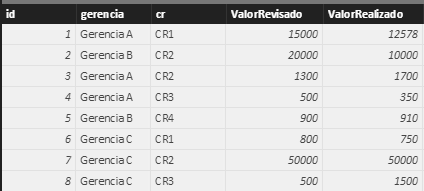
id gerencia cr ValorRevisado ValorRealizado
| 1 | Gerencia A | CR1 | 15000 | 12578 |
| 2 | Gerencia B | CR2 | 20000 | 10000 |
| 3 | Gerencia A | CR2 | 1300 | 1700 |
| 4 | Gerencia A | CR3 | 500 | 350 |
| 5 | Gerencia B | CR4 | 900 | 910 |
| 6 | Gerencia C | CR1 | 800 | 750 |
| 7 | Gerencia C | CR2 | 50000 | 50000 |
| 8 | Gerencia C | CR3 | 500 | 1500 |
And this is what im trying to do:
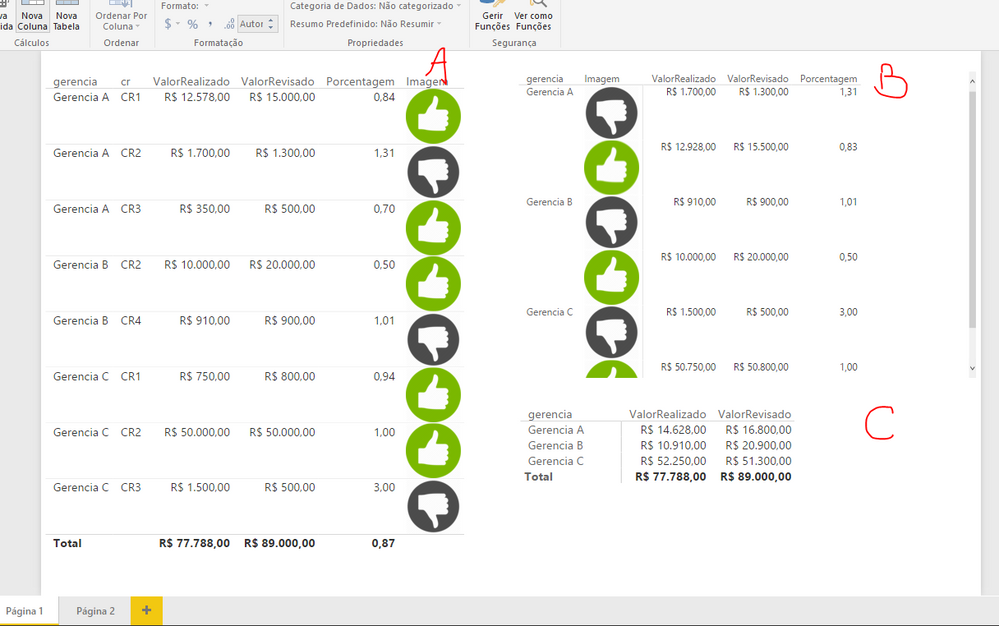
- My rule is :
Measure: Porcentagem = (ValorRealizado / ValorRevisado)
Column (Image URL) = IF Porcentagem > 1: good image else bad image;
I can figure what is happening on table A.
I know what is happening on table B too but my doubt is, is this correct?
I expected somethind like table C, where the rule is applyed after the grouping..
Solved! Go to Solution.

- Mark as New
- Bookmark
- Subscribe
- Mute
- Subscribe to RSS Feed
- Permalink
- Report Inappropriate Content
Hi jhonatas,
Based on the measure, if ValorRealizado/ValorRevisado >1, displays good image otherwise it’s bad image. But from the screenshot you provided, it seems you place images in wrong location. For example:
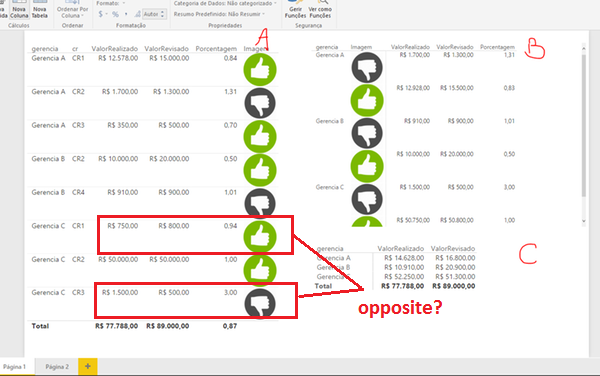
In addition, if you want to add good or bad images after grouping, you need to create a summarize table, then place all fields in a table visual. You can follow steps below:
Create the table.
Add measures.
Calculate percent:
Porcentagem =
var ValorRealizado=SUM([ValorRealizado])
var ValorRevisado=SUM([ValorRevisado])
return
CALCULATE(ValorRealizado/ValorRevisado,ALL(Test))
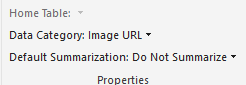
Format the result to url:
Image = if([Porcentagem]>1, "http://www.clipartbest.com/cliparts/jix/pjG/jixpjGdiE.png","http://www.freeiconspng.com/uploads/checked-correct-right-yes-checkmark-12.png")
Add a calculate column to store and display the url string.
Image Result = [Image]

Create visuals.
Table visual:
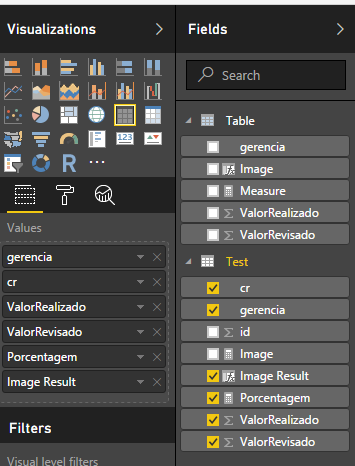
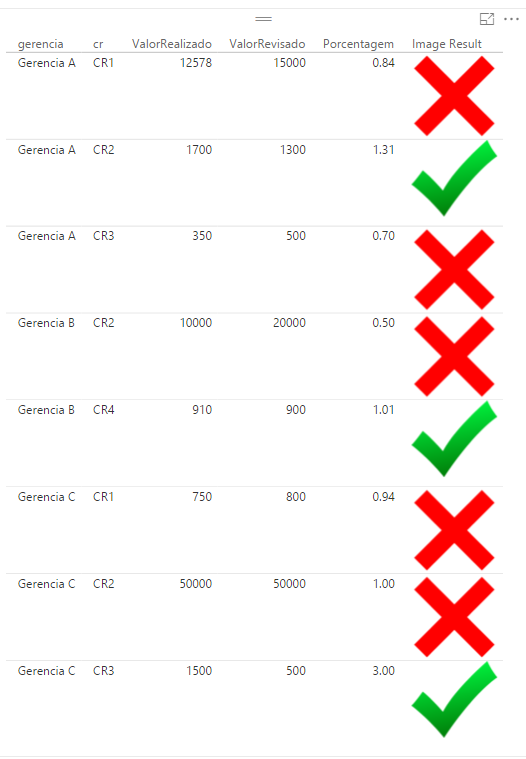
Matrix visual:
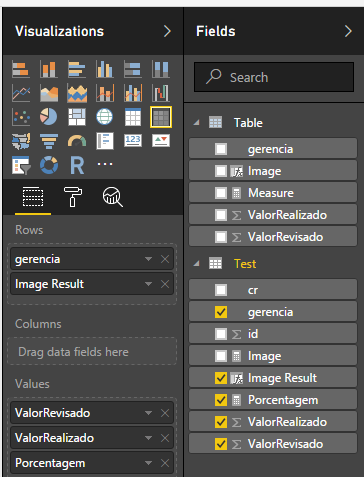
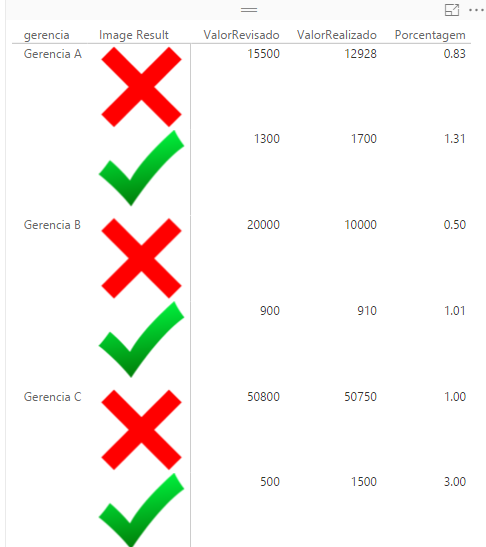
Use table formula to create a summarize table:
Table = SUMMARIZE(Test,Test[gerencia],"ValorRealizado",SUMX(FILTER(Test,Test[gerencia]=EARLIER(Test[gerencia])), Test[ValorRealizado]),"ValorRevisado",SUMX(FILTER(Test,Test[gerencia]=EARLIER(Test[gerencia])),Test[ValorRevisado]))
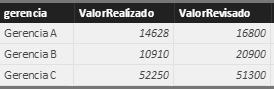
Measure and calculate column to display image:
Measure = var ValorRealizado=SUM([ValorRealizado])
var ValorRevisado=SUM([ValorRevisado])
return
CALCULATE(ValorRealizado/ValorRevisado,ALL(Test))
Image = if([Measure]>1,"http://www.clipartbest.com/cliparts/jix/pjG/jixpjGdiE.png","http://www.freeiconspng.com/uploads/checked-correct-right-yes-checkmark-12.png")
Create a table visual:


Regards,
Xiaoxin Sheng
- Mark as New
- Bookmark
- Subscribe
- Mute
- Subscribe to RSS Feed
- Permalink
- Report Inappropriate Content
Hello! Me again!
Its possible to do this without creating a summarized table?
- Mark as New
- Bookmark
- Subscribe
- Mute
- Subscribe to RSS Feed
- Permalink
- Report Inappropriate Content
Hi @jhonatas,
Yes, it also support.
Create a calculated column with calculate, then use if state to check the result to return the specify image url.
Regards,
Xiaoxin Sheng
- Mark as New
- Bookmark
- Subscribe
- Mute
- Subscribe to RSS Feed
- Permalink
- Report Inappropriate Content
I cant make a COLUMN work with all this variables. The context of column in this mess is getting me crazy.
- Mark as New
- Bookmark
- Subscribe
- Mute
- Subscribe to RSS Feed
- Permalink
- Report Inappropriate Content
Hi @jhonatas,
Please try to use below formula to create a column on original table:
Image:
var temp= calculate(SUM(Table[ValorRealizado])/SUM(Table[ValorRevisado]),Table[Gerencia]=EARLIER(Table[Gerencia]),ALLSELECTED(table))
return
if(temp>1, "http://www.clipartbest.com/cliparts/jix/pjG/jixpjGdiE.png","http://www.freeiconspng.com/uploads/checked-correct-right-yes-checkmark-12.png")
Regards,
Xiaoxin Sheng

- Mark as New
- Bookmark
- Subscribe
- Mute
- Subscribe to RSS Feed
- Permalink
- Report Inappropriate Content
Hi guys,
When you move the cursor over the icons, the url pops up. Is it possible to no longer occur?
Thank you,
Simona
- Mark as New
- Bookmark
- Subscribe
- Mute
- Subscribe to RSS Feed
- Permalink
- Report Inappropriate Content
Hi jhonatas,
Based on the measure, if ValorRealizado/ValorRevisado >1, displays good image otherwise it’s bad image. But from the screenshot you provided, it seems you place images in wrong location. For example:
In addition, if you want to add good or bad images after grouping, you need to create a summarize table, then place all fields in a table visual. You can follow steps below:
Create the table.
Add measures.
Calculate percent:
Porcentagem =
var ValorRealizado=SUM([ValorRealizado])
var ValorRevisado=SUM([ValorRevisado])
return
CALCULATE(ValorRealizado/ValorRevisado,ALL(Test))
Format the result to url:
Image = if([Porcentagem]>1, "http://www.clipartbest.com/cliparts/jix/pjG/jixpjGdiE.png","http://www.freeiconspng.com/uploads/checked-correct-right-yes-checkmark-12.png")
Add a calculate column to store and display the url string.
Image Result = [Image]
Create visuals.
Table visual:
Matrix visual:
Use table formula to create a summarize table:
Table = SUMMARIZE(Test,Test[gerencia],"ValorRealizado",SUMX(FILTER(Test,Test[gerencia]=EARLIER(Test[gerencia])), Test[ValorRealizado]),"ValorRevisado",SUMX(FILTER(Test,Test[gerencia]=EARLIER(Test[gerencia])),Test[ValorRevisado]))
Measure and calculate column to display image:
Measure = var ValorRealizado=SUM([ValorRealizado])
var ValorRevisado=SUM([ValorRevisado])
return
CALCULATE(ValorRealizado/ValorRevisado,ALL(Test))
Image = if([Measure]>1,"http://www.clipartbest.com/cliparts/jix/pjG/jixpjGdiE.png","http://www.freeiconspng.com/uploads/checked-correct-right-yes-checkmark-12.png")
Create a table visual:
Regards,
Xiaoxin Sheng
- Mark as New
- Bookmark
- Subscribe
- Mute
- Subscribe to RSS Feed
- Permalink
- Report Inappropriate Content
Ei xioxin, sorry for the late reply. This works perfectly!
Let me ask, i can use this with a date slicer too?
- Mark as New
- Bookmark
- Subscribe
- Mute
- Subscribe to RSS Feed
- Permalink
- Report Inappropriate Content
Nevermind, my bad. Its working 100% now, thanks!
- Mark as New
- Bookmark
- Subscribe
- Mute
- Subscribe to RSS Feed
- Permalink
- Report Inappropriate Content
maybe i need to write some more details?
Helpful resources

FabCon & SQLCon – Barcelona 2026
Join us in Barcelona for FabCon and SQLCon, the Fabric, Power BI, SQL, and AI community event. Save €200 with code FABCMTY200.

Power BI DataViz World Championships - June 2026
A new Power BI DataViz World Championship is coming this June! Don't miss out on submitting your entry.

| User | Count |
|---|---|
| 27 | |
| 22 | |
| 20 | |
| 18 | |
| 14 |


| User | Count |
|---|---|
| 25 | |
| 20 | |
| 20 | |
| 20 | |
| 20 |


