Join us at FabCon Atlanta from March 16 - 20, 2026, for the ultimate Fabric, Power BI, AI and SQL community-led event. Save $200 with code FABCOMM.
Register now!The Power BI Data Visualization World Championships is back! Get ahead of the game and start preparing now! Learn more
HI
I am using the following statement in a measure which takes the value in the transactional currency and converts it to the local currency.
GBP Invoice COGS Value = sumx('Sales_Invoice_Data','Sales_Invoice_Data'[Standard Cogs ] / LOOKUPVALUE('CurrencyTable'[Value], 'CurrencyTable'[Date], 'Sales_Invoice_Data'[Invoice Date], 'CurrencyTable'[Rate], 'Sales_Invoice_Data'[Local Currency Code]))
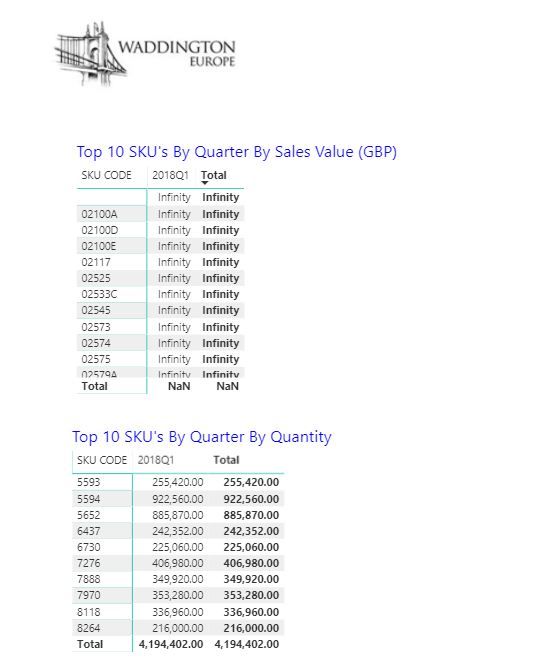
The calculation seems to work fine and creates the column OK in the table with the correct data but when I then apply it to a BI report i get infinity errors.
I think i need to change the statement so that it handles a 0 but all the options i have tried failed.
Any help would be appreciated.
Thanks
Mark
Hello @MBrackenbury,
This issues its based on the fact that you are using/sign you will need to use the DIVIDE function instead.
Regards!
ED
HI Ed
Thank you for the reply however I did try using the divide option previously and couldn't get it to work - possible due to the divide being based on a lookup value.
Where in the statement are you saying I need to use the DIVIDE()?
GBP Invoice COGS Value = sumx('Sales_Invoice_Data','Sales_Invoice_Data'[Standard Cogs ] / LOOKUPVALUE('CurrencyTable'[Value], 'CurrencyTable'[Date], 'Sales_Invoice_Data'[Invoice Date], 'CurrencyTable'[Rate], 'Sales_Invoice_Data'[Local Currency Code]))
Thanks
Mark
HI
Has anyone got another solution to this issue as i still cannot get it to work.
Thanks
Mark
Hi @MBrackenbury,
You can try to use below measure:
GBP Invoice COGS Value =
SUMX (
'Sales_Invoice_Data',
DIVIDE (
'Sales_Invoice_Data'[Standard Cogs ],
LOOKUPVALUE (
'CurrencyTable'[Value],
'CurrencyTable'[Date], 'Sales_Invoice_Data'[Invoice Date],
'CurrencyTable'[Rate], 'Sales_Invoice_Data'[Local Currency Code]
),
-1
)
)
Regards,
Xiaoxin Sheng
The Power BI Data Visualization World Championships is back! Get ahead of the game and start preparing now!
| User | Count |
|---|---|
| 41 | |
| 37 | |
| 35 | |
| 35 | |
| 28 |
| User | Count |
|---|---|
| 134 | |
| 101 | |
| 71 | |
| 67 | |
| 65 |