cancel
Showing results for 
Search instead for 
Did you mean: 

The Power BI Data Visualization World Championships is back! Get ahead of the game and start preparing now! Learn more

Reply
Anonymous
Not applicable

Individual and Group average

Hello,


I have the following puzzle that I am trying to resolve and so far I was not able to find a good solution to it (DAX).


The raw data table looks like:

NameActivitiesDate
John22019-07-07
John32019-07-08
John42019-07-12
Deanna32019-07-08
Deanna42019-07-09
Deanna52019-07-11


I want to know the Average activities per day per "employee" so I have created two measures:

1- Worked days = DISTINCTCOUNT(Date)

2- Total Activities = SUM(Activities)

3- Avg Activities = Total Activities / Worked Days / DISTINCTCOUNT(Name) 


Which yield the expected results:

NameAvg ActivitiesTotal ActivitiesWorked days
John393
Deanna4123


So far so good, now I want to calculate the Average activities per day per name of the team, you would say that the above is pretty simple, just remove the Name component and I should get the team average:


Avg ActivitiesTotal ActivitiesWorked daysDISTINCTCOUNT(Name) 
2.12152


As you can see the average result of 4.2 is not the right one, it should be 3.5 (in this case I've simulated the data to be simple at the eye). 


This result is given by the way that Worked days counts the number of "active days" of each employee.


I think that a weighted average would work, but I have not been able to identify the right way to do it in PowerBI

1 ACCEPTED SOLUTION
v-lili6-msft
Community Support
Community Support

hi, @Anonymous 

This looks like a measure totals problem. Very common. See this post about it
https://community.powerbi.com/t5/DAX-Commands-and-Tips/Dealing-with-Measure-Totals/td-p/63376

Also, this Quick Measure, Measure Totals, The Final Word should get you what you need:
https://community.powerbi.com/t5/Quick-Measures-Gallery/Measure-Totals-The-Final-Word/m-p/547907


For your case,  just try this formula:

Measure = var _table=SUMMARIZE(Table1,Table1[Name],"Avg Activities",[Avg Activities]) return
AVERAGEX(_table,[Avg Activities])

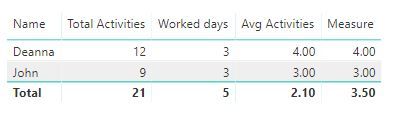
Result:

12.JPG


Best Regards,

Lin

Community Support Team _ Lin
If this post helps, then please consider Accept it as the solution to help the other members find it more quickly.

View solution in original post

3 REPLIES 3
v-lili6-msft
Community Support
Community Support

hi, @Anonymous 

This looks like a measure totals problem. Very common. See this post about it
https://community.powerbi.com/t5/DAX-Commands-and-Tips/Dealing-with-Measure-Totals/td-p/63376

Also, this Quick Measure, Measure Totals, The Final Word should get you what you need:
https://community.powerbi.com/t5/Quick-Measures-Gallery/Measure-Totals-The-Final-Word/m-p/547907


For your case,  just try this formula:

Measure = var _table=SUMMARIZE(Table1,Table1[Name],"Avg Activities",[Avg Activities]) return
AVERAGEX(_table,[Avg Activities])

Result:

12.JPG


Best Regards,

Lin

Community Support Team _ Lin
If this post helps, then please consider Accept it as the solution to help the other members find it more quickly.
Anonymous
Not applicable

Thank you!.


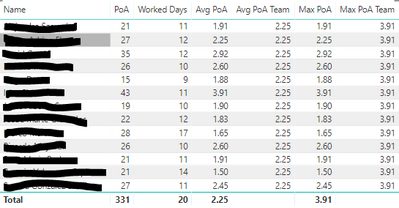
I've just combined your answer with an additional mesasure using HASONEFILETER to come out with a final table:


Capture.PNG

Now both totals and Team average show the right numbers.

HotChilli
Super User
Super User

Shouldn't your measures be :

worked days = COUNT(Table1[Date])

Avg Activities = [Total Activities] / [worked days] 

Helpful resources

Announcements
Power BI DataViz World Championships

Power BI Dataviz World Championships

The Power BI Data Visualization World Championships is back! Get ahead of the game and start preparing now!

December 2025 Power BI Update Carousel

Power BI Monthly Update - December 2025

Check out the December 2025 Power BI Holiday Recap!

FabCon Atlanta 2026 carousel

FabCon Atlanta 2026

Join us at FabCon Atlanta, March 16-20, for the ultimate Fabric, Power BI, AI and SQL community-led event. Save $200 with code FABCOMM.