Don't miss your chance to take exam DP-600 or DP-700 on us!
Request nowLearn from the best! Meet the four finalists headed to the FINALS of the Power BI Dataviz World Championships! Register now
I am new to Power BI and hoping someone can help understand the reasoning and the correct way to do this.
The sample PBIX file is available here: https://ufile.io/iw27ae44
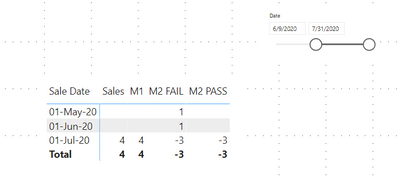
1. The measure M1 is the original measure which works fine (responds to filter) when I use a filter through a slicer which uses a related table.
2. The measure M2 FAIL is a scenario, where I am trying to do a mathematical operation (Example: 1 - CALCULATE RESULT = some %) on the result of the CALCULATE function. The measure yeilds correct results, but the data filter stops working.
3. To make it work, I had a create a measure M2 PASS using column M2 Value with a hard coded, so that the CALCULATE doesn't loose context. It correctly corresponds to the date slicer.
My questions are:
1. Why does it loose context when I add a + or - operator. It seems to work with a * operator.
2. How I can achieve the M2 PASS result in an elegant / recommended way.
Thanks in Advance
Andy!
Solved! Go to Solution.
@Anonymous
Becasue your Dates table is joined to your Data table you don't need to use RELATED in your measure, M1 can just be
M1 = SUM(Data[Sales])
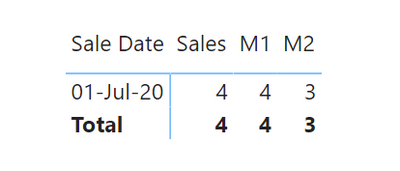
Now, for the context on M2, it's not losing it it's just the fact that each date exists so it is able to calculate the 1 on every row. If you only want to show it on rows where M1 is not blank you can do it like so.
M2 =
VAR _M1 = [M1]
RETURN
IF ( NOT ISBLANK ( _M1 ), _M1 - 1, BLANK())
@Anonymous
Becasue your Dates table is joined to your Data table you don't need to use RELATED in your measure, M1 can just be
M1 = SUM(Data[Sales])
Now, for the context on M2, it's not losing it it's just the fact that each date exists so it is able to calculate the 1 on every row. If you only want to show it on rows where M1 is not blank you can do it like so.
M2 =
VAR _M1 = [M1]
RETURN
IF ( NOT ISBLANK ( _M1 ), _M1 - 1, BLANK())
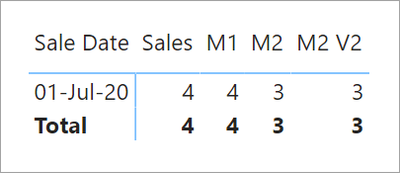
Another way to do it is to use a trick of DIVIDE returning a BLANK on error and BLANK * <anything> is BLANK.
M2 V2 =
VAR _M1 = [M1]
RETURN
DIVIDE( _M1 , _M1 ) * ( _M1 - 1 )
We use [M1] 3 times but because we used a VAR it only gets pulled by the DAX engine once.
Share feedback directly with Fabric product managers, participate in targeted research studies and influence the Fabric roadmap.
Check out the February 2026 Power BI update to learn about new features.
| User | Count |
|---|---|
| 53 | |
| 49 | |
| 33 | |
| 16 | |
| 15 |
| User | Count |
|---|---|
| 85 | |
| 70 | |
| 38 | |
| 28 | |
| 25 |