Hi everyone,
Likely this has been answered previously, but can't find the correct search term to get hits.
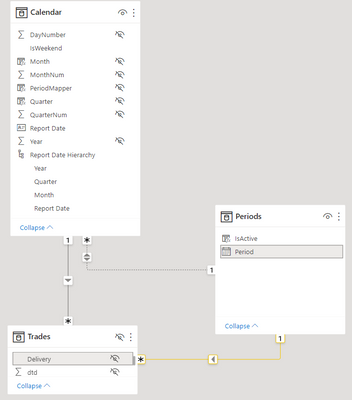
I've got a setup (simplified below), containing 2 date tables (Calendar and Periods) used to filter various other tables based on different tables.
One date is a daily calendar while the other is a month-start calendar, but they do not cross-filter as for each date in Calendar there may be multiple Periods (months).
For every selected date in "Calendar" all prior dates in "Periods" are by definition "Inactive" and I've been trying to create a boolean Column or Measure to allow allow for this behaviour in a filter within the "Periods" table (simplified model below). Eg. If one selected August 1'st 2022 in "Calendar" July 2022 and prior would be "Inactive" while August and onwards would be Active.
However, my vague attempts as both a measure and column have proven fruitless. One such example is the below example as either unrelated column or measure.
IsActive = SELECTEDVALUE(Periods[Period]) >= SELECTEDVALUE('Calendar'[Report Date])
The goal seems simple to implement within each table individually (in this example "Trades") however, the model contains multiple tables where this logic applies, and I'm trying to achieve a centralized filter for all of them through Periods[Period].
Any suggestions will be much appreciated.


