cancel
Showing results for 
Search instead for 
Did you mean: 

Vote for your favorite vizzies from the Power BI Dataviz World Championship submissions. Vote now!

Reply
Anonymous
Not applicable

Indicator using inactive relationship

Hi everyone, 

Likely this has been answered previously, but can't find the correct search term to get hits.


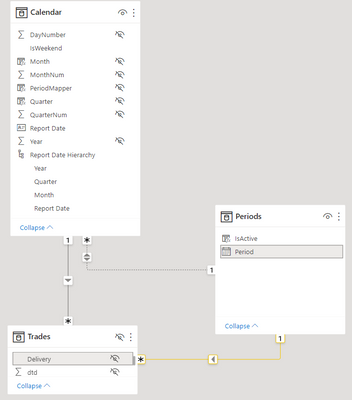
I've got a setup (simplified below), containing 2 date tables (Calendar and Periods) used to filter various other tables based on different tables. 

One date is a daily calendar while the other is a month-start calendar, but they do not cross-filter as for each date in Calendar there may be multiple Periods (months). 


For every selected date in "Calendar" all prior dates in "Periods" are by definition "Inactive" and I've been trying to create a boolean Column or Measure to allow allow for this behaviour in a filter within the "Periods" table (simplified model below). Eg. If one selected August 1'st 2022 in "Calendar" July 2022 and prior would be "Inactive" while August and onwards would be Active.

However, my vague attempts as both a measure and column have proven fruitless. One such example is the below example as either unrelated column or measure.


IsActive = SELECTEDVALUE(Periods[Period]) >= SELECTEDVALUE('Calendar'[Report Date])


The goal seems simple to implement within each table individually (in this example "Trades") however, the model contains multiple tables where this logic applies, and I'm trying to achieve a centralized filter for all of them through Periods[Period].
 

Bijaelo_0-1669982662236.png


Any suggestions will be much appreciated.

3 REPLIES 3
lbendlin
Super User
Super User

the concept of inactive relationships is about something else entirely.  It is targeted for scenarios where you need to connect ONE calendar table multiple times with ONE fact table, for example a transaction table that has order dates,shipping dates, invoice dates and delivery dates.


You cannot abuse the concept of USERELATIONSHIP to avoid circular references.

Anonymous
Not applicable

Thank you Ibendlin for not providing an answer to the question at hand. I have not referenced Userelationship, nor used it in this question.


Have you considered using TREATAS or LOOKUPVALUE instead?

Helpful resources

Announcements
Power BI DataViz World Championships

Power BI Dataviz World Championships

Vote for your favorite vizzies from the Power BI World Championship submissions!

Sticker Challenge 2026 Carousel

Join our Community Sticker Challenge 2026

If you love stickers, then you will definitely want to check out our Community Sticker Challenge!

January Power BI Update Carousel

Power BI Monthly Update - January 2026

Check out the January 2026 Power BI update to learn about new features.

FabCon Atlanta 2026 carousel

FabCon Atlanta 2026

Join us at FabCon Atlanta, March 16-20, for the ultimate Fabric, Power BI, AI and SQL community-led event. Save $200 with code FABCOMM.