cancel
Showing results for 
Search instead for 
Did you mean: 

Vote for your favorite vizzies from the Power BI Dataviz World Championship submissions. Vote now!

Reply
NJ81858
Helper IV
Helper IV

Indenting Matrix Measure

Hello,


I am trying to replicate an Excel file in Power BI, and I have everything duplicated except for the indentation of some of the row headers.

Now normally, I could just add the leading spaces in the back end, but unfortunately I had to create each of these as a measure to get the correct numbers, and then simply select "Switch Values to Row Headers" in the Matrix Formatting.


I am just wondering if there is a workaround to get the names of these measures indented. I have tried adding leading spaces to the name of the measure, but that just gets removed when it displays the name. I have also tried to add leading spaces to the display name of the measure, but that also gets removed when it displays the name. I have also tried to add a small character, such as a period, to the beginning of the name, and then add the leading spaces, but that removes all of the leading spaces except for one, which is not quite enough.


Thank you in advance!

1 ACCEPTED SOLUTION
rsbin
Community Champion
Community Champion

@NJ81858 ,

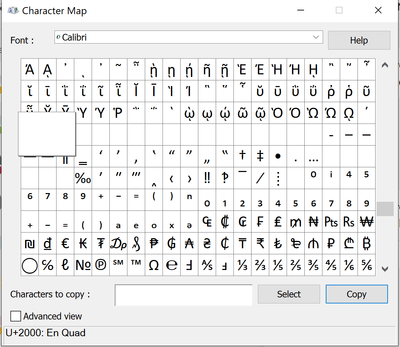
I have used the Character Map utility to copy and paste an empty space.

rsbin_0-1685632211281.png

Hope you can get this to work for you.

Regards,

View solution in original post

1 REPLY 1
rsbin
Community Champion
Community Champion

@NJ81858 ,

I have used the Character Map utility to copy and paste an empty space.

rsbin_0-1685632211281.png

Hope you can get this to work for you.

Regards,

Helpful resources

Announcements
Power BI DataViz World Championships

Power BI Dataviz World Championships

Vote for your favorite vizzies from the Power BI World Championship submissions!

Sticker Challenge 2026 Carousel

Join our Community Sticker Challenge 2026

If you love stickers, then you will definitely want to check out our Community Sticker Challenge!

January Power BI Update Carousel

Power BI Monthly Update - January 2026

Check out the January 2026 Power BI update to learn about new features.

FabCon Atlanta 2026 carousel

FabCon Atlanta 2026

Join us at FabCon Atlanta, March 16-20, for the ultimate Fabric, Power BI, AI and SQL community-led event. Save $200 with code FABCOMM.