cancel
Showing results for 
Search instead for 
Did you mean: 

The Power BI Data Visualization World Championships is back! Get ahead of the game and start preparing now! Learn more

Reply

Indentation in matrix for measures

Hello all,


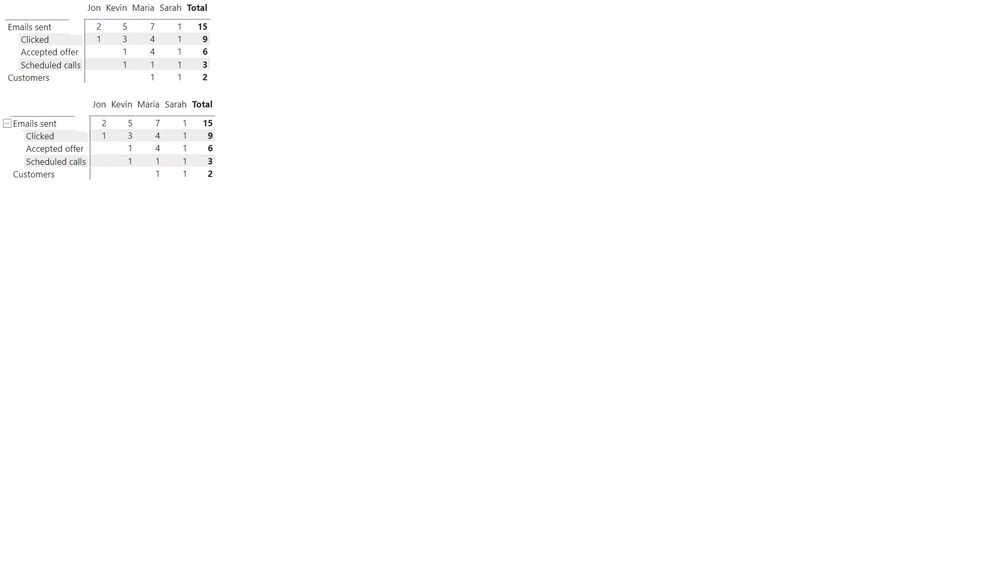
I'm trying to figure out how to add indentation to my rows (which are measures) in the matrix or ideally +/- button for better visualization. Is it possible to achieve? Please help

This is the link to pbix 

https://7xinc-my.sharepoint.com/:u:/g/personal/powerbi_admin_7xpowered_com/Ec28ESW2J6xNk8Q9mEwiZasBP...


What I want.jpg


1 ACCEPTED SOLUTION

See if this works for you, 


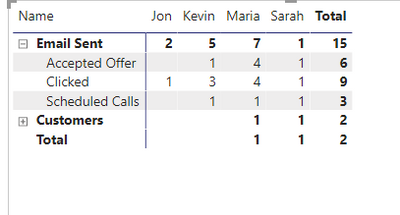
FarhanAhmed_0-1611657078411.png


The customer may have extra expand but that's how close I came up with 😞


Did I answer your question? Mark my post as a solution! Appreciate your Kudos!!

Proud to be a Super User!


View solution in original post

3 REPLIES 3

Hi @FarhanAhmed , thank you for the quick reply. I was trying to follow you but couldn't figure it out. Could you achieve the same in my pbix file? It's a pretty simple file

See if this works for you, 


FarhanAhmed_0-1611657078411.png


The customer may have extra expand but that's how close I came up with 😞


Did I answer your question? Mark my post as a solution! Appreciate your Kudos!!

Proud to be a Super User!


FarhanAhmed
Community Champion
Community Champion

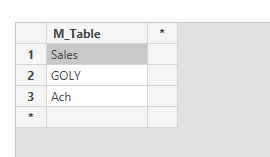
One way to do this is to create a separate table that will hold your measure name in it.


FarhanAhmed_0-1611642499763.png

After that create a measure that will return values against each table value


_ Value = IF(HASONEVALUE('Measure Table'[M_Table]),SWITCH(FIRSTNONBLANK('Measure Table'[M_Table],'Measure Table'[M_Table]), "Sales", SUM(Sales[Sales]), "GOLY",FORMAT([GOLY],"Percent"),"Ach",FORMAT([Achievement],"Percent")),"")


then Put your fields in Rows and this one below your row field

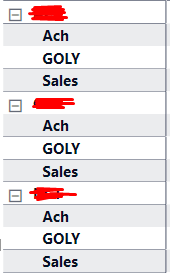
you will get these results.

FarhanAhmed_1-1611642698294.png


Did I answer your question? Mark my post as a solution! Appreciate your Kudos!!

Proud to be a Super User!


Helpful resources

Announcements
November Power BI Update Carousel

Power BI Monthly Update - November 2025

Check out the November 2025 Power BI update to learn about new features.

Fabric Data Days Carousel

Fabric Data Days

Advance your Data & AI career with 50 days of live learning, contests, hands-on challenges, study groups & certifications and more!

FabCon Atlanta 2026 carousel

FabCon Atlanta 2026

Join us at FabCon Atlanta, March 16-20, for the ultimate Fabric, Power BI, AI and SQL community-led event. Save $200 with code FABCOMM.

Top Solution Authors
Top Kudoed Authors