cancel
Showing results for 
Search instead for 
Did you mean: 

Get Fabric Certified for FREE during Fabric Data Days. Don't miss your chance! Request now

Reply
villasenorbritt
Resolver I
Resolver I

Incremented Data

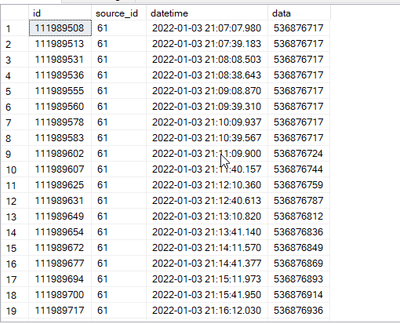
I am dealing with data that deals with wood logs. Production is being tracked by incremented data. For example, between lines 9 and 10 you can see the data going from 536876724 to 53687644. This means that in that 30 seconds,  20 more peices of wood were produced or sent through that station in the mill. What I need is to find a way to bring this into Power Bi. Does anyone know a formula or a way to get production based off of this incremented data? Additionally, I will need to have selections for different intervals of time. I want to be able to select intervals and have power bi group the data accordingly. I'm completely lost on how to make this work or what formula would do the trick. Please help!


villasenorbritt_1-1659465747373.png


1 REPLY 1
ryan_mayu
Super User
Super User

@villasenorbritt 

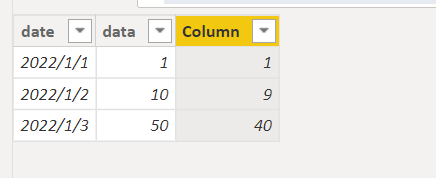
maybe you can try this

Column = 
VAR _last=maxx(FILTER('Table (2)','Table (2)'[date]<EARLIER('Table (2)'[date])),'Table (2)'[date])
return 'Table (2)'[data]-maxx(FILTER('Table (2)','Table (2)'[date]=_last),'Table (2)'[data])

1.PNG


Did I answer your question? Mark my post as a solution!

Proud to be a Super User!


Helpful resources

Announcements
November Power BI Update Carousel

Power BI Monthly Update - November 2025

Check out the November 2025 Power BI update to learn about new features.

Fabric Data Days Carousel

Fabric Data Days

Advance your Data & AI career with 50 days of live learning, contests, hands-on challenges, study groups & certifications and more!

FabCon Atlanta 2026 carousel

FabCon Atlanta 2026

Join us at FabCon Atlanta, March 16-20, for the ultimate Fabric, Power BI, AI and SQL community-led event. Save $200 with code FABCOMM.

Top Solution Authors
Top Kudoed Authors