cancel
Showing results for 
Search instead for 
Did you mean: 

The Power BI Data Visualization World Championships is back! Get ahead of the game and start preparing now! Learn more

Reply
Anonymous
Not applicable

Incremental refresh

Hi,


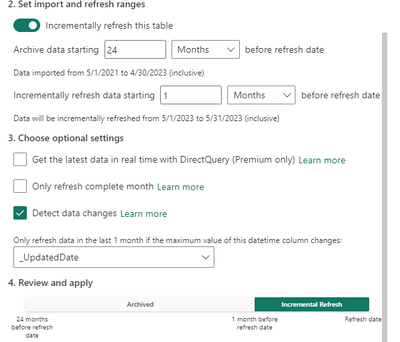
I am trying to implement Incremental refresh and a bit confused about how I can use "Detect data changes". I have a fact table with a Datekey column (the date of the transaction), in addition to a UpdatedDate column (when the row is last updated). I have set the RangeEnd and RangeStart filters on Datekey, and using UpdatedDate for the "Detect data changes" option. 

Espenblo_0-1685519194358.png


When testing this I noticed when I updated a row in the Archived data (more than 1 month), and set the UpdatedDate to the current date that is inside the Incremental Refresh period, it is not fetched and refreshed. I consider two things from this:


1. Set the incremental refresh period as long as the archived period to always fetch and refresh updated rows.

2. Change the RangeStart and RangeEnd filters to UpdatedDate instead of Datekey and don't use "Detect data changes" 

0 REPLIES 0

Helpful resources

Announcements
Power BI DataViz World Championships

Power BI Dataviz World Championships

The Power BI Data Visualization World Championships is back! Get ahead of the game and start preparing now!

December 2025 Power BI Update Carousel

Power BI Monthly Update - December 2025

Check out the December 2025 Power BI Holiday Recap!

FabCon Atlanta 2026 carousel

FabCon Atlanta 2026

Join us at FabCon Atlanta, March 16-20, for the ultimate Fabric, Power BI, AI and SQL community-led event. Save $200 with code FABCOMM.