cancel
Showing results for 
Search instead for 
Did you mean: 

Learn from the best! Meet the four finalists headed to the FINALS of the Power BI Dataviz World Championships! Register now

Reply
Anonymous
Not applicable

Incremental refresh

Hi, I have some questions regarding incremental refresh.

  1. Does it only work when you have date columns?
  2. If I have only one date column and I used that column when I configure the incremental refresh and I set up the filter parameters on that column, Can I still use the same date column to detect data changes?


1 ACCEPTED SOLUTION

Hi @Anonymous ,

  1. If you select the Detect data changes checkbox, you can select a date/time column used to identify and refresh only the days where the data has changed. This should not be the same column used to partition the data with the RangeStart/RangeEnd parameters.
  2. If you configure the incremental update to Update rows where column OrderDate is in the last 30 days, it means if something has changed in the data source 40 days ago, it will not be included in the updates.

Best Regards,

Yingjie Li


If this post helps then please consider Accept it as the solution to help the other members find it more quickly.

View solution in original post

3 REPLIES 3
v-yingjl
Community Support
Community Support

Hi @Anonymous ,

When you enable and configure increment refresh in power bi desktop, you should set up parameters so you should have a date column first.

For incremental refresh, datasets are filtered by using Power Query date/time parameters with the reserved, case-sensitive names RangeStart and RangeEnd. These parameters are used to filter the data imported into Power BI Desktop, and also to dynamically partition the data into ranges once published to the Power BI service. The parameter values are substituted by the service to filter for each partition. There's no need to set them in dataset settings in the service. Once published, the parameter values are overridden automatically by the Power BI service.


Please refer the following Microsoft document, blog and case that could also help you:

  1. https://docs.microsoft.com/en-us/power-bi/service-premium-incremental-refresh
  2. https://community.powerbi.com/t5/Community-Blog/Important-Considerations-for-Setting-up-Incremental-Refresh-on/ba-p/554151
  3. https://community.powerbi.com/t5/Desktop/Incremental-Refresh-Date-Parameters/m-p/939626


Best Regards,

Yingjie Li


If this post helps then please consider Accept it as the solution to help the other members find it more quickly.

Anonymous
Not applicable

@v-yingjl 

Thank you for your reply. I have some more questions.
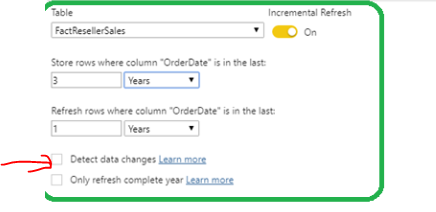
1. If I have only one date column, such as OrderDate, and I applied the "RangeStart" and "RangeEnd" parameters on this column, can I use OrderDate to configure "detect data changes" or is there any other option? for example, duplicate OrderDate and use it to configure to detect data changes

2. If I configure the incremental update to Update rows where column OrderDate is in the last 30 days, does it mean if something has changed in the data source 40 days ago, will it not be included in the updates?

Thanks in advance!

Capture.PNG

Hi @Anonymous ,

  1. If you select the Detect data changes checkbox, you can select a date/time column used to identify and refresh only the days where the data has changed. This should not be the same column used to partition the data with the RangeStart/RangeEnd parameters.
  2. If you configure the incremental update to Update rows where column OrderDate is in the last 30 days, it means if something has changed in the data source 40 days ago, it will not be included in the updates.

Best Regards,

Yingjie Li


If this post helps then please consider Accept it as the solution to help the other members find it more quickly.

Helpful resources

Announcements
Power BI DataViz World Championships carousel

Power BI DataViz World Championships - June 2026

A new Power BI DataViz World Championship is coming this June! Don't miss out on submitting your entry.

Join our Fabric User Panel

Join our Fabric User Panel

Share feedback directly with Fabric product managers, participate in targeted research studies and influence the Fabric roadmap.

March Power BI Update Carousel

Power BI Community Update - March 2026

Check out the March 2026 Power BI update to learn about new features.