
cancel
Showing results for 
Search instead for 
Did you mean: 

Did you hear? There's a new SQL AI Developer certification (DP-800). Start preparing now and be one of the first to get certified. Register now

Reply
giuliapiazza94
Helper IV
Helper IV

Incremental refresh error

Hi guys,

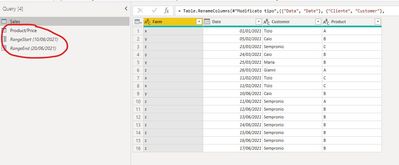
my tables are 

a.jpg

and my range parameters are 

b.jpg

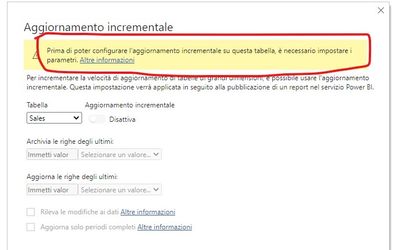
Why doesn't work? It says to set parameters but I have just done

Immagine 2021-06-14 172323.jpg


Thank you all

1 ACCEPTED SOLUTION
Anonymous
Not applicable

Hi @giuliapiazza94 

Incremental refresh is configured in Desktop and takes effect in Service .


Best Regards

Community Support Team _ Ailsa Tao


If this post helps, then please consider Accept it as the solution to help the other members find it more quickly.

View solution in original post

5 REPLIES 5
Anonymous
Not applicable

Hi @giuliapiazza94 

Incremental refresh is configured in Desktop and takes effect in Service .


Best Regards

Community Support Team _ Ailsa Tao


If this post helps, then please consider Accept it as the solution to help the other members find it more quickly.

Anonymous
Not applicable

Hi @giuliapiazza94 

What do you mean by the data on desktop version ? Such as SQL Server ?

Ailsamsft_0-1623895897809.png

If you want to know which data sources are supported by incremental refresh, you can refer to the following link

https://docs.microsoft.com/en-us/power-bi/connect-data/incremental-refresh-overview


Best Regards

Community Support Team _ Ailsa Tao

Sorry for my english 😅

I try again to explain my doubt. 

When I open my PBI file after incremental refresh, sales aren't updated, while the sales on web file yes.

So, the incremental refresh works only on the web account?

amitchandak
Super User
Super User

@giuliapiazza94 , can you paste the error in text format


refer troubleshoot if needed

https://docs.microsoft.com/en-us/power-bi/connect-data/incremental-refresh-troubleshoot

Share with Power BI Enthusiasts: Full Power BI Video (20 Hours) YouTube
Microsoft Fabric Series 60+ Videos YouTube
Microsoft Fabric Hindi End to End YouTube

I solved te problem: I have used format Date, not Date/hour 

But I don't understand one thing: only data on web is updated?

The data on desktop version doesn't update?

Helpful resources

Announcements
April Power BI Update Carousel

Power BI Monthly Update - April 2026

Check out the April 2026 Power BI update to learn about new features.

Fabric SQL PBI Data Days

Data Days 2026 coming soon!

Sign up to receive a private message when registration opens and key events begin.

New to Fabric survey Carousel

New to Fabric Survey

If you have recently started exploring Fabric, we'd love to hear how it's going. Your feedback can help with product improvements.

Power BI DataViz World Championships carousel

Power BI DataViz World Championships - June 2026

A new Power BI DataViz World Championship is coming this June! Don't miss out on submitting your entry.