FabCon is coming to Atlanta
Join us at FabCon Atlanta from March 16 - 20, 2026, for the ultimate Fabric, Power BI, AI and SQL community-led event. Save $200 with code FABCOMM.
Register now!- Power BI forums
- Get Help with Power BI
- Desktop
- Service
- Report Server
- Power Query
- Mobile Apps
- Developer
- DAX Commands and Tips
- Custom Visuals Development Discussion
- Health and Life Sciences
- Power BI Spanish forums
- Translated Spanish Desktop
- Training and Consulting
- Instructor Led Training
- Dashboard in a Day for Women, by Women
- Galleries
- Data Stories Gallery
- Themes Gallery
- Contests Gallery
- QuickViz Gallery
- Quick Measures Gallery
- Visual Calculations Gallery
- Notebook Gallery
- Translytical Task Flow Gallery
- TMDL Gallery
- R Script Showcase
- Webinars and Video Gallery
- Ideas
- Custom Visuals Ideas (read-only)
- Issues
- Issues
- Events
- Upcoming Events
Get Fabric Certified for FREE during Fabric Data Days. Don't miss your chance! Request now
- Power BI forums
- Forums
- Get Help with Power BI
- Desktop
- Re: Incremental refresh can not toggle to ON
- Subscribe to RSS Feed
- Mark Topic as New
- Mark Topic as Read
- Float this Topic for Current User
- Bookmark
- Subscribe
- Printer Friendly Page


- Mark as New
- Bookmark
- Subscribe
- Mute
- Subscribe to RSS Feed
- Permalink
- Report Inappropriate Content
Incremental refresh can not toggle to ON
Hi,
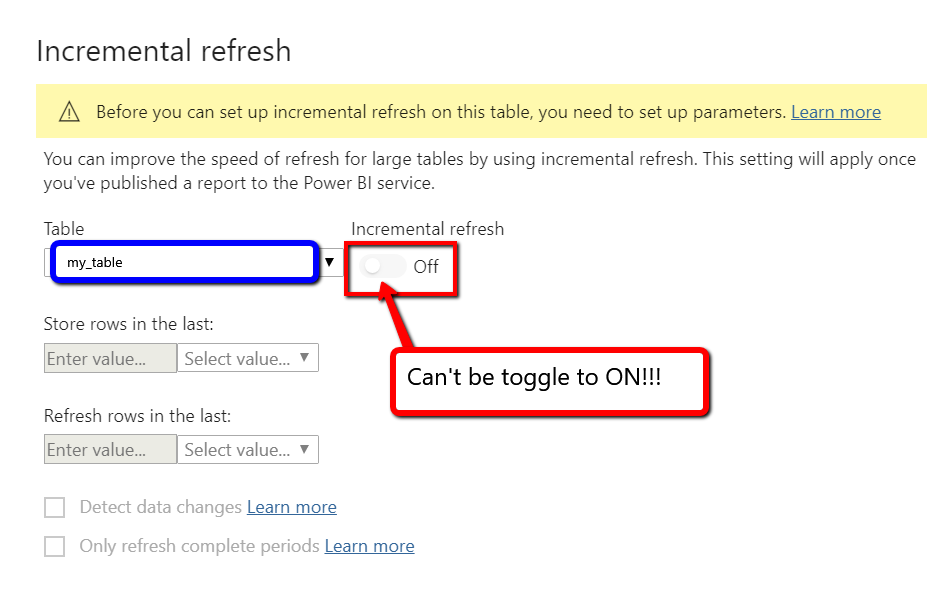
Need help to understand why I can't toggle Incremental refresh to ON.
-Power BI Desktop 2.79
-Power BI Pro
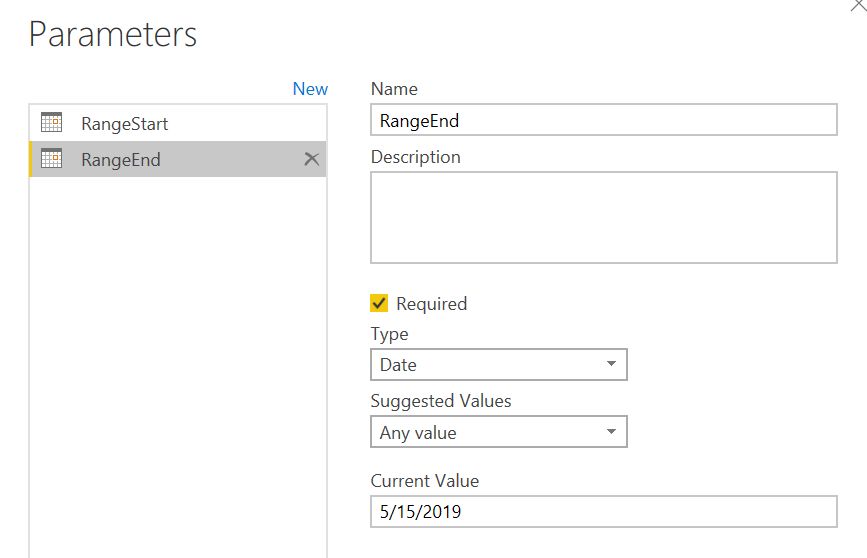
Followed the official documentation to set up the parameters for RangeStart and RangeEnd.
Here my screenshots for them.

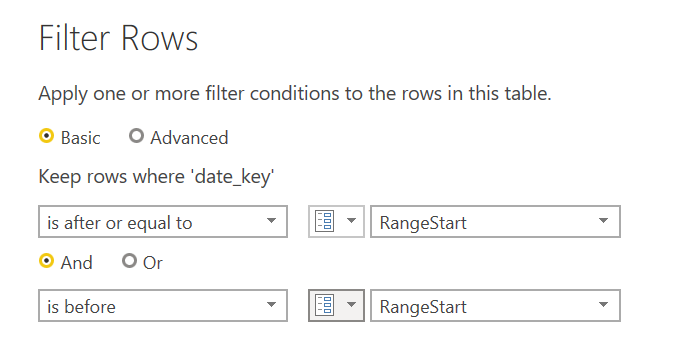
Here is my Filter Rows screenshot:
When I get to the Incremental refresh screen, I can't toggle the button to ON.
Please advise!
Thank you in advance!
Dennis
Solved! Go to Solution.


- Mark as New
- Bookmark
- Subscribe
- Mute
- Subscribe to RSS Feed
- Permalink
- Report Inappropriate Content
Parameter names should be "RangeStart" and "RangeEnd" and its type should be Date/Time, not just Date.
Did I answer your question? Mark my post as a solution!
Appreciate with a kudos 🙂
Regards,
Nandu Krishna


- Mark as New
- Bookmark
- Subscribe
- Mute
- Subscribe to RSS Feed
- Permalink
- Report Inappropriate Content
Hi @dtran ,
Yes, as suggested by @nandukrishnavs ,type for Parameter should be Date/Time, not just Date.Besides you should have a date/time column in your original table to be filtered by parameter.
Here is the reference.
https://docs.microsoft.com/en-us/power-bi/service-premium-incremental-refresh
Best Regards,
Kelly
- Mark as New
- Bookmark
- Subscribe
- Mute
- Subscribe to RSS Feed
- Permalink
- Report Inappropriate Content
Hi @dtran ,
Yes, as suggested by @nandukrishnavs ,type for Parameter should be Date/Time, not just Date.Besides you should have a date/time column in your original table to be filtered by parameter.
Here is the reference.
https://docs.microsoft.com/en-us/power-bi/service-premium-incremental-refresh
Best Regards,
Kelly


- Mark as New
- Bookmark
- Subscribe
- Mute
- Subscribe to RSS Feed
- Permalink
- Report Inappropriate Content
@dtran , have you loaded data once? There is a date column in the table ?
Refer:https://radacad.com/all-you-need-to-know-about-the-incremental-refresh-in-power-bi-load-changes-only
- Mark as New
- Bookmark
- Subscribe
- Mute
- Subscribe to RSS Feed
- Permalink
- Report Inappropriate Content
- Mark as New
- Bookmark
- Subscribe
- Mute
- Subscribe to RSS Feed
- Permalink
- Report Inappropriate Content
Parameter names should be "RangeStart" and "RangeEnd" and its type should be Date/Time, not just Date.
Did I answer your question? Mark my post as a solution!
Appreciate with a kudos 🙂
Regards,
Nandu Krishna
- Mark as New
- Bookmark
- Subscribe
- Mute
- Subscribe to RSS Feed
- Permalink
- Report Inappropriate Content
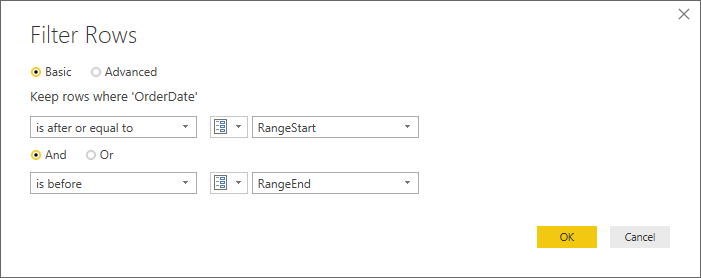
You are using RangeStart instead of RangeEnd. Please verify that.
Did I answer your question? Mark my post as a solution!
Appreciate with a kudos 🙂
Regards,
Nandu Krishna
- Mark as New
- Bookmark
- Subscribe
- Mute
- Subscribe to RSS Feed
- Permalink
- Report Inappropriate Content
Apologoes...this is the correct screenshot. I'm using RangeEnd in the bottom parameters


Helpful resources

Power BI Monthly Update - November 2025
Check out the November 2025 Power BI update to learn about new features.

Fabric Data Days
Advance your Data & AI career with 50 days of live learning, contests, hands-on challenges, study groups & certifications and more!

FabCon Atlanta 2026
Join us at FabCon Atlanta, March 16-20, for the ultimate Fabric, Power BI, AI and SQL community-led event. Save $200 with code FABCOMM.


