cancel
Showing results for 
Search instead for 
Did you mean: 

The FabCon + SQLCon recap series starts April 14th at 8am Pacific. If you’re tracking where AI is going inside Fabric, this first session is a can't miss. Register now

Reply
ljx0648
Helper III
Helper III

Incremental Refresh using date column

Hi guys,


I am trying to set up incremental refresh on my dashboard but I am stuck with how to refresh using the date column in the source data.


1st, I have already set up the RangeStart and RangeEnd in PBI desktop

ljx0648_0-1671825946575.png

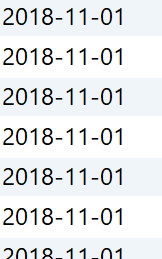
But I am stuck at the step at where I have to refresh using the date column from the source table. The format of the date column as per below (yyyy-MM-dd) DATE format
ljx0648_1-1671826041207.png


And since I am pulling directly from the source data (using ODBC connection).  I do not have any authority to make changes on the source table, thus it is not possible to make any sort of change on the date column to 'yyyyMMdd' or any other modifications. 


(yyyy-MM-dd) DATE format is the only column I can use. 


After tons of research, I have tried the code below and it returns zero row:


Select sum(sales) as sales, sum(cost) as cost, sum(profit) as profit, date

from sales_table 

where date => ' " & Datetime.Date (RangeStart) & " ' 

group by date


I am aware that Datetime.Date function can only return the date format like "DD/MM/YY", but I am not able to find anything on how to convert the RangeStart parameter to (yyyy-MM-dd) DATE format. I have tried the Datetime.Totext function but it can only returns (yyyy-MM-dd) STRING format, which is not DATE.


Lastly, I will need to sum the numbers from source as there are more than 10 million rows in the source table, thus the calculation functions are required in the SQL statement as well.


Any suggest would be appreciated! 


Thanks in advance

2 REPLIES 2
amitchandak
Super User
Super User

@ljx0648 , Based on what I got, a column in format YYYY-MM-DD can be marked as datetime in power query


or you can use DateTime.FromText

https://learn.microsoft.com/en-us/powerquery-m/datetime-fromtext


Power BI Incremental Refresh Pro; Premium Deployment pipeline - https://youtu.be/nIxTRdeCYSE


Share with Power BI Enthusiasts: Full Power BI Video (20 Hours) YouTube
Microsoft Fabric Series 60+ Videos YouTube
Microsoft Fabric Hindi End to End YouTube

Hi @amitchandak ,


Thank you for your suggestion here.


However, I need to convert the Parameters (RangeStart & RangeEnd) using the SQL statement when I import the Data import powerbi in the import section. (because I need to sum and group variables from the source table as I will not be pulling millions of records into PBI at the first place)


In other words, I am looking for a method/function to finish the convert when the data is being import to PBI desktop, before I can convert the column inside PBI


This is the SQL I am using:


Select sum(sales) as sales, sum(cost) as cost, sum(profit) as profit, date

from sales_table 

where date => ' " & Datetime.Date (RangeStart) & " ' 

group by date


May I know if there is any modification I can do to the above statement so the data can first be pull after the RangeStart then sum & group into PBI desktop? 


Thank you

Helpful resources

Announcements
New to Fabric survey Carousel

New to Fabric Survey

If you have recently started exploring Fabric, we'd love to hear how it's going. Your feedback can help with product improvements.

Power BI DataViz World Championships carousel

Power BI DataViz World Championships - June 2026

A new Power BI DataViz World Championship is coming this June! Don't miss out on submitting your entry.

Join our Fabric User Panel

Join our Fabric User Panel

Share feedback directly with Fabric product managers, participate in targeted research studies and influence the Fabric roadmap.

March Power BI Update Carousel

Power BI Community Update - March 2026

Check out the March 2026 Power BI update to learn about new features.