cancel
Showing results for 
Search instead for 
Did you mean: 

Get Fabric Certified for FREE during Fabric Data Days. Don't miss your chance! Request now

Reply
lliu_western
Frequent Visitor

Incremental Refresh HELP

Hello community,


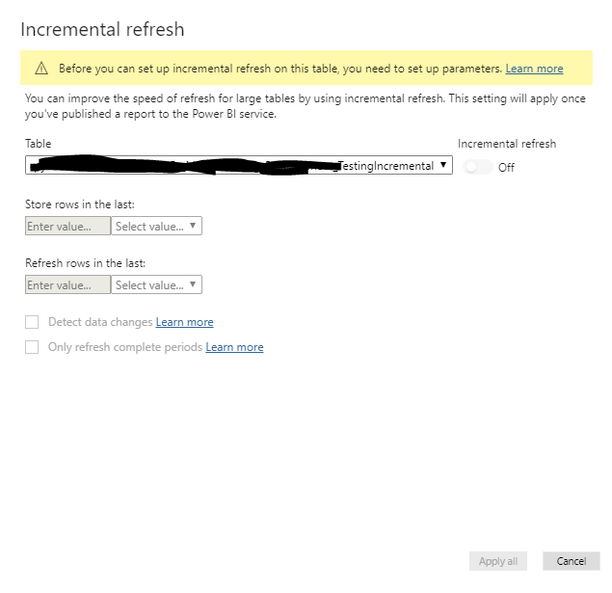
I am trying to do the incremental refresh for the first time but I am really stuck. I follow the documentation and the Youtube videos to set up the parameters. But when I get to the Incremental Refresh set up page, it just shows, "Before you can set up incremental refresh on this table, you need to set up parameters."


But I did set them up, I have tried re-setting them but I still get the same error message, can I please get some help and point me to the right directions, thank you!


incremental.PNG


1 ACCEPTED SOLUTION
lliu_western
Frequent Visitor

Answering my own question here since I figured out what went wrong. 


So when using incremental refresh, you HAVE TO use "RangeStart" and "RangeEnd" because they are the two reserved words used for incremental refresh. 


I happened to misspell the word "RangeStart" to "RangStart" so it didn't work. That simple! 


View solution in original post

1 REPLY 1
lliu_western
Frequent Visitor

Answering my own question here since I figured out what went wrong. 


So when using incremental refresh, you HAVE TO use "RangeStart" and "RangeEnd" because they are the two reserved words used for incremental refresh. 


I happened to misspell the word "RangeStart" to "RangStart" so it didn't work. That simple! 


Helpful resources

Announcements
November Power BI Update Carousel

Power BI Monthly Update - November 2025

Check out the November 2025 Power BI update to learn about new features.

Fabric Data Days Carousel

Fabric Data Days

Advance your Data & AI career with 50 days of live learning, contests, hands-on challenges, study groups & certifications and more!

FabCon Atlanta 2026 carousel

FabCon Atlanta 2026

Join us at FabCon Atlanta, March 16-20, for the ultimate Fabric, Power BI, AI and SQL community-led event. Save $200 with code FABCOMM.

Top Solution Authors
Top Kudoed Authors