cancel
Showing results for 
Search instead for 
Did you mean: 

Data Days is here! Join us now for 60+ days of learning, challenges, and connection. Learn more

Reply
watje255_ju
Helper III
Helper III

Incremental Load

Hello, 


I am wanting to create a record of the daily prices off a website. 

I have had a go at creating an incremental load, but no data shows up in my table, can anyone point me as to what I am doing wrong? Ideally I would see each day's data with a new refresh. 


Thanks! 

This is the blog I was looking at 

https://radacad.com/all-you-need-to-know-about-the-incremental-refresh-in-power-bi-load-changes-only 


Link to PBIX file Ink Prices.pbix

6 REPLIES 6
watje255_ju
Helper III
Helper III

Thank you for your reply! I can see data coming in, but the data keeps over writing when I refresh, rather than bringing in the new day's data. I am refreshing and republishing from the desktop app to the workspace, do I have to set up an automatic refresh? Thank you for your help

Did you ever find a way to accomplish this?  I have a similar use-case where I'm querying a source which doesn't store historical data.  I want to query the source each day and get the currently values and store that information historically in a PowerBi dataflow.  This sounds similar to what you're trying to accomplish here.

Hi @MattBossert , no I couldnt figure out how to stop the historical data from being overridden, @Jihwan_Kim is this because I was pushing through a manual refresh from Desktop app? Thanks again for your time

watje255_ju
Helper III
Helper III

Ok great thank you so much, I've made that wee change and will check tomorrow if its working! 

Anonymous
Not applicable

Hi @watje255_ju ,


Could you tell me if your issue has been solved? If it is, kindly Accept it as the solution. More people will benefit from it. Or you are still confused about it, please provide me with more details about your issue .


Best Regards,

Rico Zhou

Jihwan_Kim
Super User
Super User

Hi,

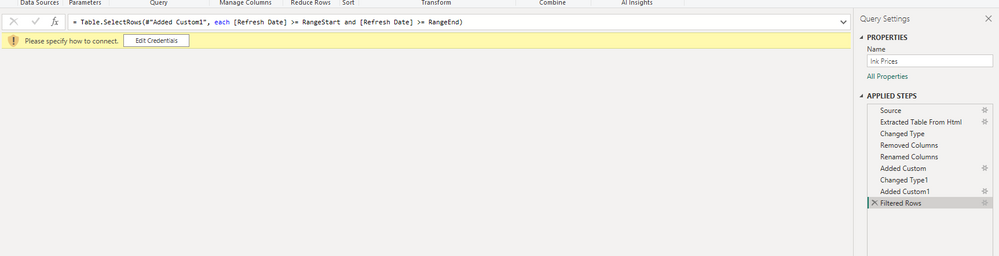
In the Power Query Editor, the below might be one of reasons.

And please be noted that incremental refresh is shown in the Workspace in Power BI Service after the dataset is refreshed from the second time (not from the first time refresh), not on the Power BI Desktop.


Try to change >RangeStart and <=RangeEnd


Jihwan_Kim_0-1682306216920.png


If this post helps, then please consider accepting it as the solution to help other members find it faster, and give a big thumbs up.


Click here to visit my LinkedIn page

Helpful resources

Announcements
Fabric Data Days is here Carousel

Fabric Data Days 2026

Don't miss out on Data Days, June 15 through August 7. Learn Fabric, Power BI, SQL, AI and more.

May Power BI Update Carousel

Power BI Monthly Update - May 2026

Check out the May 2026 Power BI update to learn about new features.

Power BI DataViz World Championships carousel

Power BI DataViz World Championships - June 2026

A new Power BI DataViz World Championship is coming this June! Don't miss out on submitting your entry.