Join us at FabCon Atlanta from March 16 - 20, 2026, for the ultimate Fabric, Power BI, AI and SQL community-led event. Save $200 with code FABCOMM.
Register now!Learn from the best! Meet the four finalists headed to the FINALS of the Power BI Dataviz World Championships! Register now
Hi all,
I have a premium capacity and try to do an incremental load from Google BigQuery.
In Power BI Desktop i have managed to:
1: Setup RangeStart and RangeEnd parameters.
2: Applied these to a datetime column.
3: Verified that the parametrized filter is working in Power BI Desktop.
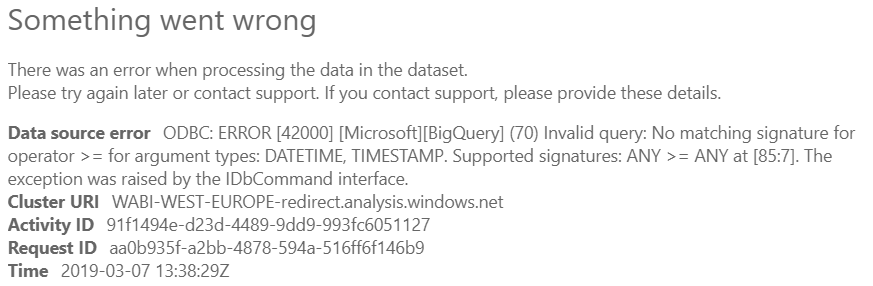
But when i try to update in the App then i get the an error message (see first pic).
I have two hypotheses:
--> There's a bug in the driver to Google BigQuery .
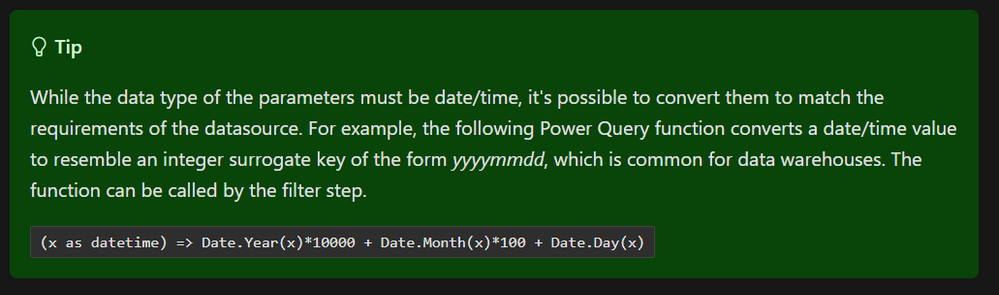
--> I need to tweak the datetime format via a Dax-Formula, such that BigQuery can work with it (see last pic). But i must admit, that i don't really know how to do that. Would i need to tinker with the "advanced editor"?
Best Regards,
Torben
Solved! Go to Solution.
I needed to use a "timestamp" column in Google BigQuery, not "datetime".
Hi @Anonymous
Have you been using the built-in BQ connector or another one? I don't receive an error but I'm forever stuck on 1000 imported rows... seems like the query is not being pushed down to BQ.
Any suggestions? Thanks in advance.
Cheers,
Eli
@Anonymous ,
You may try to convert the data type from the source.
Yeah, i should try to experiment with that.
But to make sure i understand you correct, ill just outline the dataflow:
1: GBQ --> 2: Power BI Desktop --> 3: Power BI App (which then refreshes the entire dataset from GBQ)
The thing is, that in step 2 only datetime columns are accepted for the incremental load parameters: RangeStart and RangeEnd. So i not really sure how to experiment with the datatypes. But anyway, ill try to play around with it and see i can find a solution.
Share feedback directly with Fabric product managers, participate in targeted research studies and influence the Fabric roadmap.
Check out the February 2026 Power BI update to learn about new features.
| User | Count |
|---|---|
| 61 | |
| 59 | |
| 42 | |
| 18 | |
| 15 |
| User | Count |
|---|---|
| 108 | |
| 100 | |
| 39 | |
| 29 | |
| 29 |