cancel
Showing results for 
Search instead for 
Did you mean: 

The Power BI Data Visualization World Championships is back! Get ahead of the game and start preparing now! Learn more

Reply
duggy
Advocate II
Advocate II

Increasing Average Basket size by value of slider

Hi,


I have an issue that I am trying to sort out... miserably....

I have a column for the turnover for each day, next to it I have a column for the number of transactions per day. This means I can calculate the average basket value (turnover/number of transactions = Average Basket Value).


I want to now add the results of the What If slider to the average basket value and then recalculate the turnover based on the new basket value. So as the user slides the slider and keeps adding the average basket value (or the new increased average basket value), increases, then the new turnover for each day is calculated by (New Averge Basket Value * number of transactions = New Turnover).


I have my What if Slider working, I have the average basket value working, but I cannot get each row to update with a new average basket value based on the value generated by the slider. That is, each row's new basket value should be Average Basket Value + Value of slider.


Any assistance would be appreciated.

1 ACCEPTED SOLUTION
v-lili6-msft
Community Support
Community Support

hi, @duggy

After my test, you can try to add several measures to achieve it.

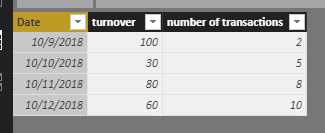
Assume that this is the basic data.

8.png

Step1:

Add the Average Basket Value measure

Average Basket Value = CALCULATE(SUM(Table1[turnover ]))/CALCULATE(SUM(Table1[number of transactions ]))

Step2:

Add a what if New Parameter 

9.png

Step3:

Add new Average Basket Value measure

new Average Basket Value = [Average Basket Value]+Parameter[Parameter Value]

Step4:

Add new turnover measure

new turnover = [new Average Basket Value]*CALCULATE(SUM(Table1[number of transactions ]))

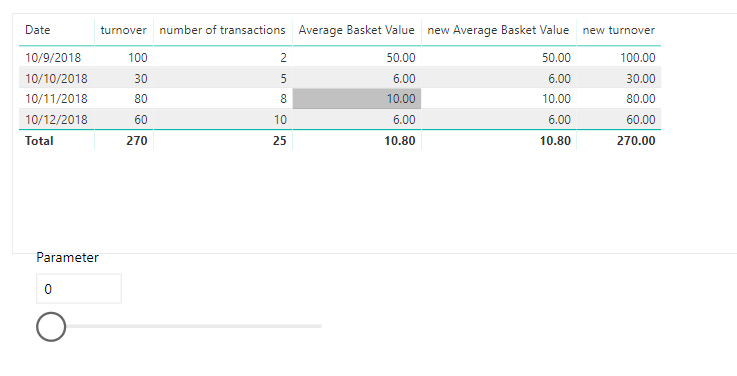
Result:

10.png

and after adding parameter

11.png


here is pbix, please try it.

https://www.dropbox.com/s/b40ijbe6mnenfqo/Increasing%20Average%20Basket%20size%20by%20value%20of%20s...


Best Regards,

Lin


Community Support Team _ Lin
If this post helps, then please consider Accept it as the solution to help the other members find it more quickly.

View solution in original post

1 REPLY 1
v-lili6-msft
Community Support
Community Support

hi, @duggy

After my test, you can try to add several measures to achieve it.

Assume that this is the basic data.

8.png

Step1:

Add the Average Basket Value measure

Average Basket Value = CALCULATE(SUM(Table1[turnover ]))/CALCULATE(SUM(Table1[number of transactions ]))

Step2:

Add a what if New Parameter 

9.png

Step3:

Add new Average Basket Value measure

new Average Basket Value = [Average Basket Value]+Parameter[Parameter Value]

Step4:

Add new turnover measure

new turnover = [new Average Basket Value]*CALCULATE(SUM(Table1[number of transactions ]))

Result:

10.png

and after adding parameter

11.png


here is pbix, please try it.

https://www.dropbox.com/s/b40ijbe6mnenfqo/Increasing%20Average%20Basket%20size%20by%20value%20of%20s...


Best Regards,

Lin


Community Support Team _ Lin
If this post helps, then please consider Accept it as the solution to help the other members find it more quickly.

Helpful resources

Announcements
Power BI DataViz World Championships

Power BI Dataviz World Championships

The Power BI Data Visualization World Championships is back! Get ahead of the game and start preparing now!

November Power BI Update Carousel

Power BI Monthly Update - November 2025

Check out the November 2025 Power BI update to learn about new features.

FabCon Atlanta 2026 carousel

FabCon Atlanta 2026

Join us at FabCon Atlanta, March 16-20, for the ultimate Fabric, Power BI, AI and SQL community-led event. Save $200 with code FABCOMM.