Share feedback directly with Fabric product managers, participate in targeted research studies and influence the Fabric roadmap.
Sign up nowGet Fabric certified for FREE! Don't miss your chance! Learn more
Hi,
I have a requirement to calculate the date difference between two dates (Initial Date and today()) and then categorise them into different buckets 0-45, 46-89,90+
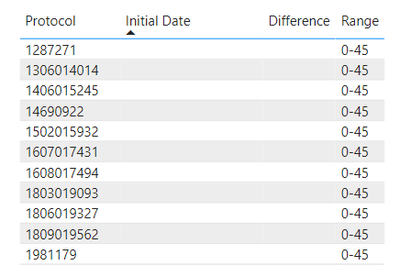
I am getting incorrect values when the difference is null.
Issue: As the Initial Date is blank, the difference between initial date and today is null. But the range is showing as 0-45 as null is being treated as zero.
Sample pbix file is attached here.
Can someone please suggest on how to show this range as "Blank" instead of 0-45?
Differnece =
DATEDIFF(data11[Initial Date],TODAY(),DAY)Range =
IF(data11[Differnece] >=0 && data11[Differnece]<46,"0-45",
IF(data11[Differnece] >45 &&data11[Differnece]<90,"46-90",
IF(data11[Differnece]>89,">90",
IF(ISBLANK(data11[Differnece]),"Blank"))))
Thank you.
Solved! Go to Solution.
In your current setup, when the data11[Initial Date] is blank, DATEDIFF returns a null value, which is not correctly handled in your Range calculation. The solution is to first check if data11[Initial Date] is blank before calculating the difference. If it's blank, you should directly assign "Blank" to the range. Otherwise, proceed with the date difference calculation.
Range =
IF(
ISBLANK(data11[Initial Date]),
"Blank",
VAR Differnece = DATEDIFF(data11[Initial Date], TODAY(), DAY)
RETURN
IF(Differnece >= 0 && Differnece < 46, "0-45",
IF(Differnece >= 46 && Differnece < 90, "46-90",
IF(Differnece >= 90, ">90")))
)
In your current setup, when the data11[Initial Date] is blank, DATEDIFF returns a null value, which is not correctly handled in your Range calculation. The solution is to first check if data11[Initial Date] is blank before calculating the difference. If it's blank, you should directly assign "Blank" to the range. Otherwise, proceed with the date difference calculation.
Range =
IF(
ISBLANK(data11[Initial Date]),
"Blank",
VAR Differnece = DATEDIFF(data11[Initial Date], TODAY(), DAY)
RETURN
IF(Differnece >= 0 && Differnece < 46, "0-45",
IF(Differnece >= 46 && Differnece < 90, "46-90",
IF(Differnece >= 90, ">90")))
)
Welcome 🙂
Share feedback directly with Fabric product managers, participate in targeted research studies and influence the Fabric roadmap.
If you love stickers, then you will definitely want to check out our Community Sticker Challenge!
Check out the January 2026 Power BI update to learn about new features.
| User | Count |
|---|---|
| 63 | |
| 62 | |
| 42 | |
| 20 | |
| 18 |
| User | Count |
|---|---|
| 123 | |
| 114 | |
| 36 | |
| 29 | |
| 28 |