Join us at FabCon Atlanta from March 16 - 20, 2026, for the ultimate Fabric, Power BI, AI and SQL community-led event. Save $200 with code FABCOMM.
Register now!Learn from the best! Meet the four finalists headed to the FINALS of the Power BI Dataviz World Championships! Register now
Hi,
I have a requirement to calculate the date difference between two dates (Initial Date and today()) and then categorise them into different buckets 0-45, 46-89,90+
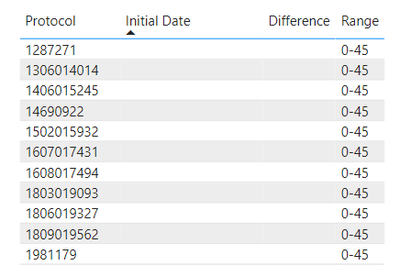
I am getting incorrect values when the difference is null.
Issue: As the Initial Date is blank, the difference between initial date and today is null. But the range is showing as 0-45 as null is being treated as zero.
Sample pbix file is attached here.
Can someone please suggest on how to show this range as "Blank" instead of 0-45?
Differnece =
DATEDIFF(data11[Initial Date],TODAY(),DAY)Range =
IF(data11[Differnece] >=0 && data11[Differnece]<46,"0-45",
IF(data11[Differnece] >45 &&data11[Differnece]<90,"46-90",
IF(data11[Differnece]>89,">90",
IF(ISBLANK(data11[Differnece]),"Blank"))))
Thank you.
Solved! Go to Solution.
In your current setup, when the data11[Initial Date] is blank, DATEDIFF returns a null value, which is not correctly handled in your Range calculation. The solution is to first check if data11[Initial Date] is blank before calculating the difference. If it's blank, you should directly assign "Blank" to the range. Otherwise, proceed with the date difference calculation.
Range =
IF(
ISBLANK(data11[Initial Date]),
"Blank",
VAR Differnece = DATEDIFF(data11[Initial Date], TODAY(), DAY)
RETURN
IF(Differnece >= 0 && Differnece < 46, "0-45",
IF(Differnece >= 46 && Differnece < 90, "46-90",
IF(Differnece >= 90, ">90")))
)
In your current setup, when the data11[Initial Date] is blank, DATEDIFF returns a null value, which is not correctly handled in your Range calculation. The solution is to first check if data11[Initial Date] is blank before calculating the difference. If it's blank, you should directly assign "Blank" to the range. Otherwise, proceed with the date difference calculation.
Range =
IF(
ISBLANK(data11[Initial Date]),
"Blank",
VAR Differnece = DATEDIFF(data11[Initial Date], TODAY(), DAY)
RETURN
IF(Differnece >= 0 && Differnece < 46, "0-45",
IF(Differnece >= 46 && Differnece < 90, "46-90",
IF(Differnece >= 90, ">90")))
)
Welcome 🙂
Share feedback directly with Fabric product managers, participate in targeted research studies and influence the Fabric roadmap.
Check out the February 2026 Power BI update to learn about new features.
| User | Count |
|---|---|
| 62 | |
| 55 | |
| 39 | |
| 16 | |
| 15 |
| User | Count |
|---|---|
| 93 | |
| 85 | |
| 33 | |
| 31 | |
| 25 |