Join us at FabCon Atlanta from March 16 - 20, 2026, for the ultimate Fabric, Power BI, AI and SQL community-led event. Save $200 with code FABCOMM.
Register now!The Power BI Data Visualization World Championships is back! Get ahead of the game and start preparing now! Learn more
Hi
I tried for several days to fix this but to no avail so appreciate all/any help!
I have a model built in SSAS Tabular.
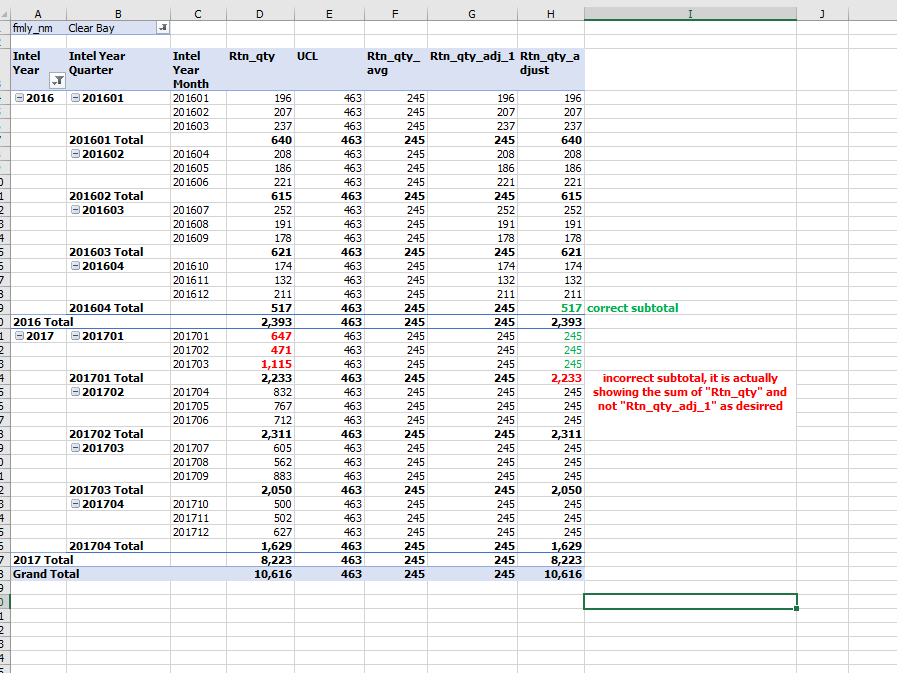
When checking my metric in Excel pivot table, it gives the wrong value in the subtotal, but only for a certain condition.
Here's the logic for "Rtn_qty_adjust":
If Rtn_qty > UCL, THEN Rtn_qty_avg ELSE Rtn_qty
Note "UCL" = Upper Control Limit
As you can see from the image, the subtotals are correct anywhere that Rtn_qty < UCL, but where Rtn_qty > UCL, then they are wrong.
Here is the DAX I have for "Rtn_qty_adjust":
:=
IF(COUNTROWS(VALUES(dates[incr_base_date])) =1, [Rtn_qty_adj_1]
,
SUMX
(
SUMMARIZE(drct_excg, dates[incr_base_date], "rtns", [Rtn_qty_1sd_adj_prd] ),
[rtns]
)
)
this relies on the measure "Rtn_qty_adj_1" per below
:=
Rtn_qty_adj_1:= IF( [Rtn_qty] > [UCL], [rtn_qty_avg], [Rtn_qty] )
thanks!!!!
HI @Anonymous,
I'd like to suggest you to take a look at following blog about deal with calculation on hierarchy level subtotal:
Clever Hierarchy Handling in DAX
Regards,
Xiaoxin Sheng
thanks for that link, I will check it out now
The Power BI Data Visualization World Championships is back! Get ahead of the game and start preparing now!
Check out the November 2025 Power BI update to learn about new features.
| User | Count |
|---|---|
| 66 | |
| 47 | |
| 43 | |
| 26 | |
| 19 |
| User | Count |
|---|---|
| 196 | |
| 127 | |
| 102 | |
| 67 | |
| 49 |