Get certified for free when you join Fabric Data Days 2026 and dive into Fabric, Power BI, SQL, AI, and other essential data skills.
Join nowJuly 7 - July 17 | Round 2 of the Power BI Dataviz World Championships. Don't miss your chance! Learn more
Hi All,
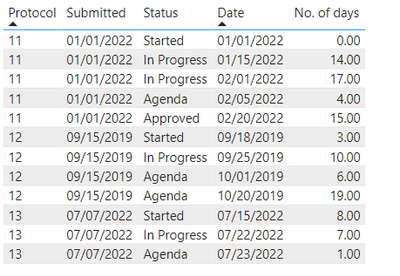
I have a requirement to show the avergae of data for different protocols. Please find sample date below:
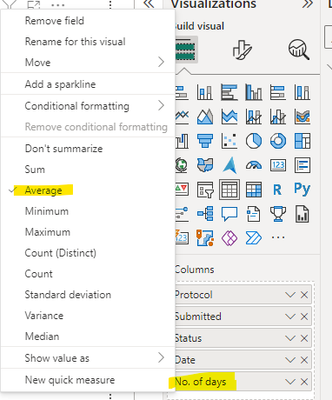
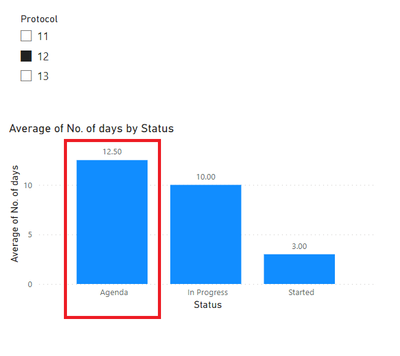
Issue: When one protocol is selected, then the values for same statuses should be aggregated, but they are getting showing as average as I have selected average for no. of days.
Expected output is 6+19=25 but it is showing as average 25/2=12.50.
The values should be aggregated for same protocols that has same statuses and values should show as average for different protocols.
Overall:
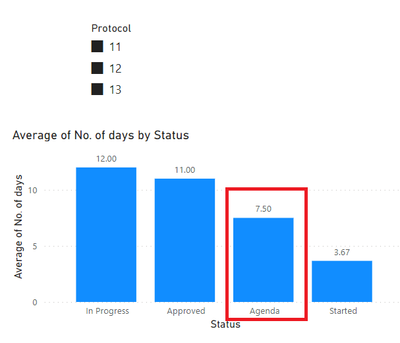
When all the protocols are selected, the result should be (4+6+19+1)/3=10 but it shows as 7.50
Could someone please sugest on how to achieve this using DAX.
Attaching sample pbix file here.
Thank you,
Poojitha
Solved! Go to Solution.
@POSPOS Try this:
Measure =
VAR __Protocols = COUNTROWS(DISTINCT('Table'[Protocol]))
VAR __Sum = SUM('Table'[No. of days])
VAR __Result = DIVIDE(__Sum, __Protocols)
RETURN
__Result
Hi,
Write these measures
D = SUM('Table (2)'[No. of days])Measure = AVERAGEX(VALUES('Table (2)'[Protocol]),[D])
Drag the second one to the visual.
Hope this helps.
Hi,
Write these measures
D = SUM('Table (2)'[No. of days])Measure = AVERAGEX(VALUES('Table (2)'[Protocol]),[D])
Drag the second one to the visual.
Hope this helps.
@POSPOS Try this:
Measure =
VAR __Protocols = COUNTROWS(DISTINCT('Table'[Protocol]))
VAR __Sum = SUM('Table'[No. of days])
VAR __Result = DIVIDE(__Sum, __Protocols)
RETURN
__Result
Join us in Barcelona for FabCon and SQLCon, the Fabric, Power BI, SQL, and AI community event. Save €200 with code FABCMTY200.
If you love stickers, then you will definitely want to check out our community sticker challenge, Barcelona edition!
Check out the July 2026 Power BI update to learn about new features.
| User | Count |
|---|---|
| 30 | |
| 26 | |
| 23 | |
| 23 | |
| 14 |
| User | Count |
|---|---|
| 47 | |
| 33 | |
| 20 | |
| 18 | |
| 16 |