cancel
Showing results for 
Search instead for 
Did you mean: 

Learn from the best! Meet the four finalists headed to the FINALS of the Power BI Dataviz World Championships! Register now

Reply
Sekhar1
Frequent Visitor

Incorrect Running Total Balance

Hi team,


I am struggling to create Running Balance and I am getting just Balance but not Running Balance to Date.

Running Balance result shall be as per "Running Balance Column" highlighted in RED. 

I have included sample data in below table. Can you please assist. 


Thanks in Advance. 


Date Invoice NumberCredit DebitRUNNING BALANCE RUNNING BALANCE SHALL BE CALCULATED AS PER BELOW 
01/01/20181291,8480291,848C2-D2
02/01/20182211,2470503,095C2+C3-D2-D3
03/01/20183156,0190659,114C2+C3+C4-D2-D3-D4
01/02/20194010,244648,870C2+C3+C4+C5-D2-D3-D4-D5
05/02/20195011,112637,757 
06/02/20196013,218624,538 
07/02/20197100,00010,142714,396 
22/05/2020803,882710,513 
24/06/2021903,182707,331 
10/07/202110100,000498806,833 
2 ACCEPTED SOLUTIONS
amitchandak
Super User
Super User

@Sekhar1 , with help from date table; with out without window function


without window


Cumm = CALCULATE( SUM(Table[Credit]) - Sum(Table[Debit]) ,filter(all('Date'),'Date'[date] <=max('Date'[date])))


or


Cumm = CALCULATE(SUM(Table[Credit]) - Sum(Table[Debit]) ,filter(allselected(date),date[date] <=max(date[Date])))


Running Total/ Cumulative: https://www.youtube.com/watch?v=h2wsO332LUo&list=PLPaNVDMhUXGaaqV92SBD5X2hk3TMNlHhb&index=41


Window


Power BI Window function Rolling, Cumulative/Running Total, WTD, MTD, QTD, YTD, FYTD: https://youtu.be/nxc_IWl-tTc

Share with Power BI Enthusiasts: Full Power BI Video (20 Hours) YouTube
Microsoft Fabric Series 60+ Videos YouTube
Microsoft Fabric Hindi End to End YouTube

View solution in original post

Please try this one instead.

RB2 =
VAR thisinvoice =
    MAX ( T3[Invoice Number] )
RETURN
    CALCULATE (
        SUMX ( T3, T3[Credit ] - T3[Debit] ),
        ALL ( T3 ),
        T3[Invoice Number] <= thisinvoice
    )

Pat

Microsoft Employee

View solution in original post

4 REPLIES 4
Sekhar1
Frequent Visitor

@amitchandak,@ppm1 


Thanks for your response. It did work however if there are multiple transactions in same day, it is showing only 1 Running balance for the particular day by subtracting all Debits happened on that day rather than doing it one by one (See Red values in Running Balance column).  I would like to see final result as shown in green values under "Running Balance (Expected Result)" in below table. Can you please let me know how to rectify it. 

Date Invoice NumberCredit DebitRUNNING BALANCE RUNNING BALANCE (EXPECTED RESULT)RUNNING BALANCE SHALL BE CALCULATED AS PER BELOW 
01/01/20181291,8480291,848291,848C2-D2
02/01/20182211,2470503,095503,095C2+C3-D2-D3
03/01/20183156,0190659,114659,114C2+C3+C4-D2-D3-D4
01/02/20194010,244648,870648,870C2+C3+C4+C5-D2-D3-D4-D5
05/02/20195011,112637,757637,757 
06/02/20196013,218624,538624,538 
07/02/20197100,00010,142714,396714,396 
22/05/2020803,882710,513710,513 
24/06/2021903,182707,331707,331 
10/07/202110100,000498806,833806,833 
10/08/2021110200805,833806,633 
10/08/2021120300805,833806,333 
10/08/2021130200805,833806,133 
10/08/2021140100805,833806,033 
10/08/2021150200805,833805,833 

Thanks for your help in advance.


Please try this one instead.

RB2 =
VAR thisinvoice =
    MAX ( T3[Invoice Number] )
RETURN
    CALCULATE (
        SUMX ( T3, T3[Credit ] - T3[Debit] ),
        ALL ( T3 ),
        T3[Invoice Number] <= thisinvoice
    )

Pat

Microsoft Employee
ppm1
Solution Sage
Solution Sage

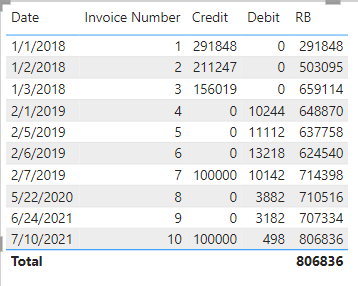
Here is a measure expression that shows one way to do it.

RB =
VAR thisdate =
    MAX ( T3[Date ] )
RETURN
    CALCULATE (
        SUMX ( T3, T3[Credit ] - T3[Debit] ),
        ALL ( T3 ),
        T3[Date ] <= thisdate
    )

ppm1_0-1674220745075.png


Pat

Microsoft Employee
amitchandak
Super User
Super User

@Sekhar1 , with help from date table; with out without window function


without window


Cumm = CALCULATE( SUM(Table[Credit]) - Sum(Table[Debit]) ,filter(all('Date'),'Date'[date] <=max('Date'[date])))


or


Cumm = CALCULATE(SUM(Table[Credit]) - Sum(Table[Debit]) ,filter(allselected(date),date[date] <=max(date[Date])))


Running Total/ Cumulative: https://www.youtube.com/watch?v=h2wsO332LUo&list=PLPaNVDMhUXGaaqV92SBD5X2hk3TMNlHhb&index=41


Window


Power BI Window function Rolling, Cumulative/Running Total, WTD, MTD, QTD, YTD, FYTD: https://youtu.be/nxc_IWl-tTc

Share with Power BI Enthusiasts: Full Power BI Video (20 Hours) YouTube
Microsoft Fabric Series 60+ Videos YouTube
Microsoft Fabric Hindi End to End YouTube

Helpful resources

Announcements
Join our Fabric User Panel

Join our Fabric User Panel

Share feedback directly with Fabric product managers, participate in targeted research studies and influence the Fabric roadmap.

February Power BI Update Carousel

Power BI Monthly Update - February 2026

Check out the February 2026 Power BI update to learn about new features.

FabCon Atlanta 2026 carousel

FabCon Atlanta 2026

Join us at FabCon Atlanta, March 16-20, for the ultimate Fabric, Power BI, AI and SQL community-led event. Save $200 with code FABCOMM.