Join us at FabCon Atlanta from March 16 - 20, 2026, for the ultimate Fabric, Power BI, AI and SQL community-led event. Save $200 with code FABCOMM.
Register now!The Power BI Data Visualization World Championships is back! Get ahead of the game and start preparing now! Learn more
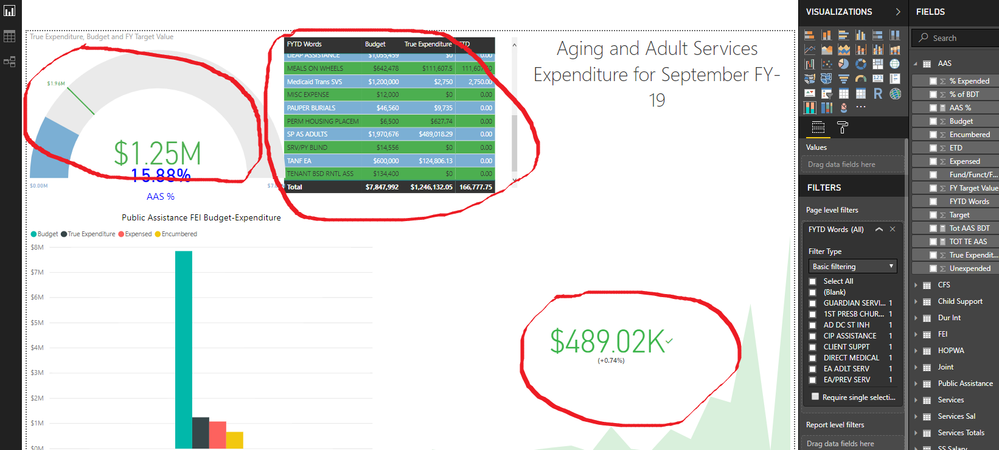
It appears that instead of summing the totality of my data set, my KPI is defaulting to the HIGHEST TOTAL WITHIN MY DATA SET and displaying that. Is it possible for KPI's to default to the total amount of all the data and still have dynamic abilities? It works fine individually, but I'd like to have a Total measure similar to the guage in the top picture?
Solved! Go to Solution.
Hi @bw70316,
Please create a measure similar to below and add it to KPI.
Total = CALCULATE ( SUM ( table[Value] ), ALLSELECTED ( table ) )
Best regards,
Yuliana Gu
Hi @bw70316,
Please create a measure similar to below and add it to KPI.
Total = CALCULATE ( SUM ( table[Value] ), ALLSELECTED ( table ) )
Best regards,
Yuliana Gu
Hi, Thank you! It works but I've just lose the trend axis in that way... any idea?
Thank you!
The Power BI Data Visualization World Championships is back! Get ahead of the game and start preparing now!
| User | Count |
|---|---|
| 40 | |
| 35 | |
| 34 | |
| 31 | |
| 28 |
| User | Count |
|---|---|
| 137 | |
| 102 | |
| 68 | |
| 66 | |
| 64 |