Don't miss your chance to take the Fabric Data Engineer (DP-600) exam for FREE! Find out how by attending the DP-600 session on April 23rd (pacific time), live or on-demand.
Learn moreNext up in the FabCon + SQLCon recap series: The roadmap for Microsoft SQL and Maximizing Developer experiences in Fabric. All sessions are available on-demand after the live show. Register now
Hi all, I have a simple IF statement which is returning inconsistent results and I can'T figure out why. I would greatly appreciate any help in this.
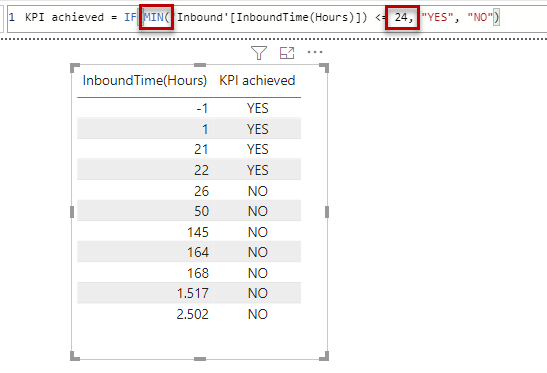
This is the IF statement where I want it to return a "YES" when the value is less than 24 else "NO".
| InboundTime(Hours) | KPI Achieved |
| 164 | YES |
| 2502 | NO |
| -1 | YES |
| 22 | YES |
| -1 | YES |
| 26 | NO |
| 26 | NO |
| 21 | YES |
| 145 | YES |
| 168 | YES |
| 50 | NO |
| 50 | NO |
| 1 | YES |
| 1 | YES |
| 50 | NO |
| 1517 | YES |
Solved! Go to Solution.
I would assume that the first column is not formatted correctly. Can you check that it's stored as whole number/decimal number?
@Anonymous , @FrankAT I think that may be at the core of my woes. The column is a product of a datediff function. I reformmated my IF statement as IF('Inbound'[InboundTime(Hours)] <= 24 , "YES","NO") with a space after the 24 and it seems to be working, atleast for the sample data I have for now, it's returning concistent results.
Unfortunately this did not work in my case.
Hi @eWise ,
you try an alphabetical compare of text "24", so your "inconsistent results" are in this term correct.
If you want a numerical compare you can do it like this:
With kind regards from the town where the legend of the 'Pied Piper of Hamelin' is at home
FrankAT (Proud to be a Datanaut)
If you have recently started exploring Fabric, we'd love to hear how it's going. Your feedback can help with product improvements.
A new Power BI DataViz World Championship is coming this June! Don't miss out on submitting your entry.
| User | Count |
|---|---|
| 45 | |
| 43 | |
| 38 | |
| 19 | |
| 15 |
| User | Count |
|---|---|
| 67 | |
| 66 | |
| 31 | |
| 28 | |
| 24 |