I have pulled from the same data source into several different data tables (main quiery tables) and have displayed this data into report tables.
When I first did this I pulled all the metrics and dimensions I planned to use from Google Analytics into one data table in power bi. But it was brought to my attention that this could cause some of the metrics/dimensions to be inflated (have multiple lines of the same data).
So my plan was to test this by created several data tables with just a few metrics and then create relationships and avoid the duplicate data issue. But when I did this the data I got was not constistent.
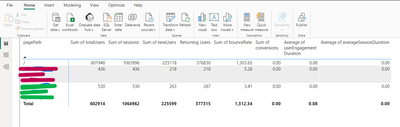
The first report from a data table with several metrics/dimentinos
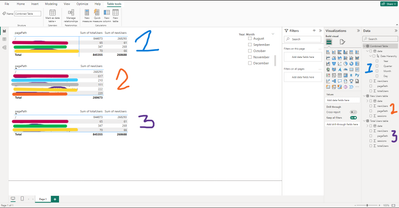
breaking down the metrics into smaller tabels
The first table shows the data when I pulled all the metrics and dimentions into one large data table.
The second shows where I pulled in a table focused on total users with date, sessions, pagePath, totalUsers.
Another data table focused on new users with date, sessions, pagePath, newUsers.
Then ended up adding one with both to compare becasue the numbers were not matching up.
Can anyone explain why these have different numbers. I expected these all to be the same.


