Don't miss your chance to take the Fabric Data Engineer (DP-700) exam on us!
Learn moreWe've captured the moments from FabCon & SQLCon that everyone is talking about, and we are bringing them to the community, live and on-demand. Starts on April 14th. Register now
Hello, and thanks in advance for any help,
When I use Power BI Desktop (Version: 2.49.4831.521 64-bit (August 2017)) to connect to an Oracle PeopleSoft HCM 9.2 database, the number of tables listed in the SYSADM schema is limited. It's a long list of tables, but it's far from a complete list. The resulting list is ordered alphabetically by table name and it ends with a table named "PS_GPHK_PSLP_LANG". So if I search for something simple like "PS_JOB", it is not found and therefore, I cannot load it. I even disabled preview, but that didn't affect the number of tables that were listed for the schema.
How do I load tables that are in the schema, but due to the limitation of how many tables are listed, I cannot select it?
Solved! Go to Solution.
On the pop-up for the Oracle connector in Desktop, at the bottom is "Advanced options". Expand that and you can paste in your SQL Statement.
I had the same issue. Here's the solution I found.
Different schema (usernames) have different access to the tables in Oracle DB. You may be connecting to your database with credentials for an underprivileged schema. You can fix this by clearing your credential cache and signing in with the correct credentials.
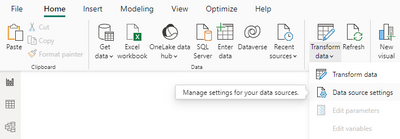
In Power BI Desktop, under the Home tab, click "Transform data" > Data source settings > Global permissions.
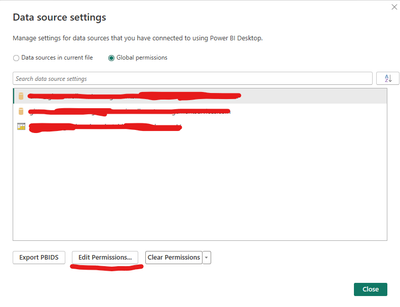
Find the server name for the connection you want to modify and click "Edit permissions".
Under Credentials, click Edit... and center the credentials for the privileged schema you wish to use.
Good luck!
Yeah, this worked for me, some table were not listing, changed the username with how you showed here and then they got listed correctly. Thanks man
On the pop-up for the Oracle connector in Desktop, at the bottom is "Advanced options". Expand that and you can paste in your SQL Statement.
Thanks!
That works! I guess there's no way to just select it from the list though, huh? So this will likely be my recourse in nearly all situations with a database of this size.
Well, the visual navigator is really nice and handy but it has its limits.
If you have recently started exploring Fabric, we'd love to hear how it's going. Your feedback can help with product improvements.
A new Power BI DataViz World Championship is coming this June! Don't miss out on submitting your entry.
Share feedback directly with Fabric product managers, participate in targeted research studies and influence the Fabric roadmap.
| User | Count |
|---|---|
| 51 | |
| 37 | |
| 35 | |
| 19 | |
| 17 |
| User | Count |
|---|---|
| 69 | |
| 65 | |
| 39 | |
| 33 | |
| 23 |