cancel
Showing results for 
Search instead for 
Did you mean: 

The Power BI Data Visualization World Championships is back! Get ahead of the game and start preparing now! Learn more

Reply
Anonymous
Not applicable

Incomplete filter options

Hi all,


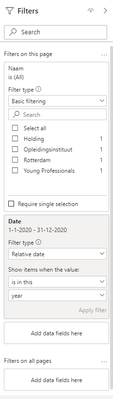
In my report I have a page level filter that shows 4 of the 8 options when a date filter is set on 2020. When the date filter is removed, all 8 options show. However, when the date filter is set on 2020 and I manually fill one of the missing values into the advanced filtering box to show items when the value is >missing value<, the page correctly filters with what I would expect for the missing value. How is this possible? Screenshots below for clarity. 

vincentnoot_1-1609328383561.png

Filter pane with missing values and date filter active


vincentnoot_2-1609328411687.png

Complete list, date filter inactive

1 ACCEPTED SOLUTION
Anonymous
Not applicable

Hi Stephen,


Thanks for your suggestion. However, this is not the case in my dataset.

I now solved it by removing my date filter, selecting the required filters, and then adding the date filter back in. This actually works and my data is now correctly filtered. 

When I remove the filters though, they disappear again from the filter pane and I need to repeat above method to add them back in.

I don't know how I can show my file without exposing my client's private data.


Kind regards,

Vincent

View solution in original post

5 REPLIES 5
Anonymous
Not applicable

Hi @Anonymous ,

Could you tell me if your problem has been solved?
If it is, kindly Accept it as the solution. More people will benefit from it.
Or you are still confused about it, please provide me with more details about your table and your problem or share me with your pbix file from your Onedrive for Business.


Best Regards,
Stephen Tao

Anonymous
Not applicable

Hi @Anonymous ,


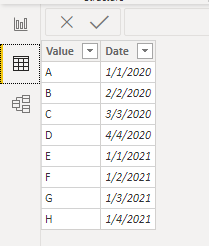
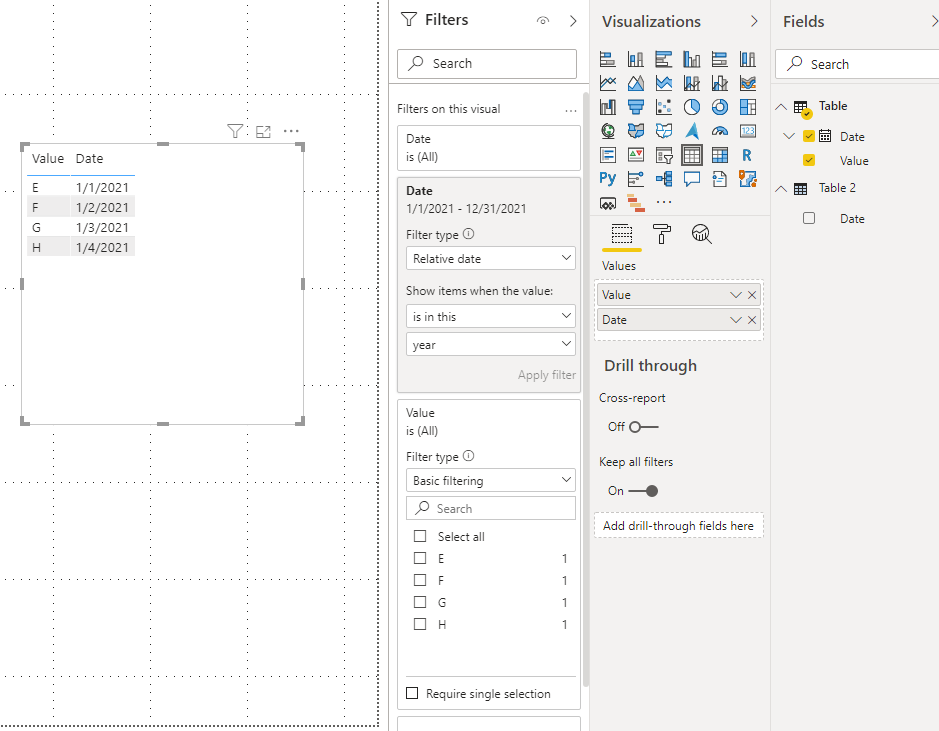
It may be because the Naam column corresponding to your date column does not contain all the values. As shown in the following two figures, the Value column contains only four values(E,F,G,H) in 2021, so the four values(A,B,C,D) will not be displayed.

2.png1.png


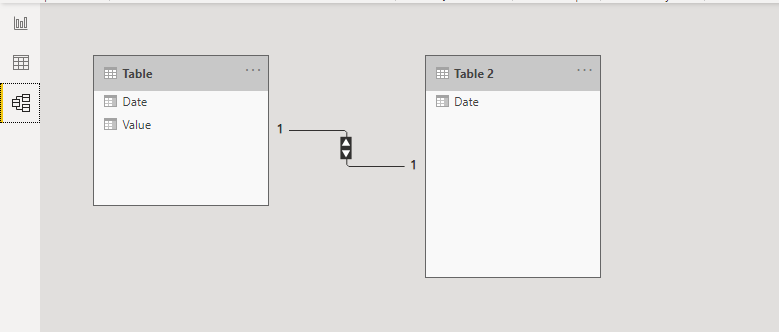
Or the date column and the Naam column are from different tables. In fact, it is similar to the above, the values not contained in the date column will also be filtered out.

4.png3.png


Best Regards,

Stephen Tao


If this post helps, then please consider Accept it as the solution to help the other members find it more quickly.

Anonymous
Not applicable

Hi Stephen,


Thanks for your suggestion. However, this is not the case in my dataset.

I now solved it by removing my date filter, selecting the required filters, and then adding the date filter back in. This actually works and my data is now correctly filtered. 

When I remove the filters though, they disappear again from the filter pane and I need to repeat above method to add them back in.

I don't know how I can show my file without exposing my client's private data.


Kind regards,

Vincent

Anonymous
Not applicable

Hi @Anonymous ,


Now that you have solved the problem, you can accept your own reply as the  solution

More people will benefit from it.


Best Regards,

Stephen Tao

amitchandak
Super User
Super User

@Anonymous , if the date is part of the same table or with bi-direction with a table having this, this will filter out.

Also, there is no option to stop interaction between page level filters.


You can create a separate table for Naam and join it back with your fact table and use that in the page level filter. That should work.

Share with Power BI Enthusiasts: Full Power BI Video (20 Hours) YouTube
Microsoft Fabric Series 60+ Videos YouTube
Microsoft Fabric Hindi End to End YouTube

Helpful resources

Announcements
Power BI DataViz World Championships

Power BI Dataviz World Championships

The Power BI Data Visualization World Championships is back! Get ahead of the game and start preparing now!

December 2025 Power BI Update Carousel

Power BI Monthly Update - December 2025

Check out the December 2025 Power BI Holiday Recap!

FabCon Atlanta 2026 carousel

FabCon Atlanta 2026

Join us at FabCon Atlanta, March 16-20, for the ultimate Fabric, Power BI, AI and SQL community-led event. Save $200 with code FABCOMM.