cancel
Showing results for 
Search instead for 
Did you mean: 

July 7 - July 17 | Round 2 of the Power BI Dataviz World Championships. Don't miss your chance! Learn more

Reply
pacoruiz
New Member

Incomplete data load from Tabular database

Hi.  I'm having a very strange issue.


I have a tabular database with financial information of two fiscal years, 2016 and 2017.  This tabular database is the source of my PowerBI solution.  Is not a live connection, as I'm manually refreshing the data as I created many DAX based measures on PBI side. There is one specific table from which I have exactly 28999 rows on my relational database (the source of the tabular), the tabular itself (verified browsing the data in Management Studio) but PBI is only importing 28639 rows.  


I've tried deleting the tabular database, deploying it again, refreshing and have browsed the entire solutions for something. Nothing seems wrong.  Even I've tried to import that same table with a different name but the same quantity of rows is coming.  Is a Fact table the affected, and is partitioned by Fiscal Year.  I've checked even the quantity of rows by partition in the Management Studio and all is ok.  This difference in rows is causing to not having the same totals on both sides.


Do you guys have any idea of what can be wrong?  Maybe I'm passing something important to check.


Thanks in advance for your help.


2 REPLIES 2
v-haibl-msft
Microsoft Employee
Microsoft Employee

@pacoruiz


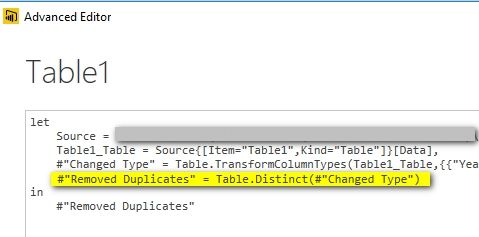
You can go to Query Editor - Advanced Editor to check if there is any step removing the duplicate rows.


Incomplete data load from Tabular database_1.jpg


Best Regards,
Herbert

pacoruiz
New Member

I've found the issue directly on duplicated rows. Even I don't have any instruction to remove duplicates, for some reason the rows weren't coming. I've tried to import the table from tabular with an alias name and the Keep Duplicates instruction. All figures are matching now. I applied the same instruction to the previous table and nothing changed. I inactivated all the relationships and reload the data and nothing changed. So it was working just with the new table. So, is fixed but didn't find the cause of the error.

Helpful resources

Announcements
FabCon and SQLCon Barcelona 2026

FabCon & SQLCon – Barcelona 2026

Join us in Barcelona for FabCon and SQLCon, the Fabric, Power BI, SQL, and AI community event. Save €200 with code FABCMTY200.

60 days of Data Days Carousel

Data Days 2026

Join Fabric Data Days 2026: 60 days of free live/on-demand sessions, challenges, study groups, and certification opportunities.

Power BI DataViz World Championships carousel

Power BI DataViz World Championships - June 2026

A new Power BI DataViz World Championship is coming this June! Don't miss out on submitting your entry.