cancel
Showing results for 
Search instead for 
Did you mean: 

Get Fabric Certified for FREE during Fabric Data Days. Don't miss your chance! Request now

Reply
Anonymous
Not applicable

Income Statement Matrix


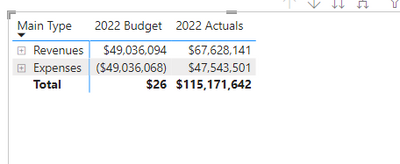
Below I have a picture of a Matrix of an Incomestatement :  For Budget it is totaling correctly; however, I want expenses to be positive.  In actuals I flipped expenses to be positive; however, now the grand total is off.  How can I get it to where I have positive rev - positive exp = total?

JMcAnarney_0-1660057271298.png


1 ACCEPTED SOLUTION
DataInsights
Super User
Super User

@Anonymous,


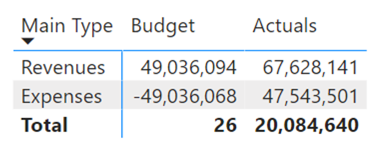
Try this solution:


1. Create calculated column:


Adjusted Actuals = IF ( FactTable[Main Type] = "Expenses", [Actuals] * -1, [Actuals] )


2. Create measure:


Actuals = 
IF (
    HASONEVALUE ( FactTable[Main Type] ),
    SUM ( FactTable[Actuals] ),
    SUM ( FactTable[Adjusted Actuals] )
)


DataInsights_0-1660147881439.png


Did I answer your question? Mark my post as a solution!

Proud to be a Super User!


View solution in original post

1 REPLY 1
DataInsights
Super User
Super User

@Anonymous,


Try this solution:


1. Create calculated column:


Adjusted Actuals = IF ( FactTable[Main Type] = "Expenses", [Actuals] * -1, [Actuals] )


2. Create measure:


Actuals = 
IF (
    HASONEVALUE ( FactTable[Main Type] ),
    SUM ( FactTable[Actuals] ),
    SUM ( FactTable[Adjusted Actuals] )
)


DataInsights_0-1660147881439.png


Did I answer your question? Mark my post as a solution!

Proud to be a Super User!


Helpful resources

Announcements
November Power BI Update Carousel

Power BI Monthly Update - November 2025

Check out the November 2025 Power BI update to learn about new features.

Fabric Data Days Carousel

Fabric Data Days

Advance your Data & AI career with 50 days of live learning, contests, hands-on challenges, study groups & certifications and more!

FabCon Atlanta 2026 carousel

FabCon Atlanta 2026

Join us at FabCon Atlanta, March 16-20, for the ultimate Fabric, Power BI, AI and SQL community-led event. Save $200 with code FABCOMM.

Top Solution Authors
Top Kudoed Authors