cancel
Showing results for 
Search instead for 
Did you mean: 

The Power BI Data Visualization World Championships is back! Get ahead of the game and start preparing now! Learn more

Reply
jsteffe
Helper III
Helper III

Inactive relationship

Hello,

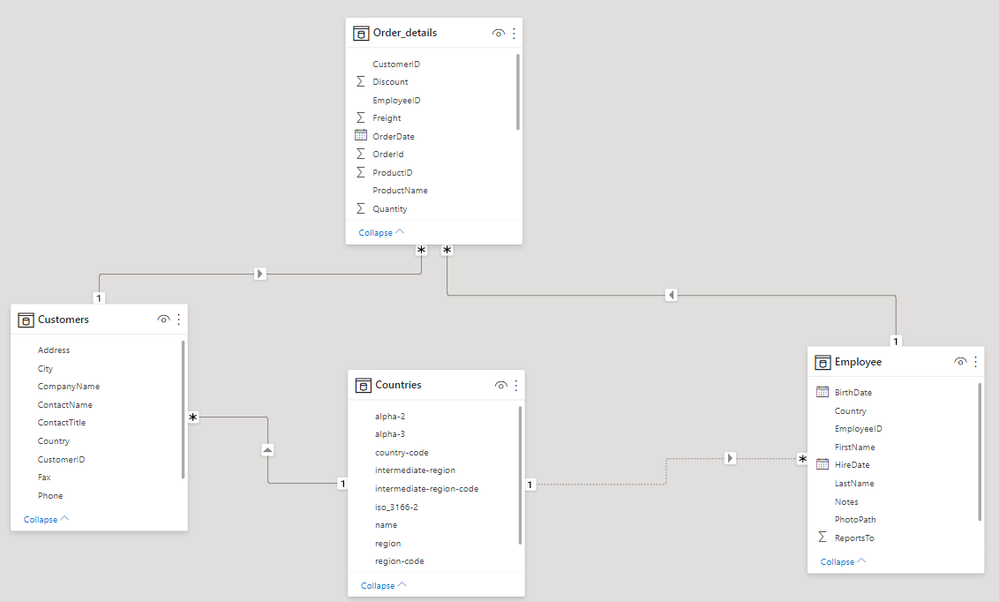
I get the model below :

relationships.png


As there is one relationship between country and customer, the relationship between country and employees is not active.

So how can I get a table with total of employees and total of customers per country ?

Thanks

2 ACCEPTED SOLUTIONS
amitchandak
Super User
Super User

@jsteffe , country should join to order details.


Or do you need to have merged tables -  Customer+country

and Employee and Country

Share with Power BI Enthusiasts: Full Power BI Video (20 Hours) YouTube
Microsoft Fabric Series 60+ Videos YouTube
Microsoft Fabric Hindi End to End YouTube

View solution in original post

VahidDM
Super User
Super User

@jsteffe 


In addition to @amitchandak reply, you can use USERELATIONSHIP code.


https://www.sqlbi.com/articles/using-userelationship-in-dax/


If this post helps, please consider accepting it as the solution to help the other members find it more quickly.

Appreciate your Kudos✌️!!

View solution in original post

4 REPLIES 4
VahidDM
Super User
Super User

@jsteffe 


In addition to @amitchandak reply, you can use USERELATIONSHIP code.


https://www.sqlbi.com/articles/using-userelationship-in-dax/


If this post helps, please consider accepting it as the solution to help the other members find it more quickly.

Appreciate your Kudos✌️!!

I tried his formula and it works :

nb_employee_per_country = CALCULATE(count(Employee[EmployeeID]),USERELATIONSHIP(Countries[name],Employee[Country]))
 
Thanks
amitchandak
Super User
Super User

@jsteffe , country should join to order details.


Or do you need to have merged tables -  Customer+country

and Employee and Country

Share with Power BI Enthusiasts: Full Power BI Video (20 Hours) YouTube
Microsoft Fabric Series 60+ Videos YouTube
Microsoft Fabric Hindi End to End YouTube

Merged table are a solution. Thanks

Helpful resources

Announcements
Power BI DataViz World Championships

Power BI Dataviz World Championships

The Power BI Data Visualization World Championships is back! Get ahead of the game and start preparing now!

December 2025 Power BI Update Carousel

Power BI Monthly Update - December 2025

Check out the December 2025 Power BI Holiday Recap!

FabCon Atlanta 2026 carousel

FabCon Atlanta 2026

Join us at FabCon Atlanta, March 16-20, for the ultimate Fabric, Power BI, AI and SQL community-led event. Save $200 with code FABCOMM.